组网及说明
1.1 适用产品系列
本案例适用于如S5008PV2-EI、S5024PV2-EI-PWR、S5048PV2-EI-HPWR、S5120-52P-LI、S5120-28P-SI、S5120-48P-EI等S5000PV2、S5120系列的交换机。
1.2 需要的工具及软件环境
使用串口线连接电脑串口和设备Console口,电脑上安装管理软件,软件推荐使用SecureCRT,具体连接方式请参照案例2.1.1“V5交换机Console登录设备方法”

配置步骤
2 配置Console口密码登录方式
2.1 密码登录方式配置步骤
# 进入系统视图
<H3C>system
# 配置AUX接口认证模式为password模式(密码认证)
[H3C]user-interface aux 0
[H3C-line-aux0] authentication-mode password //另两种认证模式为None
[H3C-line-aux0]set authentication
password simple 123456
//
[H3C-line-aux0]user privilege level 3 //权限级别为三级权限即管理员权限
[H3C-line-aux0]quit
# 保存配置
[H3C] save
2.2 密码登录方式快速配置
# 可复制如下内容直接粘贴到设备命令行,实现快速配置,注意提前修如下红色部分改账号和密码。
system
user-interface aux 0
authentication-mode password
set authentication password simple 123456
user privilege level 3
quit
save
2.3 用户名密码登录方式配置步骤
# 进入系统视图
<H3C>system
# 配置AUX接口认证模式为scheme模式(用户名+密码认证)。
[H3C]user-interface aux 0
[H3C-ui-aux0]authentication-mode scheme //
[H3C-ui-aux0]quit
# 创建本地账号h3c,密码为123456,权限级别为3级管理员权限
[H3C] local-user h3c
[H3C-luser-abc]password simple 123456
[H3C-luser-abc]service-type terminal
//
[H3C-luser-abc]authorization-attribute level 3
[H3C-luser-abc]quit
# 保存配置
[H3C] save
2.4 用户名密码登录方式快速配置
# 可复制如下内容直接粘贴到设备命令行,实现快速配置,注意提前修如下红色部分改账号和密码。
system
user-interface aux 0
authentication-mode scheme
quit
local-user h3c
password simple 123456
service-type terminal
authorization-attribute level 3
quit
save
3 配置验证及登录测试
3.1 SecureCRT软件客户端密码登录
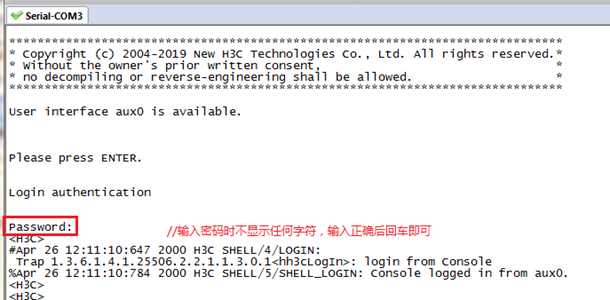
Console口登录操作步骤请参照案例2.1.1“V5交换机Console登录设备方法”,登入结果如下:
3.2 SecureCRT软件客户端用户名密码登录
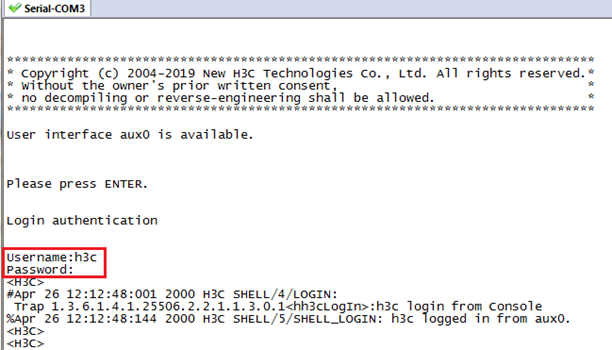
Console口登录操作步骤请参照案例2.1.1“V5交换机Console登录设备方法”,登入结果如下: