使用ospf database-filter过滤LSA不生效
组网及说明
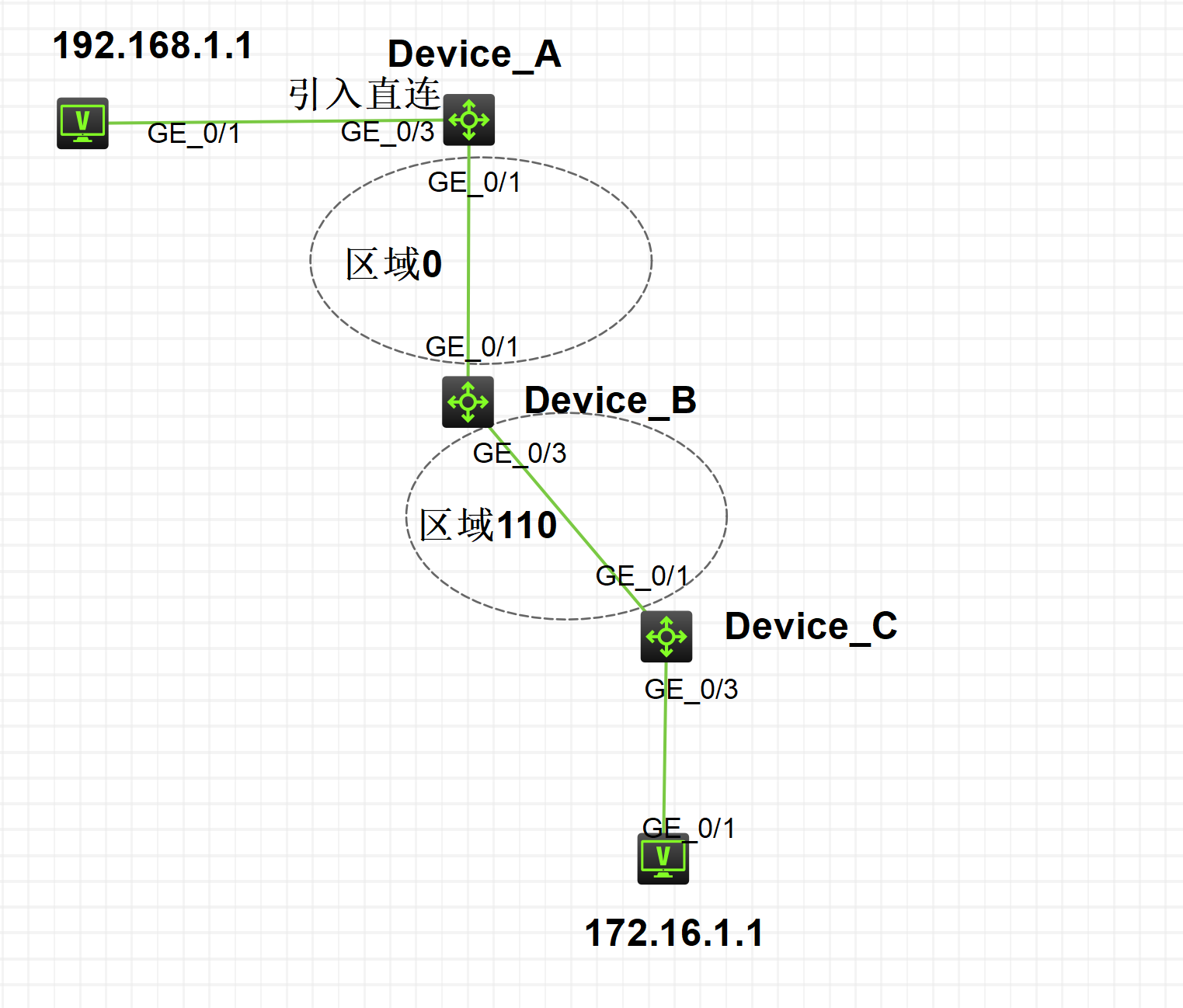
问题描述
使用ospf database-filter 过滤LSA不生效问题
过程分析
1、Device_A ospf 1 area 0引入直连后,Device_A、Device_B和Device_C的链路状态数据库中存在
AS External Database
Type LinkState ID AdvRouter Age Len Sequence Metric
External 192.168.1.0 1.1.1.1 1345 36 80000001 1
External 10.1.13.0 1.1.1.1 1345 36 80000001 1
External 1.1.1.1 1.1.1.1 1345 36 80000001 1
2、在Device_B的G1/0/3配置 ospf database-filter ase
interface GigabitEthernet1/0/3
port link-mode route
combo enable fiber
ip address 10.1.35.3 255.255.255.0
ospf database-filter ase
3、分别在Device_A、Device_B和Device_C的链路状态数据库中存在查看192.168.1.0的5类LSA信息依然存在
且192.168.1.1可以ping通172.16.1.1
4、重启Device_C的OSPF进程后查看链路状态数据库中的192.168.1.0外部信息消失
<Device_C>reset ospf process
Reset OSPF process? [Y/N]:y
<H3C>%Nov 13 23:04:32:428 2024 H3C OSPF/5/OSPF_NBR_CHG_REASON: OSPF 1 Area 0.0.0.110 Router 5.5.5.5(GE1/0/1) CPU usage: 1%, IfMTU: 1500, Neighbor address: 10.1.35.3, NbrID:10.1.35.3 changed from Full to DOWN because the OSPF process was reset at 2024-11-13 23:04:32:428.
<Device_C>dis ospf lsdb
OSPF Process 1 with Router ID 5.5.5.5
Link State Database
Area: 0.0.0.110
Type LinkState ID AdvRouter Age Len Sequence Metric
Router 10.1.35.3 10.1.35.3 20 36 8000000C 0
Router 5.5.5.5 5.5.5.5 17 48 8000000D 0
Network 10.1.35.3 10.1.35.3 16 32 80000002 0
Sum-Net 10.1.13.0 10.1.35.3 471 28 80000001 1
Sum-Asbr 1.1.1.1 10.1.35.3 339 28 80000001 1
<H3C>
<PC>ping 172.16.1.1
Ping 172.16.1.1 (172.16.1.1): 56 data bytes, press CTRL_C to break
Request time out
5、重启Device_C的OSPF进程后ospf database-filter ase生效,测试重启Device_B的OSPF进程不重启Device_C的OSPF进程
1)删除Device_B的G1/0/3接口ospf database-filter ase配置不用再重启OSPF进程
[H3C]ping 172.16.1.1
Ping 172.16.1.1 (172.16.1.1): 56 data bytes, press CTRL_C to break
Request time out
Request time out
56 bytes from 172.16.1.1: icmp_seq=2 ttl=252 time=0.808 ms
56 bytes from 172.16.1.1: icmp_seq=3 ttl=252 time=0.728 ms
56 bytes from 172.16.1.1: icmp_seq=4 ttl=252 time=0.997 ms
2)重新在Device_B的G1/0/3接口配置ospf database-filter ase,然后重启Device_B的OSPF进程不重启Device_C的OSPF进程
<Device_C>dis ospf lsdb //Device_C的OSPF链路数据库中依然存在192.168.1.0的外部LSA信息
OSPF Process 1 with Router ID 5.5.5.5
Link State Database
Area: 0.0.0.110
......
AS External Database
Type LinkState ID AdvRouter Age Len Sequence Metric
External 192.168.1.0 1.1.1.1 668 36 80000002 1
External 10.1.13.0 1.1.1.1 668 36 80000002 1
External 1.1.1.1 1.1.1.1 668 36 80000002 1
解决方法
问题原因:
1、如果在配置该命令前邻居路由器就已经收到了将要进行过滤的LSA,那么配置该命令后,这些LSA仍存在于邻居路由器的LSDB中,且路由还会生效。
2、如果存在多个邻居同时发送了需要过滤的LSA,需要在其他邻居接口也配置ospf database-filter。
解决方法:重启邻居(Device_C)的OSPF进程