组网及说明
1 配置需求或说明
1.1适用产品系列
本案例适用于如S3600V2-28TP-EI、S3600V2-28TP-SI等S3600V2系列的交换机。
1.2配置需求
SWA和SWB通过VLAN20互联、通过OSPF路由协议实现PC1和PC2的互连互通。
2 组网图
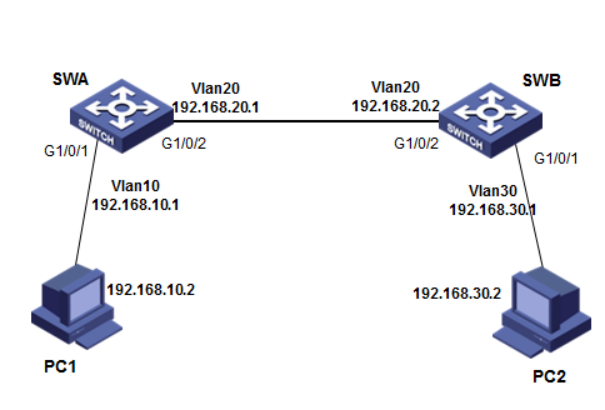
配置步骤
3 配置步骤
3.1 SWA配置
#创建vlan10和vlan20,并把G1/0/1口加入vlan10、1/0/2口加入vlan20 ,并且配置vlan10和vlan20 的虚接口地址
<SWA>system-view
System View: return to User View with Ctrl+Z.
[SWA]vlan 10
[SWA-vlan10]port GigabitEthernet 1/0/1
[SWA-vlan10]quit
[SWA]vlan 20
[SWA-vlan20]port GigabitEthernet 1/0/2
[SWA-vlan20]quit
[SWA]interface vlan 10
[SWA-Vlan-interface10]ip address 192.168.10.1 255.255.255.0
[SWA-Vlan-interface10]quit
[SWA]interface vlan 20
[SWA-Vlan-interface20]ip address 192.168.20.1 255.255.255.0
[SWA-Vlan-interface20]quit
#启动ospf协议,并设置路由器的router id
[SWA]ospf 1 router-id 192.168.20.1
#配置区域0并且发布网段
[SWA-ospf-1]area 0
[SWA-ospf-1-area-0.0.0.0]network 192.168.10.0 0.0.0.255
[SWA-ospf-1-area-0.0.0.0]network 192.168.20.0 0.0.0.255
[SWA-ospf-1-area-0.0.0.0]quit
[SWA-ospf-1]quit
#保存配置
[SWA]save force
3.2 SWB配置
#创建vlan10和vlan30,并把G1/0/1口加入vlan20、1/0/2口加入vlan30 ,并且配置vlan20和vlan30 的虚接口地址
<SWB>system-view
System View: return to User View with Ctrl+Z.
[SWB]vlan 20
[SWB-vlan20]port GigabitEthernet 1/0/1
[SWB-vlan20]quit
[SWB]vlan 30
[SWB-vlan30]port GigabitEthernet 1/0/2
[SWB-vlan30]quit
[SWB]interface vlan 20
[SWB-Vlan-interface20]ip address 192.168.20.2 255.255.255.0
[SWB-Vlan-interface20]quit
[SWB]interface vlan 30
[SWB-Vlan-interface30]ip address 192.168.30.1 255.255.255.0
[SWB-Vlan-interface30]quit
#启动ospf协议,并设置路由器的router id
[SWB]ospf 1 router-id 192.168.20.2
#配置区域0并且发布网段
[SWB-ospf-1]area 0
[SWB-ospf-1-area-0.0.0.0]network 192.168.20.0 0.0.0.255
[SWB-ospf-1-area-0.0.0.0]network 192.168.30.0 0.0.0.255
[SWB-ospf-1-area-0.0.0.0]quit
[SWB-ospf-1]quit
#保存配置
[SWB]save force
3.3 验证配置
# 查看Switch A的OSPF邻居,Full为正常状态。
<SWA>display ospf peer
OSPF Process 1 with Router ID 192.168.20.1
Neighbor Brief Information
Area: 0.0.0.0
Router ID Address Pri Dead-Time State Interface
192.168.20.2 192.168.20.2 1 35 Full/BDR Vlan20
#查看Switch A的OSPF路由信息
<SWB>display ospf routing
OSPF Process 1 with Router ID 192.168.20.1
Routing Table
Topology base (MTID 0)
Routing for network
Destination Cost Type NextHop AdvRouter Area
192.168.10.0/24 1 Stub 0.0.0.0 192.168.20.1 0.0.0.0
192.168.30.0/24 2 Stub 192.168.20.2 192.168.20.2 0.0.0.0
192.168.20.0/24 1 Transit 0.0.0.0 192.168.20.1 0.0.0.0
#查看Switch A的路由表信息,有到192.168.30.0/24网段的路由
<SWA>display ip routing-table
Destinations : 17 Routes : 17
Destination/Mask Proto Pre Cost NextHop Interface
0.0.0.0/32 Direct 0 0 127.0.0.1 InLoop0
127.0.0.0/8 Direct 0 0 127.0.0.1 InLoop0
127.0.0.0/32 Direct 0 0 127.0.0.1 InLoop0
127.0.0.1/32 Direct 0 0 127.0.0.1 InLoop0
127.255.255.255/32 Direct 0 0 127.0.0.1 InLoop0
192.168.10.0/24 Direct 0 0 192.168.10.1 Vlan10
192.168.10.0/32 Direct 0 0 192.168.10.1 Vlan10
192.168.10.1/32 Direct 0 0 127.0.0.1 InLoop0
192.168.10.255/32 Direct 0 0 192.168.10.1 Vlan10
192.168.20.0/24 Direct 0 0 192.168.20.1 Vlan20
192.168.20.0/32 Direct 0 0 192.168.20.1 Vlan20
192.168.20.1/32 Direct 0 0 127.0.0.1 InLoop0
192.168.20.255/32 Direct 0 0 192.168.20.1 Vlan20
192.168.30.0/24 O_INTRA 10 2 192.168.20.2 Vlan20
224.0.0.0/4 Direct 0 0 0.0.0.0 NULL0
224.0.0.0/24 Direct 0 0 0.0.0.0 NULL0
255.255.255.255/32 Direct 0 0 127.0.0.1 InLoop0
# PC1 ping PC2 正常通信
C:\Users\mfw2656>ping 192.168.30.2
Ping 192.168.30.2 (192.168.30.2): 56 data bytes, press CTRL_C to break
56 bytes from 192.168.30.2: icmp_seq=0 ttl=254 time=8.000 ms
56 bytes from 192.168.30.2: icmp_seq=1 ttl=254 time=2.000 ms
56 bytes from 192.168.30.2: icmp_seq=2 ttl=254 time=3.000 ms
56 bytes from 192.168.30.2: icmp_seq=3 ttl=254 time=3.000 ms
192.168.30.2 的 Ping 统计信息:
数据包: 已发送 = 4,已接收 = 4,丢失 = 0 (0% 丢失),
返行程的估计时间(以毫秒为单位):
最短 = 2ms,最长 = 3ms,平均 = 2ms