H3C MSR 3640开启web界面(http、https)
- 0关注
- 0收藏,4436浏览

问题描述:
你好,工程师
我们单位有一台H3C MSR 3640的总出口路由器,现在需要开启web界面,请求提供一份技术方案????
- 2025-12-04提问
- 举报
-
(0)
最佳答案


#进入系统视图
<H3C>system-view //进入系统视图
#创建本地用户admin,并设置登录密码为admin,服务类型为http跟https,用户级别为network-admin管理员级别
[H3C] local-user admin //创建本地用户admin
[H3C-luser-manage-admin] password simple admin //设置登录密码为admin
[H3C-luser-manage-admin] service-type http https //服务类型为http跟https
[H3C-luser-manage-admin] authorization-attribute user-role network-admin //用户级别为network-admin管理员级别
[H3C-luser-manage-admin] quit //退出当前视图
#配置交换机的管理地址:
[H3C] interface vlan-interface 1 //进入vlan1虚接口
[H3C-VLAN-interface1] ip address 192.168.1.58 255.255.255.0 //配置IP地址为192.168.1.50,掩码为24位
[H3C-VLAN-interface1] quit //退出当前视图
#开启http跟https服务
[H3C]ip http enable //开启http服务
[H3C]ip https enable //开启https服务
#保存配置
[H3C]save force //保存配置
此时打开浏览器,地址栏输入交换机的管理地址即可登录WEB界面。也可以使用https://192.168.1.58 这样的https的方式登录WEB进行管理。
在“WEB用户登录”对话框中输入用户名、密码及验证码,点击<登录>按钮后即可登录,显示WEB初始页面。成功登录后,用户可以在配置区对设备进行相关配置。
- 2025-12-04回答
- 评论(2)
- 举报
-
(0)
目前我的配置无法成功
[MSR3640]ip http enable ^ % Unrecognized command found at '^' position. [MSR3640]ip https enable ^ % Unrecognized command found at '^' position.


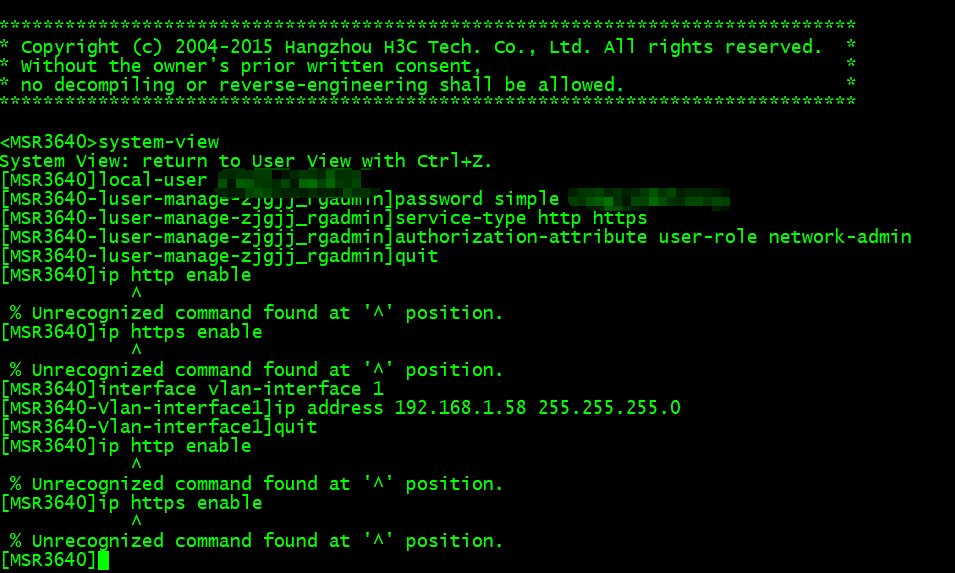
你好,目前我的配置无法成功哦
- 2025-12-04回答
- 评论(3)
- 举报
-
(0)
dis ver 查看下软件版本
<MSR3640>display version H3C Comware Software, Version 7.1.059, Release 0304 Copyright (c) 2004-2015 Hangzhou H3C Tech. Co., Ltd. All rights reserved. H3C MSR36-40 uptime is 25 weeks, 0 days, 5 hours, 10 minutes Last reboot reason : Power on Boot image: cfa0:/msr36-cmw710-boot-r0304.bin Boot image version: 7.1.059P08, Release 0304 Compiled Jun 29 2015 13:50:24 System image: cfa0:/msr36-cmw710-system-r0304.bin System image version: 7.1.059, Release 0304 Compiled Jun 29 2015 13:50:24 Feature image(s) list: cfa0:/msr36-cmw710-security-r0304.bin, version: 7.1.059 Compiled Jun 29 2015 13:50:24 CPU ID: 0x2 2G bytes DDR3 SDRAM Memory 8M bytes Flash Memory PCB Version: 2.0 CPLD Version: 2.0 Basic BootWare Version: 1.43 Extended BootWare Version: 1.43 [SLOT 0]AUX (Hardware)2.0, (Driver)1.0, (CPLD)2.0 [SLOT 0]GE0/0 (Hardware)2.0, (Driver)1.0, (CPLD)2.0 [SLOT 0]GE0/1 (Hardware)2.0, (Driver)1.0, (CPLD)2.0 [SLOT 0]GE0/2 (Hardware)2.0, (Driver)1.0, (CPLD)2.0 [SLOT 0]CELLULAR0/0 (Hardware)2.0, (Driver)1.0, (CPLD)2.0 [SLOT 0]CELLULAR0/1 (Hardware)2.0, (Driver)1.0, (CPLD)2.0 [SLOT 5]HMIM-4GEE (Hardware)2.0, (Driver)1.0, (CPLD)0.0


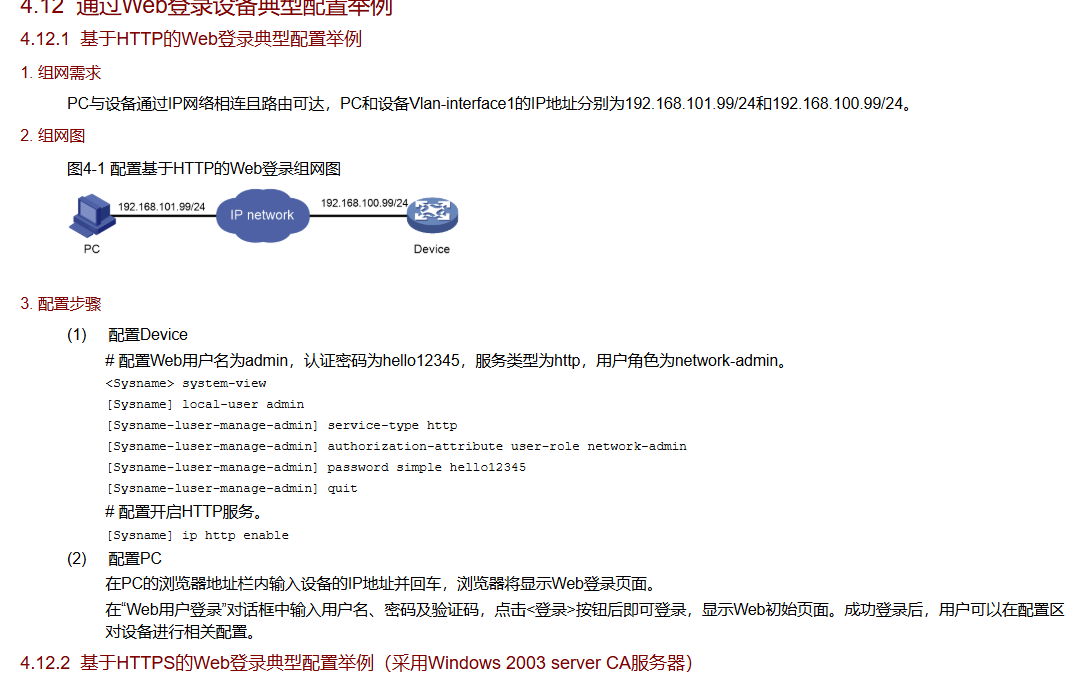
如果你配置不上是不是登录的用户权限不够?
- 2025-12-04回答
- 评论(6)
- 举报
-
(0)
我还是不行哦 <MSR3640>system-view System View: return to User View with Ctrl+Z. [MSR3640]loca [MSR3640]local-user zjgjj_rgadmin [MSR3640-luser-manage-zjgjj_rgadmin]ser [MSR3640-luser-manage-zjgjj_rgadmin]service-type htt [MSR3640-luser-manage-zjgjj_rgadmin]service-type http [MSR3640-luser-manage-zjgjj_rgadmin]authorization-attribute user-role network-admin [MSR3640-luser-manage-zjgjj_rgadmin]pass [MSR3640-luser-manage-zjgjj_rgadmin]password [MSR3640-luser-manage-zjgjj_rgadmin]password sim [MSR3640-luser-manage-zjgjj_rgadmin]password simple ZJ@gjj2025inrg [MSR3640-luser-manage-zjgjj_rgadmin]quit [MSR3640]ip http ena [MSR3640]ip http enable ^ % Unrecognized command found at '^' position.
https://www.h3c.com/cn/d_202511/2692187_30005_40.htm#_Toc207980032 这是软件版本,你往下翻 12技术支持有升级步骤
H3C Comware Software, Version 7.1.059, Release 0304这个版本是不是无法开启web界面呢?是否是因为版本太老了呢?
编辑答案


亲~登录后才可以操作哦!
确定你的邮箱还未认证,请认证邮箱或绑定手机后进行当前操作
举报
×
侵犯我的权益
×
侵犯了我企业的权益
×
- 1. 您举报的内容是什么?(请在邮件中列出您举报的内容和链接地址)
- 2. 您是谁?(身份证明材料,可以是身份证或护照等证件)
- 3. 是哪家企业?(营业执照,单位登记证明等证件)
- 4. 您与该企业的关系是?(您是企业法人或被授权人,需提供企业委托授权书)
抄袭了我的内容
×
原文链接或出处
诽谤我
×
- 1. 您举报的内容以及侵犯了您什么权益?(请在邮件中列出您举报的内容、链接地址,并给出简短的说明)
- 2. 您是谁?(身份证明材料,可以是身份证或护照等证件)
对根叔社区有害的内容
×
不规范转载
×
举报说明
[MSR3640]ip http enable ^ % Unrecognized command found at '^' position. [MSR3640]ip https enable ^ % Unrecognized command found at '^' position.