
最佳答案



The usage of log-file flash:/logfile/ffilter.log reaches 80%.
这是防火墙日志达到阈值提醒了

- 2025-12-09回答
- 评论(0)
- 举报
-
(0)
暂无评论





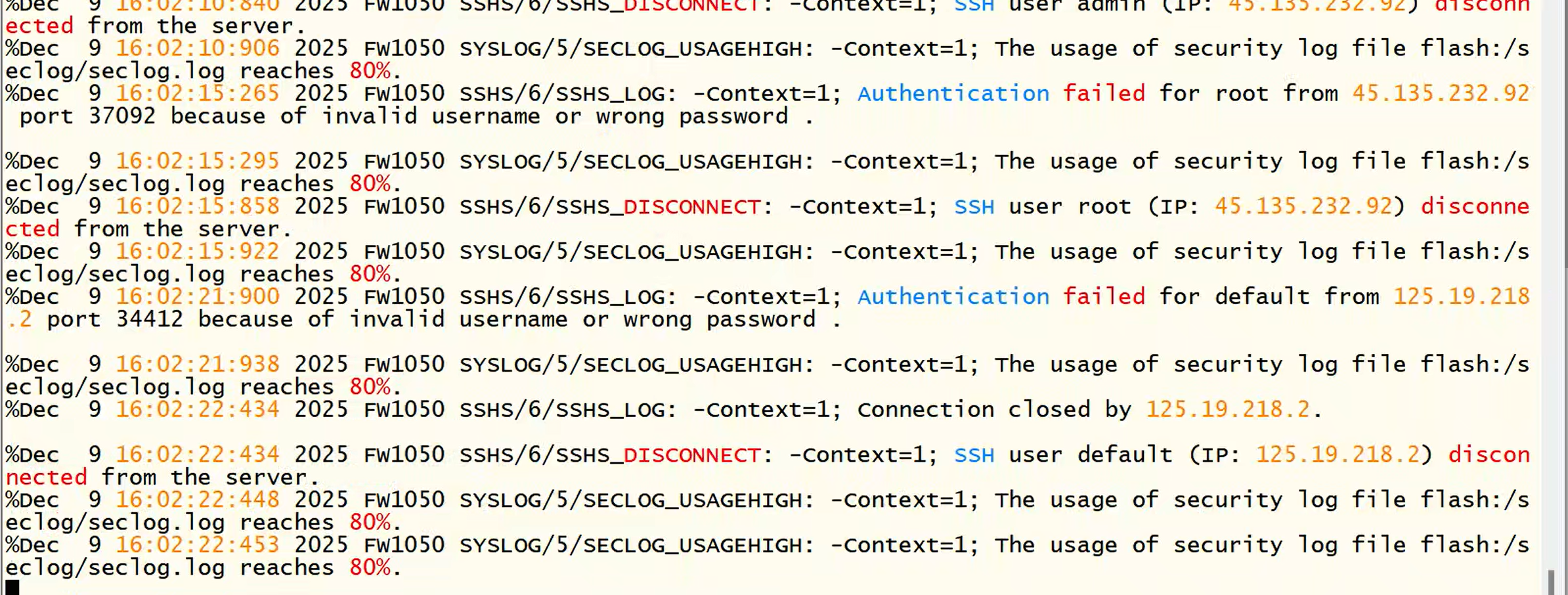
从日志可以看出两个关键问题:
SSH暴力破解攻击:IP 45.135.232.92和 125.19.218.2正在尝试攻击
日志空间不足:安全日志文件使用率已达80%,需要立即清理
立即处理步骤
第一步:封锁攻击源IP地址
# 进入系统视图
system-view
# 创建ACL规则封锁攻击IP
acl advanced 3000
rule 0 deny ip source 45.135.232.92 0.0.0.0 destination any
rule 5 deny ip source 125.19.218.2 0.0.0.0 destination any
rule 10 permit ip source any destination any
# 应用ACL到接口(根据实际接口修改)
interface GigabitEthernet1/0/1
packet-filter 3000 inbound
quit
第二步:立即清理日志文件释放空间
# 查看当前日志文件大小
dir flash:/seclog/
# 备份并清理旧日志文件
copy flash:/seclog/seclog.log flash:/seclog/seclog.log.bak
delete /unreserved flash:/seclog/seclog.log
# 或者直接重置日志文件
reset logbuffer
reset security-log file flash:/seclog/seclog.log
第三步:配置日志自动清理策略
# 设置日志文件大小限制
info-center logfile size-limit 50
# 启用日志自动覆盖
info-center logfile frequency 86400
info-center logfile save-time 30
# 设置安全日志保存策略
security-log file size-limit 50
security-log file save-days 30
长期安全加固方案
方案一:SSH安全加固配置
# 1. 修改SSH端口
ssh server port 5022
# 2. 限制SSH访问源IP
acl number 2000
rule 5 permit source 192.168.1.0 0.0.0.255 # 只允许内网访问
rule 10 deny source any
# 3. 应用ACL到SSH服务
ssh server acl 2000
# 4. 配置SSH登录失败锁定
ssh server authentication-retries 3
ssh server block-time 300
# 5. 禁用root直接登录
ssh server permit-root-login disable
方案二:账户安全加固
# 1. 创建管理员账户(避免使用admin/default)
local-user newadmin
password cipher YourStrongPassword123!
service-type ssh
authorization-attribute user-role network-admin
quit
# 2. 禁用默认账户
local-user admin
state block
quit
local-user default
state block
quit
# 3. 配置密码策略
password-control enable
password-control length 8
password-control composition type-number 3
方案三:配置日志外发和监控
# 1. 配置日志外发到日志服务器
info-center enable
info-center loghost 192.168.1.100 # 替换为您的日志服务器IP
info-center source default loghost level informational
# 2. 设置日志告警阈值
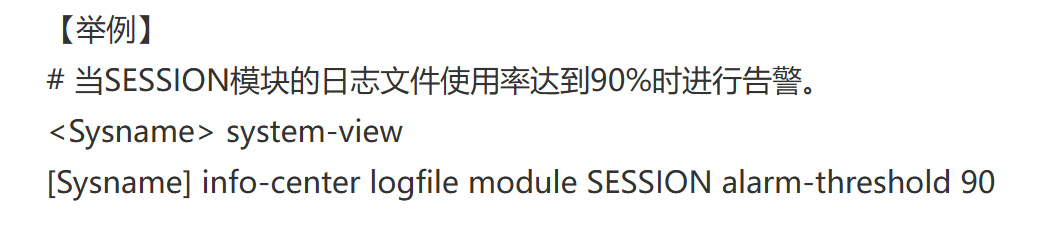
security-log file usage-warning 70 # 70%使用率时告警
# 3. 启用实时监控
security-log host 192.168.1.100 port 514
紧急故障排除命令
检查当前系统状态
# 查看磁盘空间使用情况
dir flash:/
# 查看当前连接和攻击情况
display ssh server status
display ssh server session
display connection statistics
# 查看ACL命中情况
display acl 3000
# 查看日志文件状态
display logbuffer
display security-log file summary
实时监控命令
# 实时查看日志(新会话中执行)
terminal monitor
terminal logging
display logbuffer
# 实时查看安全事件
display security-log file content
预防性维护计划
日常维护脚本
创建一个定期维护脚本:
# 每周执行的维护任务
scheduler job clean-logs
command 1 reset logbuffer
command 2 reset security-log file flash:/seclog/seclog.log
command 3 delete /unreserved flash:/seclog/seclog.log.old
scheduler schedule weekly-clean
job clean-logs
time repeating at 02:00 Sun
监控和告警配置
# 配置SNMP监控
snmp-agent
snmp-agent community read public
snmp-agent sys-info version all
# 配置CPU/内存监控阈值
monitor cpu-usage threshold 80
monitor memory-usage threshold 85
如果问题持续存在
检查系统完整性
# 检查系统版本和补丁
display version
# 检查系统运行时间
display system stable state
# 检查是否有硬件故障
display device manuinfo
display environment
联系H3C技术支持
如果问题无法解决,收集以下信息联系400-810-0504:
# 收集诊断信息
display current-configuration
display logbuffer
display security-log file content
display interface brief
display cpu-usage
display memory-usage
总结建议
立即执行:
✅ 封锁攻击IP(45.135.232.92, 125.19.218.2)
✅ 清理日志文件释放空间
✅ 修改SSH端口和禁用默认账户
长期加固:
🔄 配置日志自动清理和外发
🔄 实施SSH安全加固策略
🔄 建立定期维护计划
按照这个方案处理,您的防火墙安全状态将得到显著改善。建议先执行紧急处理步骤,然后再逐步实施长期加固措施。
- 2025-12-09回答
- 评论(0)
- 举报
-
(0)
暂无评论

是的,"The usage of log-file flash:/logfile/ffilter.log reaches 80%" 是防火墙日志文件使用率达到80%的告警提示,表示该日志文件存储空间接近满载。此告警不影响业务运行,但若剩余空间不足,设备将无法继续存储新日志。建议定期清理日志文件,释放存储空间,确保日志功能正常。
- 2025-12-09回答
- 评论(0)
- 举报
-
(0)
暂无评论
编辑答案


亲~登录后才可以操作哦!
确定你的邮箱还未认证,请认证邮箱或绑定手机后进行当前操作
举报
×
侵犯我的权益
×
侵犯了我企业的权益
×
- 1. 您举报的内容是什么?(请在邮件中列出您举报的内容和链接地址)
- 2. 您是谁?(身份证明材料,可以是身份证或护照等证件)
- 3. 是哪家企业?(营业执照,单位登记证明等证件)
- 4. 您与该企业的关系是?(您是企业法人或被授权人,需提供企业委托授权书)
抄袭了我的内容
×
原文链接或出处
诽谤我
×
- 1. 您举报的内容以及侵犯了您什么权益?(请在邮件中列出您举报的内容、链接地址,并给出简短的说明)
- 2. 您是谁?(身份证明材料,可以是身份证或护照等证件)
对根叔社区有害的内容
×
不规范转载
×
举报说明
暂无评论