防火墙上安全策略比较多
- 0关注
- 0收藏,833浏览

问题描述:
防火墙上安全策略比较多,如何在防火墙上通过安全策略的rule id或者某个安全策略的名字,用display命令来查看这条特定的安全策略,不用web界面的方式查看某条安全策略。
- 2026-01-14提问
- 举报
-
(0)
最佳答案

display security-policy { ip | ipv6 } [ brief | rule name rule-name ]
name rule-name:表示安全策略规则的名称,为1~127个字符的字符串,不区分大小写。
# 显示IPv4安全策略规则名称为der的配置信息。
<Sysname> display security-policy ip rule name der
Inactive: Time range or track is inactive.
Invalid: This rule is invalid. One or more items of source address and destination address are not configured.
rule 0 name der (Inactive)
action pass
profile er
vrf re
logging enable
counting enable period 20
counting enable TTL 1200
time-range dere
track positive 23
session aging-time 5000
session persistent aging-time 2400
source-zone trust
destination-zone trust
source-ip erer
source-ip-host 1.1.1.4
source-ip-subnet 1.1.1.0 255.255.255.0
source-ip-range 2.2.1.1 3.3.3.3
source-location location1
source-location-group location-group1
destination-ip client1
destination-ip-host 5.5.1.2
destination-ip-subnet 5.5.1.0 255.255.255.0
destination-ip-range 2.2.1.1 3.3.3.3
destination-location location2
destination-location-group location-group2
service ftp
service-port tcp
service-port tcp source lt 100 destination eq 104
service-port tcp source eq 100 destination range 104 2000
service-port udp
service-port udp source gt 100 destination eq 104
service-port udp destination eq 100
service-port icmp 100 122
service-port icmp
app-group ere
application 110Wang
terminal-group group1
terminal terminal1
user der
user-group ere
hits 100
- 2026-01-14回答
- 评论(0)
- 举报
-
(0)



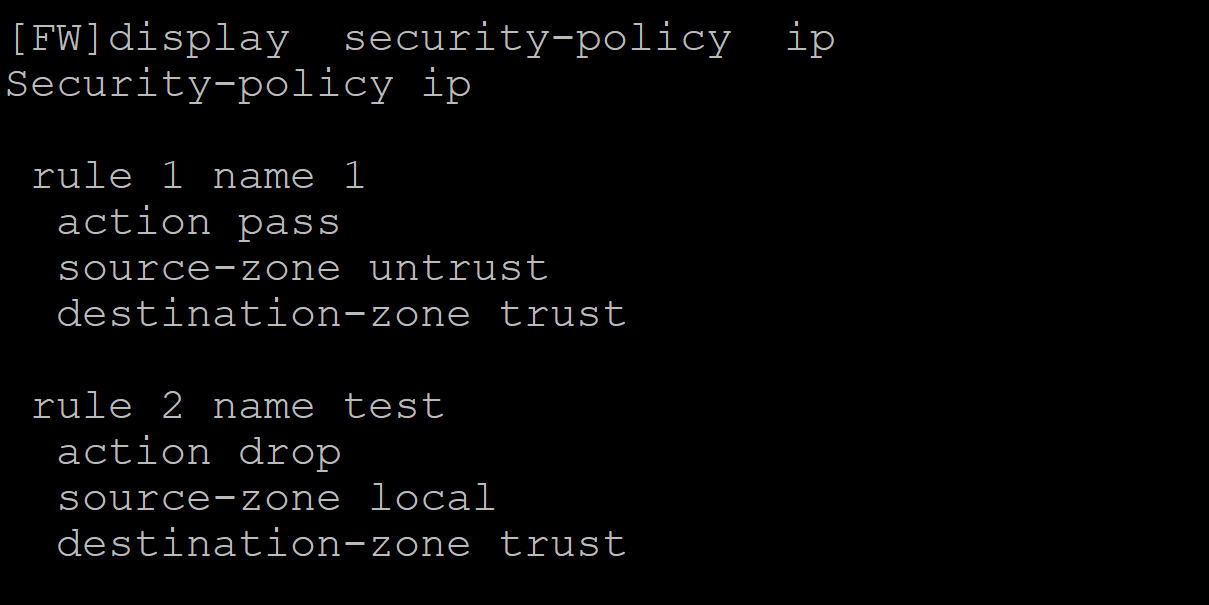
dis security-policy ip 查看安全策略的配置信息
dis security-policy statistics ip 查看安全策略的匹配上的数据情况
- 2026-01-14回答
- 评论(0)
- 举报
-
(0)
暂无评论

1.1.13 display security-policy
display security-policy命令用来显示安全策略的配置信息。
【命令】
display security-policy [ verbose | rule name rule-name ]
【视图】
任意视图
【缺省用户角色】
network-admin
network-operator
【参数】
verbose:表示显示所有安全策略规则的配置信息。若不指定参数,则显示安全策略规则的概要信息。
rule:表示显示指定安全策略规则的配置信息。
name rule-name:表示安全策略规则的名称,为1~127个字符的字符串,不区分大小写。
【举例】
# 显示所有安全策略规则的概要信息。
<Sysname> display security-policy
ID Name State Action Hits
------------------------------------------------------------------------------------
0 default active pass 11221440
1 test active drop 0
------------------------------------------------------------------------------------
# 显示安全策略的配置信息。
<Sysname> display security-policy verbose
Security-policy
rule 1 name der (Inactive: action not configured, track entry down)
profile er
vrf re
logging enable
counting enable
counting enable TTL 1200
time-range dere
track positive 23
session aging-time 5000
session persistent aging-time 2400
source-zone trust
destination-zone trust
source-address host 1::4
source-address subnet 1.1.1.10
source-address subnet 1::/64
source-address subnet 1.1.1.0 255.255.255.0
source-address range 2.2.1.1 3.3.3.3
destination-address host 1.1.1.3
destination-address host 5::2
destination-address subnet 1.1.1.0 255.255.255.0
destination-address range 2.2.1.1 3.3.3.3
service object-group http
user name usera domain test
user group groupa domain test
application name 139Mail
application group app1
表1-1 display security-policy命令显示信息描述表
字段 | 描述 | |
ID | 表示规则的ID | |
Name | 表示规则的名称 | |
State | 表示规则生效状态。此安全策略规则生效状态与Track项联动,规则的生效状态取值包括: · active:表示生效状态 · inactive:表示禁用状态 | |
Action | 表示规则动作,其取值如下: · pass:表示允许报文通过 · drop:表示丢弃报文 | |
Hits | 表示规则的命中次数 | |
rule id name rule-name (Inactive: action not configured, track entry down) | 表示规则的ID、名称和生效状态,此规则的状态为Inactive, 规则的生效状态取值包括: · Inactive:表示禁用状态 禁用原因有以下几种: · action not configured:表示未配置动作 · rule disabled:表示当前规则被禁用 · rule group disabled:表示所属安全策略组被禁用 · time range inactive:表示不在生效时间段 · track entry down:表示Track项联动导致未生效 | |
action pass | 表示规则动作,其取值如下: · pass:表示允许报文通过 · drop:表示丢弃报文 | |
profile app-profile-name | 表示引用的DPI应用profile | |
Ips-policy ips-polic-name | 表示引用的DPI业务策略 |
|
logging enable | 表示开启了对符合规则过滤条件的报文记录日志信息的功能 | |
counting enable | 表示开启了安全策略规则匹配统计功能 | |
time-range time-range-name | 表示此规则生效的时间段 | |
track negative 1 | 表示安全策略规则生效状态与Track项的Negative状态关联 | |
track positive 1 | 表示安全策略规则生效状态与Track项的Positive或NotReady状态关联 | |
session aging-time time-value | 表示此规则中设置的会话老化时间,单位为秒 | |
session persistent aging-time time-value | 表示此规则中设置的长连接会话的老化时间,单位为小时 | |
source-zone zone-name | 表示规则配置了源安全域作为过滤条件 | |
destination-zone zone-name | 表示规则配置了目的安全域作为过滤条件 | |
source-address object-group-ip address-object-group-name | 表示规则配置了源IPv4地址作为过滤条件 | |
source-address object-group-ipv6 address-object-group-name | 表示规则配置了源IPv6地址作为过滤条件 |
|
source-address object-group-mac mac-object-group-name | 表示规则配置了源MAC地址作为过滤条件 |
|
source-address host ip-address | 表示规则配置了源IP主机地址作为过滤条件 | |
source-address subnet ip-address | 表示规则配置了源IP子网地址作为过滤条件 | |
source-address range ip-address1 ip-address2 | 表示规则配置了源IP范围地址作为过滤条件 | |
destination-address object-group-ip address-object-group-name | 表示规则配置了目的IPv4地址作为过滤条件 | |
destination-address object-group-ipv6 address-object-group-name | 表示规则配置了目的IPv6地址作为过滤条件 |
|
destination-address host ip-address | 表示规则配置了目的IP主机地址作为过滤条件 | |
destination-address subnet ip-address | 表示规则配置了目的IP子网地址作为过滤条件 | |
destination-address range ip-address1 ip-address2 | 表示规则配置了目的IP范围地址作为过滤条件 | |
service object-group object-group-name | 表示规则配置了服务作为过滤条件 | |
application group app-group-name | 表示规则配置了应用组作为过滤条件 | |
application name application-name | 表示规则配置了应用作为过滤条件 | |
user name user-name | 表示规则配置了用户作为过滤条件 | |
User group user-group-name | 表示规则配置了用户组作为过滤条件 |
【相关命令】
· security-policy
- 2026-01-15回答
- 评论(0)
- 举报
-
(0)
暂无评论
编辑答案


亲~登录后才可以操作哦!
确定你的邮箱还未认证,请认证邮箱或绑定手机后进行当前操作
举报
×
侵犯我的权益
×
侵犯了我企业的权益
×
- 1. 您举报的内容是什么?(请在邮件中列出您举报的内容和链接地址)
- 2. 您是谁?(身份证明材料,可以是身份证或护照等证件)
- 3. 是哪家企业?(营业执照,单位登记证明等证件)
- 4. 您与该企业的关系是?(您是企业法人或被授权人,需提供企业委托授权书)
抄袭了我的内容
×
原文链接或出处
诽谤我
×
- 1. 您举报的内容以及侵犯了您什么权益?(请在邮件中列出您举报的内容、链接地址,并给出简短的说明)
- 2. 您是谁?(身份证明材料,可以是身份证或护照等证件)
对根叔社区有害的内容
×
不规范转载
×
举报说明
暂无评论