S5120V2交换机密码重置
- 0关注
- 0收藏,1617浏览
问题描述:
交换机插console口提示需要登陆密码,密码忘记了,该如何重置 sn:219801A19W9206Q008DX
- 2026-05-08提问
- 举报
-
(0)
最佳答案

1.2 配置需求及实现的效果
清除Consle密码,
3 配置步骤
3.1 进入bootroom菜单清除Consle密码
通过conlse线和crt软件连接并登陆设备,然后把设备断电重启。控制台上会打印如下信息,当出现“press Ctrl+B”的时候快速按住“Ctrl+B” 进入botroom菜单
System is starting...
Press Ctrl+D to access BASIC-BOOTWARE MENU
Booting Normal Extend BootWare
The Extend BootWare is self-decompressing.......................Done!
BootWare Validating...
Press Ctrl+B to enter extended boot menu...
BotWare password: Not required. Please press Enter to continue.
Password recovery capability is enabled.
Note: The current operating device is flash
Enter < Storage Device Operation > to select device.
按住“Ctrl+B”进入如下菜单。选择“<6> Skip Current System Configuration”跳过当前配置启动,不同设备可能不是数字6,
===========================<EXTEND-BOOTWARE MENU>===========================
|<1> Boot System |
|<2> Enter Serial SubMenu |
|<3> Enter Ethernet SubMenu |
|<4> File Control |
|<5> Restore to Factory Default Configuration |
|<6> Skip Current System Configuration |
|<7> BootWare Operation Menu |
|<8> Clear Super Password |
|<9> Storage Device Operation |
|<0> Reboot |
============================================================================
Ctrl+Z: Access EXTEND-ASSISTANT MENU
Ctrl+F: Format File System
Enter your choice(0-9): 6
Flag Set Success.
然后输入0重启设备
===========================<EXTEND-BOOTWARE MENU>===========================
|<1> Boot System |
|<2> Enter Serial SubMenu |
|<3> Enter Ethernet SubMenu |
|<4> File Control |
|<5> Restore to Factory Default Configuration |
|<6> Skip Current System Configuration |
|<7> BootWare Operation Menu |
|<8> Clear Super Password |
|<9> Storage Device Operation |
|<0> Reboot |
============================================================================
Ctrl+Z: Access EXTEND-ASSISTANT MENU
Ctrl+F: Format File System
Enter your choice(0-9): 0
System is starting...
Press ENTER to get started.
3.2 如果不需要之前的配置信息的话
操作步骤:跳过启动文件后直接保存当前配置,再重启。
<H3C>save
The current configuration will be written to the device. Are you sure? [Y/N]:y
Please input the file name(*.cfg)[flash:/startup.cfg]
(To leave the existing filename unchanged, press the enter key):(输入回车)
flash:/startup.cfg exists, overwrite? [Y/N]:y
Validating file. Please wait...
Configuration is saved to device successfully.
<H3C>reboot
Start to check configuration with next startup configuration file, please wait.........DONE!
Current configuration may be lost after the reboot, save current configuration? [Y/N]:y
This command will reboot the device. Continue? [Y/N]:y
3.3 如果需要之前的配置信息的话
<H3C>
#Apr 26 12:02:07:166 2000 H3C SHELL/4/LOGIN:
Trap 1.3.6.1.4.1.25506.2.2.1.1.3.0.1<hh3cLogIn>: login from Console
%Apr 26 12:02:07:306 2000 H3C SHELL/5/SHELL_LOGIN: Console logged in from aux0.
<H3C>dir %查看设备配置文件
Directory of flash:/
1 drw- - Apr 26 2000 12:00:20 logfile
2 -rw- 1666 Apr 26 2000 12:05:39 startup.cfg
3 -rw- 1556 Apr 26 2000 12:05:33 _startup_bak.cfg
4 -rw- 151 Apr 26 2000 12:05:30 system.xml
29106 KB total (16876 KB free)
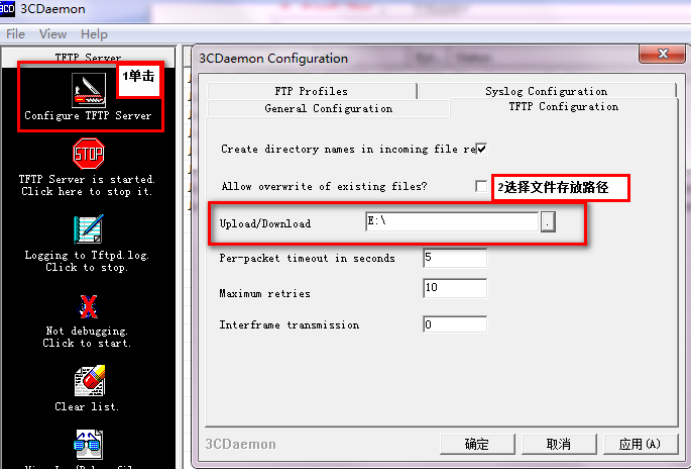
给设备和电脑配置成同网段IP地址(举例:WAC配置成192.168.100.x,电脑配置成192.168.100.x),在电脑上通过3CD软件搭建tftp服务器。
<H3C>sys
System View: return to User View with Ctrl+Z.
[H3C]interface Vlan-interface 1
[H3C-Vlan-interface1]ip address 192.168.100.x 24
[H3C-Vlan-interface1]quit
[H3C]ping 192.168.100.x
PING 192.168.100.x: 56 data bytes, press CTRL_C to break
Reply from 192.168.10a0.a: bytes=56 Sequence=1 ttl=128 time=7 ms
Reply from 192.168.100.a: bytes=56a Sequence=2 ttl=128 time=2 ms
<H3C>tftp 192.168.100.a put startup.cfg
File will be transferred in binary mode
Sending file to remote TFTP server. Please wait... |
TFTP: 1666 bytes sent in 0 second(s).
File uploaded successfully.
<H3C>
下载成功:
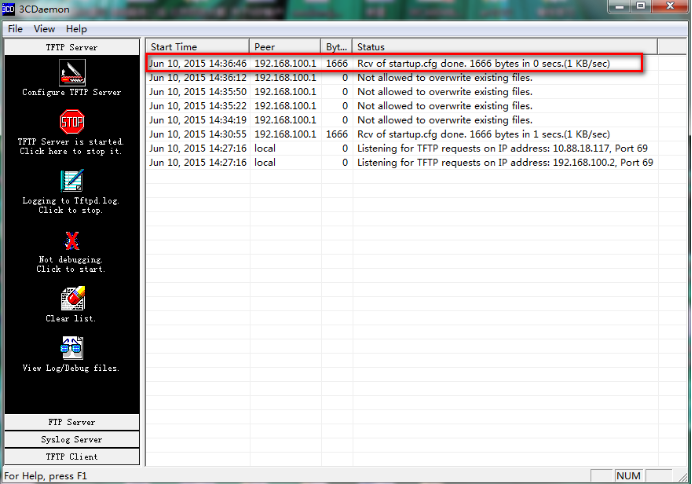
可以到本地相关路径(此例子中是E盘)查看到相关文件。
需要恢复之前配置
解决方法:删除密码恢复之前配置文件
使用记事本打开startup.cfg文件
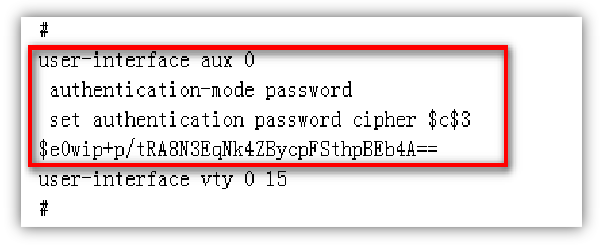
删除aux0口下的认证方式和密码并保存文件
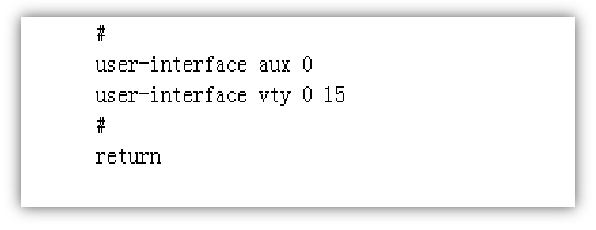
覆盖当前配置文件
<H3C>tftp 192.168.100.20 get startup.cfg
The file startup.cfg exists. Overwrite it? [Y/N]:y
Verifying server file...
Deleting the old file, please wait...
...
File will be transferred in binary mode
Downloading file from remote TFTP server, please wait....
TFTP: 1166 bytes received in 0 second(s)
File downloaded successfully.
<H3C>reboot
Start to check configuration with next startup configuration file, please wait.........DONE!
Current configuration may be lost after the reboot, save current configuration? [Y/N]:n 不保存配置
This command will reboot the device. Continue? [Y/N]:y 确定继续重启
- 2026-05-08回答
- 评论(0)
- 举报
-
(0)

打开你的电脑,在浏览器输入知了社区,找到这个帖子,要么在别人下面评论,要么点我的头像。
参考手册链接恢复密码 1.2 如何恢复Console口密码?
- 2026-05-08回答
- 评论(0)
- 举报
-
(0)
暂无评论

1. 断电重启交换机,启动时看到「Press Ctrl+B to enter extended boot menu」提示时按Ctrl+B,未修改过的默认BootRom密码为Admin@h3c(早期版本为h3c),输入后进入BootRom菜单。
2. 选择
3. 启动完成后进入用户视图,执行命令加载原有业务配置:
4. 按需修改Console登录、管理用户密码,关键配置命令:
[H3C] line aux 0
[H3C-line-aux0] set authentication password simple 你自定义的新密码
[H3C-line-aux0] quit
[H3C] local-user admin class manage
[H3C-luser-manage-admin] password simple 新密码
5. 执行save命令保存配置,重启后即可用新密码正常登录。
如果BootRom密码也遗忘,可携带你提供的SN:219801A19W9206Q008DX联系H3C官方4008100500申请临时解锁码。
- 2026-05-08回答
- 评论(0)
- 举报
-
(0)
暂无评论

H3C S5120V2交换机Console口密码遗忘,通常可通过重启设备并进入BootROM菜单来清除。
解决方案(保留配置)
此操作会重启设备,但可保留原有配置,仅用于清除密码。若业务运行中,请谨慎评估影响。
准备:用Console线连接电脑和交换机,打开终端软件(如SecureCRT)设置波特率为
9600。进入BootROM:给交换机断电重启,当终端出现
Press Ctrl+B to access...提示时,立刻按住Ctrl+B键进入菜单。提示:部分较新设备提示符可能是
Ctrl+D,请注意屏幕提示。选择清除选项(关键步骤):根据菜单按数字键选择:
选项A(方案一,推荐):寻找
Skip Authentication for Console Login并选择它。选项B(方案二):若找不到选项A,则选择
Skip Current System Configuration(跳过当前配置启动)。注意:方案二会以空配置启动,设备网络功能会暂时中断。
设置密码并保存:
若使用了方案一:重启后可直接进入系统重新设置Console密码。参考命令:
[H3C] user-interface console 0 [H3C-ui-console0] authentication-mode password [H3C-ui-console0] set authentication password simple 新密码 [H3C-ui-console0] quit [H3C] save force<H3C> system-view若使用了方案二:以空配置启动进入系统后,需先手动加载原配置文件,再修改密码。参考命令:
[H3C] configuration replace file flash:/startup.cfg [H3C] user-interface console 0 [H3C-ui-console0] authentication-mode password [H3C-ui-console0] set authentication password simple 新密码 [H3C-ui-console0] quit [H3C] save force<H3C> system-view
备选方案(恢复出厂设置)
若上述方法无效或不需保留配置,可彻底恢复出厂设置(会清除所有配置)-35:
选择 Restore to Factory Default Configuration-12或在命令行执行 reset saved-configuration 再 reboot。
- 2026-05-08回答
- 评论(0)
- 举报
-
(0)
暂无评论
编辑答案


亲~登录后才可以操作哦!
确定你的邮箱还未认证,请认证邮箱或绑定手机后进行当前操作
举报
×
侵犯我的权益
×
侵犯了我企业的权益
×
- 1. 您举报的内容是什么?(请在邮件中列出您举报的内容和链接地址)
- 2. 您是谁?(身份证明材料,可以是身份证或护照等证件)
- 3. 是哪家企业?(营业执照,单位登记证明等证件)
- 4. 您与该企业的关系是?(您是企业法人或被授权人,需提供企业委托授权书)
抄袭了我的内容
×
原文链接或出处
诽谤我
×
- 1. 您举报的内容以及侵犯了您什么权益?(请在邮件中列出您举报的内容、链接地址,并给出简短的说明)
- 2. 您是谁?(身份证明材料,可以是身份证或护照等证件)
对根叔社区有害的内容
×
不规范转载
×
举报说明
暂无评论