WAP722S-W2如何切换胖AP
- 0关注
- 0收藏,1089浏览

问题描述:
如何切换成胖AP模式呢
[H3C]dis version
H3C Comware Software, Version 7.1.064, Release 2449P10
Copyright (c) 2004-2021 New H3C Technologies Co., Ltd. All rights reserved.
H3C WAP722S-W2 uptime is 0 weeks, 0 days, 0 hours, 13 minutes
Last reboot reason : User soft reboot
Boot image: flash:/wa5300-oasis-boot.bin
Boot image version: 7.1.064, Release 2449P10
Compiled Nov 17 2021 16:00:00
System image: flash:/wa5300-oasis-system.bin
System image version: 7.1.064, Release 2449P10
Compiled Nov 17 2021 16:00:00
with 1 ARM 710MHz Processor
256M bytes DDR3
32M bytes NorFlash Memory
Hardware Version is Ver.B
Basic Bootrom Version is 7.13
Extend Bootrom Version is 7.23
[Subslot 0]H3C WAP722S-W2 Hardware Version is Ver.B
[SLOT 1]GE1/0/1 (Hardware)Ver.B, (Driver)1.0
[SLOT 1]RADIO1/0/1 (Hardware)Ver.B, (Driver)1.0
[SLOT 1]RADIO1/0/2 (Hardware)Ver.B, (Driver)1.0
- 2026-05-31提问
- 举报
-
(0)
最佳答案



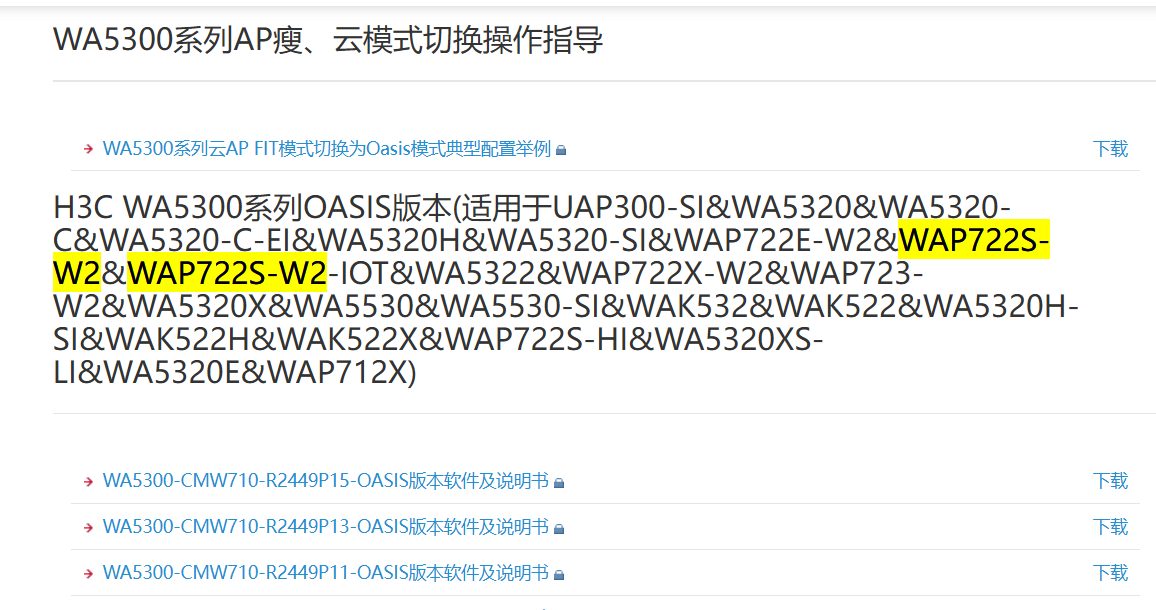


你这台 WAP722S-W2 是 WA5300 系列、Oasis 版本(当前是瘦 AP/FIT),要变成独立配置的胖 AP(FAT),必须进 BootWare 刷胖版本 + 改模式,不能直接命令行 ap-mode fat。
一、准备工作(必做)
Console 线:接 AP Console 口 → PC 串口 / USB 串口
TFTP 服务器(3CDaemon、tftp32 等)
PC 网卡设:192.168.0.1/24
TFTP 根目录放胖固件
下载对应胖固件(官网找 WAP722S-W2 FAT)
胖固件名类似:wa4300s_fat.bin
你现在是:wa5300-oasis-system.bin(瘦)
二、进入 BootWare 并切换模式(关键)
串口波特率:9600/8N1,重启 AP
看到提示时 3 秒内按 Ctrl+B,进入 BootWare:
plaintext
EXTENDED-BOOTWARE MENU
|<1> Boot System
|<2> Enter Serial SubMenu
|<3> Enter Ethernet SubMenu
|<4> File Control
|<5> Restore to Factory Default
...
Ctrl+Y: Change AP Mode
先改模式(Ctrl+Y)
plaintext
按 Ctrl+Y
Current mode is Fit
1 Fat Mode
2 Fit Mode
5 Oasis Mode
选 1 → Fat Mode
配置 TFTP 网络(选 3)
plaintext
3 Enter Ethernet SubMenu
5 Modify Ethernet Parameter
Local IP: 192.168.0.50
Server IP: 192.168.0.1
Gateway: 0.0.0.0
Subnet Mask: 255.255.255.0
上传并写入胖固件
plaintext
回到主菜单 → 4 File Control → 2 Update Main Application File
输入文件名:wa4300s_fat.bin
等待上传(3–5分钟,**不能断电**)
重启进胖 AP
plaintext
0 Reboot
启动后默认 IP:192.168.0.50
三、确认是否成功(登录后)
plaintext
<H3C> dir flash:
# 看到类似 wa4300s_fat.bin 即为胖版本
<H3C> display ap mode
# 显示 Fat Mode
四、常见坑
❌ 不能直接在 Oasis 瘦系统里 ap-mode fat:会报错,必须 BootWare 刷胖固件
⚠️ 断电必死:升级中掉电会变砖
✅ 刷完后默认 192.168.0.50,电脑同网段即可 Web / 命令行配置
- 2026-06-01回答
- 评论(0)
- 举报
-
(0)
暂无评论
编辑答案


亲~登录后才可以操作哦!
确定你的邮箱还未认证,请认证邮箱或绑定手机后进行当前操作
举报
×
侵犯我的权益
×
侵犯了我企业的权益
×
- 1. 您举报的内容是什么?(请在邮件中列出您举报的内容和链接地址)
- 2. 您是谁?(身份证明材料,可以是身份证或护照等证件)
- 3. 是哪家企业?(营业执照,单位登记证明等证件)
- 4. 您与该企业的关系是?(您是企业法人或被授权人,需提供企业委托授权书)
抄袭了我的内容
×
原文链接或出处
诽谤我
×
- 1. 您举报的内容以及侵犯了您什么权益?(请在邮件中列出您举报的内容、链接地址,并给出简短的说明)
- 2. 您是谁?(身份证明材料,可以是身份证或护照等证件)
对根叔社区有害的内容
×
不规范转载
×
举报说明
暂无评论