华三防火墙不知道所有方式登录密码。
- 0关注
- 0收藏,1853浏览
最佳答案


华三 SecPath V7 防火墙全部登录密码丢失完整解决方案(保留业务配置,不恢复出厂)
前置说明
所有登录方式(Console、Web、SSH、Telnet)密码全丢,只能通过串口 Console 线进 BootWare 修复;
全程禁止选 5 号恢复出厂,会清空所有策略、NAT、VPN、路由配置;
设备默认开启 password-recovery enable,可以完整加载原有业务配置、仅跳过登录密码;
操作需要重启防火墙,业务会短暂中断,建议夜间维护窗口执行。
一、准备工具
USB 转 Console 串口线,连接电脑与防火墙 Console 口;
串口工具(MobaXterm/CRT/Putty)
串口参数:9600 波特率、8 数据位、1 停止位、无校验、关闭所有流控。
启动提示Ctrl+B
BootWare菜单8号选项
二、进入 BootWare 跳过 Console 密码(推荐方案,完整加载原有全部配置)
步骤 1:重启设备抓 BootWare 入口
防火墙彻底断电,串口窗口保持打开;
上电瞬间紧盯打印,出现提示:
Press Ctrl+B to enter extended boot menu...
立刻按住 Ctrl 不放,反复按 B,3 秒窗口期内触发;
BootWare 默认无密码,直接回车进入扩展菜单;
界面看到 Password recovery capability is enabled. 代表密码恢复功能正常可用。
步骤 2:选择跳过 Console 认证
菜单输入数字 8 回车:
<8> Skip Authentication for Console Login
确认 Y,返回主菜单输入 0 选择 Reboot 重启。
步骤 3:重启后直接免密进入命令行
设备完整加载原有全部业务配置,串口直接进入 <H3C> 用户视图,无需任何登录密码。
三、全套修改所有登录账号密码(Web/SSH/Telnet/Console 一次性重置)
1. 重置管理员本地用户(admin,Web/SSH/Telnet 共用账号)
plaintext
system-view
# 新建/修改超级管理员账号,权限最高
local-user admin class manage
password simple Admin@2026 # 设置新强密码
service-type http https ssh telnet terminal # 放开所有登录方式
authorization-attribute user-role network-admin # 最高管理权限
quit
2. 重置 Console 串口登录密码
plaintext
line console 0
authentication-mode scheme # 使用AAA账号登录
user-role network-admin
quit
3. VTY 远程登录(SSH/Telnet)权限放行
plaintext
line vty 0 63
authentication-mode scheme
user-role network-admin
quit
4. 开启 Web 管理服务(若关闭无法网页登录)
plaintext
ip http enable
ip https enable
5. 保存配置(关键,不保存重启后密码失效)
plaintext
save force
四、特殊场景:BootWare 菜单没有 8 号选项(password-recovery 被关闭)
如果管理员之前执行 undo password-recovery enable,无 8 号跳过认证选项,改用 6 号方案:
BootWare 菜单输入 6:Skip Current System Configuration,空配置启动;
重启后进入空系统视图,原有配置文件 startup.cfg 仍保存在 flash,不会删除;
加载原有配置文件并修改密码:
plaintext
# 读取出厂配置文件
restore startup-configuration from flash:/startup.cfg
# 执行上面第三部分全套改密码命令
save force
reboot
重启后正常加载业务配置,新密码生效。
五、绝对禁止操作(业务毁灭性风险)
菜单 <5> Restore to Factory Default Configuration 恢复出厂,执行后:
所有接口、安全策略、NAT、IPSec、SDWAN、路由、VPN 全部清空;
设备回到全新出厂状态,业务完全中断,需要重新完整配置。
六、IRF 堆叠双防火墙补充操作
两台设备分开堆叠线缆,单独对主设备做 BootWare 密码重置;
改完密码、保存配置后,再插回堆叠线缆重新 IRF 合并;
从设备同步主设备配置,无需单独操作第二台。
七、验证修改结果
串口重新登录:输入用户名 admin + 新密码;
电脑插内网口,浏览器访问防火墙内网管理 IP,Web 登录验证;
SSH 工具测试远程登录,确认新密码可用。
极简操作流程总结
Console 线连接设备,串口 9600 参数打开;
断电重启,Ctrl+B 进 BootWare,选 8 跳过登录认证;
系统内重置 admin 管理员密码、Console/VTY 登录权限;
save force 保存,重启后全部登录方式使用新密码。
- 2026-07-05回答
- 评论(0)
- 举报
-
(0)


2. 重启防火墙,在启动过程中出现“Press Ctrl+B to enter Boot Menu...”提示时,按下Ctrl+B,输入BootROM密码(默认通常为“H3C”或空,若被修改需尝试常见密码或联系H3C技术支持)。
3. 进入Boot菜单后,选择“Clear password for console user”清除Console密码。
4. 选择“Reboot”重启设备,重启后通过Console口无密码登录,进入系统视图后用“local-user admin password simple [新密码]”设置新密码,保存配置“save”。
5. 若需恢复之前配置,可通过Boot菜单的“File system”查看是否有备份配置文件,尝试加载;若没有则需重新配置。
- 2026-07-03回答
- 评论(0)
- 举报
-
(0)
暂无评论
重启bootware恢复密码
3.1 进入bootroom菜单清除Console密码
通过console线和crt软件连接并登陆设备,然后把设备断电重启。控制台上会打印如下信息,当出现“press Ctrl+B”的时候快速按住“Ctrl+B” 进入botroom菜单
System is starting...
Press Ctrl+D to access BASIC-BOOTWARE MENU
Booting Normal Extend BootWare
The Extend BootWare is self-decompressing.......................Done!
BootWare Validating...
Press Ctrl+B to enter extended boot menu...
BotWare password: Not required. Please press Enter to continue.
Password recovery capability is enabled.
Note: The current operating device is flash
Enter < Storage Device Operation > to select device.
按住“Ctrl+B”进入如下菜单。选择“<6> Skip Current System Configuration”跳过当前配置启动,不同设备可能不是数字6,
===========================
|<1> Boot System |
|<2> Enter Serial SubMenu |
|<3> Enter Ethernet SubMenu |
|<4> File Control |
|<5> Restore to Factory Default Configuration |
|<6> Skip Current System Configuration |
|<7> BootWare Operation Menu |
|<8> Clear Super Password |
|<9> Storage Device Operation |
|<0> Reboot |
============================================================================
Ctrl+Z: Access EXTEND-ASSISTANT MENU
Ctrl+F: Format File System
Enter your choice(0-9): 6
Flag Set Success.
然后输入0重启设备
===========================
|<1> Boot System |
|<2> Enter Serial SubMenu |
|<3> Enter Ethernet SubMenu |
|<4> File Control |
|<5> Restore to Factory Default Configuration |
|<6> Skip Current System Configuration |
|<7> BootWare Operation Menu |
|<8> Clear Super Password |
|<9> Storage Device Operation |
|<0> Reboot |
============================================================================
Ctrl+Z: Access EXTEND-ASSISTANT MENU
Ctrl+F: Format File System
Enter your choice(0-9): 0
System is starting...
Press ENTER to get started.
3.2 如果不需要之前的配置信息的话
操作步骤:跳过启动文件后直接保存当前配置,再重启。
The current configuration will be written to the device. Are you sure? [Y/N]:y
Please input the file name(*.cfg)[flash:/startup.cfg]
(To leave the existing filename unchanged, press the enter key):(输入回车)
flash:/startup.cfg exists, overwrite? [Y/N]:y
Validating file. Please wait...
Configuration is saved to device successfully.
Start to check configuration with next startup configuration file, please wait.........DONE!
Current configuration may be lost after the reboot, save current configuration? [Y/N]:y
This command will reboot the device. Continue? [Y/N]:y
3.3 如果需要之前的配置信息的话
#Apr 26 12:02:07:166 2000 H3C SHELL/4/LOGIN:
Trap 1.3.6.1.4.1.25506.2.2.1.1.3.0.1
%Apr 26 12:02:07:306 2000 H3C SHELL/5/SHELL_LOGIN: Console logged in from aux0.
Directory of flash:/
1 drw- - Apr 26 2000 12:00:20 logfile
2 -rw- 1666 Apr 26 2000 12:05:39 startup.cfg
3 -rw- 1556 Apr 26 2000 12:05:33 _startup_bak.cfg
4 -rw- 151 Apr 26 2000 12:05:30 system.xml
29106 KB total (16876 KB free)
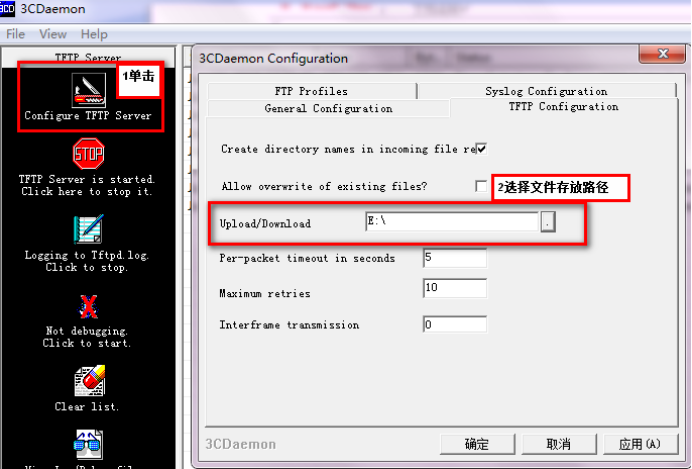
给设备和电脑配置成同网段IP地址(举例:WAC配置成192.168.100.1,电脑配置成192.168.100.2),在电脑上通过3CD软件搭建tftp服务器。
System View: return to User View with Ctrl+Z.
[H3C]interface Vlan-interface 1
[H3C-Vlan-interface1]ip address 192.168.100.1 24
[H3C-Vlan-interface1]quit
[H3C]ping 192.168.100.2
PING 192.168.100.2: 56 data bytes, press CTRL_C to break
Reply from 192.168.100.2: bytes=56 Sequence=1 ttl=128 time=7 ms
Reply from 192.168.100.2: bytes=56 Sequence=2 ttl=128 time=2 ms
File will be transferred in binary mode
Sending file to remote TFTP server. Please wait... |
TFTP: 1666 bytes sent in 0 second(s).
File uploaded successfully.
下载成功:

可以到本地相关路径(此例子中是E盘)查看到相关文件。
需要恢复之前配置
解决方法:删除密码恢复之前配置文件
使用记事本打开startup.cfg文件
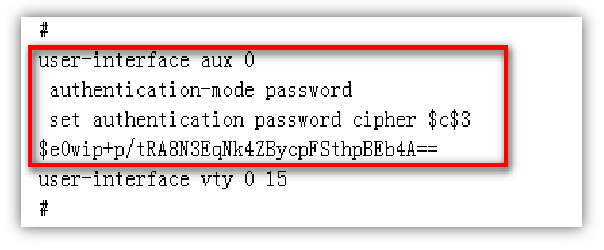
删除aux0口下的认证方式和密码并保存文件
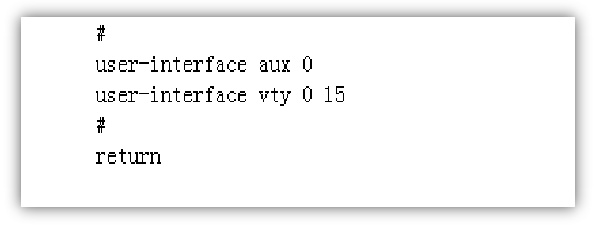
覆盖当前配置文件
The file startup.cfg exists. Overwrite it? [Y/N]:y
Verifying server file...
Deleting the old file, please wait...
...
File will be transferred in binary mode
Downloading file from remote TFTP server, please wait....
TFTP: 1166 bytes received in 0 second(s)
File downloaded successfully.
Start to check configuration with next startup configuration file, please wait.........DONE!
Current configuration may be lost after the reboot, save current configuration? [Y/N]:n 不保存配置
This command will reboot the device. Continue? [Y/N]:y 确定继续重启
- 2026-07-03回答
- 评论(0)
- 举报
-
(0)
暂无评论

整个操作的核心,就是通过重启进入BootWare菜单,绕过现有密码登录系统。完成后,你既可以重置密码并保留原有配置,也可以恢复出厂设置。
下面是详细的两种操作路径,你可以根据需求选择。
✅ 准备工作
一根Console线,连接电脑和防火墙的Console口。
终端软件(如SecureCRT、PuTTY或系统自带的超级终端),并按以下参数设置:
波特率:9600
数据位:8
停止位:1
奇偶校验:无
流控:无
确保能通过终端软件看到设备的启动信息。
🛠️ 方法一:重置密码,保留配置(首选)
此方法能让你进入系统修改密码,且不会丢失设备当前的网络配置,是风险最小的方案。
重启设备并进入BootWare菜单
选择跳过Console认证
进入系统并重置密码
设备重启完成后,通过Console口登录时将不再需要密码。
进入系统视图,重置Console口密码或创建新用户。例如,要将Console口认证关闭:
<H3C> system-view [H3C] line con 0 [H3C-line-console0] authentication-mode none // 关闭密码认证 [H3C-line-console0] quit [H3C] save force // 保存配置text如果你想重置Web登录密码(假设用户名为
admin):[H3C] local-user admin [H3C-luser-manage-admin] password simple <新密码> [H3C-luser-manage-admin] quit [H3C] save forcetext
🗑️ 方法二:跳过配置,恢复出厂(慎用)
如果方法一无效(比如BootWare菜单里没有<8>选项),或者你希望彻底清除所有配置,可以使用此方法。
同样,重启并进入BootWare菜单(步骤同方法一)。
选择跳过当前配置启动
进入系统并保存空配置
- 2026-07-06回答
- 评论(0)
- 举报
-
(0)
暂无评论
编辑答案


亲~登录后才可以操作哦!
确定你的邮箱还未认证,请认证邮箱或绑定手机后进行当前操作
举报
×
侵犯我的权益
×
侵犯了我企业的权益
×
- 1. 您举报的内容是什么?(请在邮件中列出您举报的内容和链接地址)
- 2. 您是谁?(身份证明材料,可以是身份证或护照等证件)
- 3. 是哪家企业?(营业执照,单位登记证明等证件)
- 4. 您与该企业的关系是?(您是企业法人或被授权人,需提供企业委托授权书)
抄袭了我的内容
×
原文链接或出处
诽谤我
×
- 1. 您举报的内容以及侵犯了您什么权益?(请在邮件中列出您举报的内容、链接地址,并给出简短的说明)
- 2. 您是谁?(身份证明材料,可以是身份证或护照等证件)
对根叔社区有害的内容
×
不规范转载
×
举报说明
暂无评论