H3C F100-M-G5 双WAN环境,专线IP的TCP端口映射从外网全部不通,求分析
- 0关注
- 0收藏,1778浏览

问题描述:
一、网络环境
防火墙:H3C F100-M-G5,Version 7.1.064, Release 9560P26
专线接口:GE1/0/9,固定公网 IP 61.141.76.238/24,网关 61.141.76.1
普通宽带:Dialer0(PPPoE拨号)
内网接口:
GE1/0/8:192.168.8.1/24(服务器网段)
GE1/0/6:192.168.6.1/24(办公网)
GE1/0/0:172.16.0.5/24(上联核心)
映射测试服务器:192.168.8.15:80,通过专线 IP 映射公网端口 36621(nat server protocol tcp global current-interface 36621 inside 192.168.8.15 80)
二、附全部配置:
#
version 7.1.064, Release 9560P26
#
sysname cxr
#
clock timezone Beijing add 08:00:00
clock protocol none
#
context Admin id 1
#
telnet server enable
#
irf mac-address persistent timer
irf auto-update enable
undo irf link-delay
irf member 1 priority 1
#
dialer-group 1 rule ip permit
#
nat address-group 2 name Group1
address 61.141.76.238 61.141.76.238
#
undo ip fast-forwarding load-sharing
#
dhcp enable
#
ip subscriber access-user log enable successful-login
#
password-recovery enable
#
vlan 1
#
vlan 10
#
dhcp server ip-pool DHCP-90
gateway-list 192.168.90.1
network 192.168.90.0 mask 255.255.255.0
dns-list 114.114.114.114
#
dhcp server ip-pool DHCP-91
gateway-list 192.168.91.1
network 192.168.91.0 mask 255.255.255.0
dns-list 114.114.114.114
static-bind ip-address 192.168.91.6 mask 255.255.255.0 hardware-address a0c5-f2bd-af19
#
dhcp server ip-pool GE01
gateway-list 172.16.0.1
network 172.16.0.0 mask 255.255.255.0
dns-list 114.114.114.114
expired unlimited
#
dhcp server ip-pool GE06
gateway-list 192.168.6.1
network 192.168.6.0 mask 255.255.255.0
dns-list 114.114.114.114
#
dhcp server ip-pool GE08
gateway-list 192.168.8.1
network 192.168.8.0 mask 255.255.255.0
dns-list 114.114.114.114 223.5.5.5
#
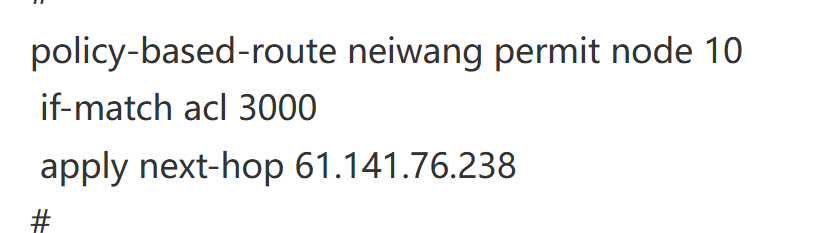
policy-based-route neiwang permit node 10
if-match acl 3000
apply next-hop 61.141.76.238
#
controller Cellular1/0/0
#
controller Cellular1/0/1
#
interface Dialer0
mtu 1492
ppp chap password cipher $c$3$+q+gdyD/6Jnp4IhjVF4W1cxo1UaTOhRKrY8a
ppp chap user 07551456465445@163.gd
ppp ipcp dns admit-any
ppp ipcp dns request
ppp pap local-user 07551227456467@163.gd password cipher $c$3$PL/r5Hq5TfJLpWN+tZloYB0ju7Ks1juruE1W
dialer bundle enable
dialer-group 1
dialer timer idle 0
dialer timer autodial 5
ip address ppp-negotiate
#
interface NULL0
#
interface Vlan-interface1
#
interface Vlan-interface10
ip address 192.168.70.1 255.255.255.0
#
interface GigabitEthernet1/0/0
port link-mode route
combo enable copper
ip address 172.16.0.5 255.255.255.0
nat hairpin enable
manage http inbound
manage http outbound
manage https inbound
manage https outbound
manage netconf-http inbound
manage netconf-https inbound
manage netconf-ssh inbound
manage snmp inbound
manage ssh inbound
manage ssh outbound
manage telnet inbound
manage telnet outbound
#
interface GigabitEthernet1/0/1
port link-mode route
combo enable fiber
#
interface GigabitEthernet1/0/2
port link-mode route
ip address 192.168.60.1 255.255.255.0
#
interface GigabitEthernet1/0/3
port link-mode route
ip address 192.168.90.1 255.255.255.0
gateway 192.168.90.1
#
interface GigabitEthernet1/0/4
port link-mode route
description GuideWan Interface
bandwidth 100000000
ip last-hop hold
nat outbound
manage http inbound
manage http outbound
manage netconf-http inbound
manage netconf-https inbound
manage ping inbound
manage ping outbound
manage ssh inbound
manage ssh outbound
manage telnet inbound
manage telnet outbound
pppoe-client dial-bundle-number 0
ip subscriber routed enable
ip subscriber initiator unclassified-ip enable
#
interface GigabitEthernet1/0/5
port link-mode route
ip address 211.162.72.61 255.255.255.252
ip last-hop hold
nat outbound
manage http inbound
manage http outbound
manage https inbound
manage https outbound
manage netconf-http inbound
manage netconf-https inbound
manage netconf-ssh inbound
manage ping inbound
manage ping outbound
manage snmp inbound
manage ssh inbound
manage ssh outbound
manage telnet inbound
manage telnet outbound
#
interface GigabitEthernet1/0/6
port link-mode route
description GuideLan Interface
ip address 192.168.6.1 255.255.255.0
#
interface GigabitEthernet1/0/7
port link-mode route
#
interface GigabitEthernet1/0/8
port link-mode route
ip address 192.168.8.1 255.255.255.0
ip policy-based-route neiwang
#
interface GigabitEthernet1/0/9
port link-mode route
ip address 61.141.76.238 255.255.255.0
ip last-hop hold
nat outbound
nat server protocol tcp global current-interface 10235 inside 192.168.8.90 8082 rule 192.168.8.90-8082-TCP disable counting description 192.168.8.90
nat server protocol tcp global current-interface 51821 inside 192.168.8.113 51821 rule 192.168.8.113-51821
nat server protocol tcp global current-interface 53363 inside 192.168.8.66 3389 rule 192.168.8.66-3389-TCP counting description 3389win2012
nat server protocol tcp global current-interface 63366 inside 192.168.8.10 3389 rule 192.168.8.10-3389-TCP counting description 3389-win10
nat server protocol udp global current-interface 51820 inside 192.168.8.113 51820 rule 192.168.8.113-51820-udp counting description wg
nat hairpin enable
manage ping inbound
manage ping outbound
gateway 61.141.76.238
ipsec no-nat-process enable
#
interface GigabitEthernet1/0/10
port link-mode route
shutdown
ip address 192.168.166.1 255.255.255.0
manage http inbound
manage http outbound
manage https inbound
manage https outbound
manage netconf-http inbound
manage netconf-https inbound
manage netconf-ssh inbound
manage ping inbound
manage ping outbound
manage snmp inbound
manage ssh inbound
manage ssh outbound
manage telnet inbound
manage telnet outbound
gateway 192.168.166.1
#
interface GigabitEthernet1/0/11
port link-mode route
ip address 220.112.42.41 255.255.255.248
ip last-hop hold
manage http inbound
manage http outbound
manage https inbound
manage https outbound
manage netconf-http inbound
manage netconf-https inbound
manage netconf-ssh inbound
manage ping inbound
manage ping outbound
manage snmp inbound
manage ssh inbound
manage ssh outbound
manage telnet inbound
manage telnet outbound
gateway 220.112.42.46
#
security-zone name Local
#
security-zone name Trust
import interface GigabitEthernet1/0/0
import interface GigabitEthernet1/0/3
import interface GigabitEthernet1/0/6
import interface GigabitEthernet1/0/8
import interface Vlan-interface10
#
security-zone name DMZ
#
security-zone name Untrust
import interface Dialer0
import interface GigabitEthernet1/0/4
import interface GigabitEthernet1/0/5
import interface GigabitEthernet1/0/9
import interface GigabitEthernet1/0/11
#
security-zone name Management
import interface GigabitEthernet1/0/2
#
scheduler logfile size 16
#
line class aux
user-role network-operator
#
line class console
authentication-mode scheme
user-role network-admin
#
line class vty
user-role network-operator
#
line aux 0
user-role network-admin
#
line con 0
user-role network-admin
#
line vty 0 63
authentication-mode scheme
user-role network-admin
#
ip route-static 0.0.0.0 0 Dialer0
#
customlog format dpi terminal
#
performance-management
#
ssh server enable
sftp server enable
sftp server idle-timeout 35791
scp server enable
#
arp ip-conflict log prompt
#
time-range 1 15:54 to 15:56 Mon
#
ntp-service enable
ntp-service source GigabitEthernet1/0/4
ntp-service refclock-master
ntp-service unicast-server 8.8.8.8
#
acl advanced 3000
rule 10 deny ip source 192.168.8.0 0.0.0.255 destination 192.168.0.0 0.0.255.255
rule 20 deny ip source 192.168.8.0 0.0.0.255 destination 172.16.0.0 0.15.255.255
rule 30 deny ip source 192.168.8.0 0.0.0.255 destination 10.0.0.0 0.255.255.255
rule 100 permit ip source 192.168.8.0 0.0.0.255
#
acl advanced 3333
#
domain system
#
domain default enable system
#
role name level-0
description Predefined level-0 role
#
role name level-1
description Predefined level-1 role
#
role name level-2
description Predefined level-2 role
#
role name level-3
description Predefined level-3 role
#
role name level-4
description Predefined level-4 role
#
role name level-5
description Predefined level-5 role
#
role name level-6
description Predefined level-6 role
#
role name level-7
description Predefined level-7 role
#
role name level-8
description Predefined level-8 role
#
role name level-9
description Predefined level-9 role
#
role name level-10
description Predefined level-10 role
#
role name level-11
description Predefined level-11 role
#
role name level-12
description Predefined level-12 role
#
role name level-13
description Predefined level-13 role
#
role name level-14
description Predefined level-14 role
#
user-group system
#
local-user admin class manage
password hash $h$6$RSm9QJjB8BVuupSR$tOK7DI5RgQz9mP3Qc/veeA9Z4BhSjtpwmrqgwxsT5NJejvbekWadeFWrjVeihm8iV6FGnus4CYPp9m+TWfdnfw==
service-type ssh telnet terminal https
authorization-attribute user-role level-3
authorization-attribute user-role network-admin
authorization-attribute user-role network-operator
#
ssl renegotiation disable
ssl version ssl3.0 disable
ssl version tls1.0 disable
#
ftp server enable
ftp timeout 35791
#
session statistics enable
#
ipsec logging negotiation enable
#
nat global-policy
rule name GlobalPolicyRule_3
source-zone Trust
destination-zone Untrust
action snat easy-ip
#
ike logging negotiation enable
#
ip https enable
web idle-timeout 999
#
blacklist ip 46.149.200.15
blacklist destination-ip 46.149.200.15
blacklist destination-ip 103.235.46.96
blacklist global enable
#
url-filter policy 钓鱼网站屏蔽
default-action block-source parameter-profile url_block_default_parameter
add blacklist 1 host text ***.***
#
inspect block-source parameter-profile ips_block_default_parameter
#
inspect block-source parameter-profile url_block_default_parameter
#
inspect logging parameter-profile av_logging_default_parameter
#
inspect logging parameter-profile ips_logging_default_parameter
#
inspect logging parameter-profile url_logging_default_parameter
#
inspect logging parameter-profile waf_logging_default_parameter
#
inspect email parameter-profile mailsetting_default_parameter
undo authentication enable
#
loadbalance isp file flash:/lbispinfo_v1.5.tp
#
traffic-policy
rule 1 name GuideAVCPolicy
action qos profile guideavcprofile1
source-zone Trust
destination-zone DMZ
destination-zone Untrust
profile name guideavcprofile1
bandwidth downstream guaranteed 100000000
bandwidth downstream maximum 100000000
#
packet-capture max-bytes 4096
packet-capture max-file-packets 1000
packet-capture storage local limit 10240
#
waf logging parameter-profile waf_logging_default_parameter
#
security-policy ip
rule 0 name Any_Any_0_IPv4
action pass
logging enable
rule 1 name Any_Any_1_IPv4
action pass
#
dac log-collect service dpi traffic enable
#
ips logging parameter-profile ips_logging_default_parameter
#
anti-virus logging parameter-profile av_logging_default_parameter
#
domain-reputation
#
cloud-management server domain opstunnel-seccloud.h3c.com
#
return
求大佬提供下完整修复命令
- 2026-07-04提问
- 举报
-
(0)
最佳答案


问题 1:安全策略看似全放通,但区域匹配逻辑有缺陷
NAT Server 是外网 Untrust 主动发起访问专线公网 IP,报文路径:
Untrust(GE1/0/9专线口) → Trust(GE1/0/8服务器网段)
你现有安全策略只有 2 条全局允许,但 V7 防火墙区域优先匹配源 / 目的安全域精准规则;无专门 Untrust→Trust 放行 TCP 入站端口,存在拦截风险,且默认全局规则日志仅记录,部分版本对入站 NAT 报文识别异常。
问题 2:多出口 PBR 策略路由干扰服务器回程(最核心元凶)
内网服务器网段 GE1/0/8 下绑定 PBR neiwang:
plaintext
interface GigabitEthernet1/0/8
ip policy-based-route neiwang
policy-based-route neiwang permit node 10
if-match acl 3000
apply next-hop 61.141.76.238
acl advanced 3000 rule 100 permit ip source 192.168.8.0 0.0.0.255
逻辑缺陷:
外网用户通过专线 61.141.76.238 访问 192.168.8.15:80,防火墙转换源为外网公网 IP、目的 192.168.8.15;
服务器回包源 192.168.8.15,匹配 ACL3000,强制下一跳61.141.76.238(自身接口 IP),回程报文从专线口发出,但五元组源端口被 PBR 破坏,防火墙无法识别是 NAT 应答报文,直接丢弃。
问题 3:默认路由为 PPPoE 宽带 Dialer0,多出口 NAT 冲突
外网访问专线 IP 映射服务器,服务器回程被 PBR 强制走专线口,但防火墙全局 SNAT、默认宽带路由容易造成会话表五元组不匹配,外网访问直接断流。
补充次要隐患
所有 nat server 仅配置在 GE1/0/9 专线口,无单独 Untrust→Trust 端口放行策略;
acl 3000 前 3 条 deny 内网互访,不影响外网入站,但 PBR 匹配逻辑错误;
未针对专线入站 TCP 端口放行 ICMP / 业务端口,排查无法 telnet 测试。
二、完整修复配置(逐条复制执行,无需删除原有配置)
步骤 1:修复 PBR 策略路由(根治回程丢包,必做)
修改 PBR ACL,拒绝服务器回包匹配 PBR,仅内网主动上网流量走专线出口,服务器应答流量不强制转发到专线接口:
plaintext
system-view
# 修改acl3000,新增拒绝目的为互联网公网回包的匹配
acl advanced 3000
undo rule 100
# 拒绝服务器应答外网访问的流量,不走PBR强制下一跳
rule 95 deny ip source 192.168.8.0 0.0.0.255 destination any
# 仅内网其他主动上网流量匹配PBR走专线
rule 100 permit ip source 192.168.8.0 0.0.0.255 destination 10.0.0.0 0.255.255.255
rule 101 permit ip source 192.168.8.0 0.0.0.255 destination 172.16.0.0 0.15.255.255
rule 102 permit ip source 192.168.8.0 0.0.0.255 destination 192.168.0.0 0.0.255.255
quit
# 清空原有PBR缓存,立即生效
reset policy-based-route statistics
步骤 2:安全策略新增【Untrust→Trust】精准放行规则(开放映射端口)
针对专线 Untrust 区域主动访问内网服务器,放行所有 TCP 映射端口,开启日志便于排查命中:
plaintext
system-view
security-policy ip
# 新增规则:外网Untrust访问内网服务器Trust,放行所有TCP端口(按需可缩小端口范围)
rule 10 name NAT_SERVER_Untrust_To_Trust
source-zone Untrust
destination-zone Trust
destination-address 192.168.8.0 mask 255.255.255.0
service protocol tcp
action pass
logging enable
# 原有rule0/1保留不动,不用删除
quit
# 清空安全策略统计,便于后续查看命中
reset security-policy statistics rule-hit
步骤 3:优化 NAT 全局策略,区分双出口 SNAT,避免会话冲突
原有全局 SNAT 全部内网走任意出口,多出口场景会话易错乱,拆分出口 SNAT:
plaintext
system-view
# 删除全局统一SNAT规则
nat global-policy
undo rule name GlobalPolicyRule_3
quit
# 专线GE1/0/9出口SNAT(内网走专线上网时使用公网地址池)
interface GigabitEthernet1/0/9
nat outbound address-group 2
quit
# PPPoE宽带Dialer0出口SNAT(内网走宽带拨号自动easy-ip)
interface Dialer0
nat outbound
quit
# 其他宽带口GE1/0/4/5保留原有nat outbound不动
步骤 4:新增专线入站 ICMP 放行,方便公网 ping 公网 IP 测试连通性
plaintext
system-view
security-policy ip
rule 11 name Untrust_Ping_Trust
source-zone Untrust
destination-zone Trust
service protocol icmp
action pass
logging enable
quit
步骤 5:保存配置并重启会话表,立即生效
plaintext
# 保存配置
save force
# 清空全部NAT会话表,消除旧错误会话缓存
reset nat session all
# 清空防火墙会话
reset session table all
三、测试验证命令(修复后排查用)
1. 查看 NAT Server 是否被外网流量命中
plaintext
display nat server statistics
访问公网 61.141.76.238:36621 后,对应规则 hit 计数上涨代表 NAT 转换正常。
2. 查看安全策略命中,确认 Untrust→Trust 流量放行
plaintext
display security-policy statistics rule-hit | include NAT_SERVER_Untrust_To_Trust
计数上涨 = 安全策略正常放行外网入站流量。
3. 查看 PBR 匹配,确认服务器回包不再匹配强制下一跳
plaintext
display policy-based-route statistics neiwang node 10
访问服务器后,该规则 hit 计数不上涨代表修复成功。
4. 报文示踪精准定位丢包(仍不通时使用)
plaintext
# 匹配外网访问专线映射服务器的TCP流量
packet-trace profile nattest match tcp destination 192.168.8.0 mask 255.255.255.0
packet-trace start profile nattest duration 30
display packet-trace history profile nattest
输出会明确显示丢弃环节:安全策略 / PBR/NAT 会话异常。
四、补充说明
你文中示例映射36621没有在配置里写 nat server,需要手动添加这条映射命令:
plaintext
interface GigabitEthernet1/0/9
nat server protocol tcp global current-interface 36621 inside 192.168.8.15 80 description test-web
若运营商对端口有限制(屏蔽高位端口),可更换 80/443 等常用端口测试;
修复核心逻辑:PBR 不再强制服务器回程报文从专线口转发,防火墙正常识别 NAT 会话,配合区域安全策略放行外网入站流量,双出口 NAT 分离避免会话五元组错乱。
- 2026-07-05回答
- 评论(0)
- 举报
-
(0)


从配置来看,TCP端口映射从外网全不通的问题,很可能是由策略路由(PBR)与NAT回流(NAT Hairpin)的冲突引起的。你的配置中同时存在这两种功能,而它们是相互矛盾的。
下面为你提供一套完整的排查和修复方案,你可以按顺序操作。
⚙️ 核心问题:策略路由 (PBR) 与 NAT Hairpin 的冲突
在你的配置中,内网接口 GigabitEthernet1/0/8 下配置了策略路由 neiwang,其ACL 3000将源IP为192.168.8.0/24的流量下一跳强制指向了专线网关 61.141.76.238。同时,你又在多个接口下开启了nat hairpin enable。
核心矛盾:
nat hairpin的设计初衷是让内网用户通过公网IP访问内网服务器。但策略路由(PBR)强制将所有内网流量(包括本应进行“回流”的流量)都指向了专线出口。这会导致nat hairpin功能失效,从而可能影响整个NAT映射流程。
因此,修复问题的首要步骤是调整策略路由,排除内网互访流量。
🔧 修复步骤与完整命令
请按照以下顺序操作,每完成一步都建议测试一下映射是否恢复。
1. 调整策略路由 (PBR) 配置
你需要修改ACL 3000,拒绝(deny) 所有发往内网网段(如 192.168.0.0/16, 172.16.0.0/12, 10.0.0.0/8)的流量,让这些流量不走策略路由,从而正常进行NAT Hairpin处理。
具体操作:进入系统视图,修改ACL 3000。
2. 检查并修正安全策略 (Security Policy)
你需要确保存在一条从 Untrust 到 Trust 的安全策略,放行外部访问你映射服务器的流量。
目前你有一条 Any_Any_0_IPv4 的全通策略,如果它生效,理论上不会拦截。但强烈建议创建一条更精确的策略,以明确放行并便于日后排查。
具体操作:在系统视图下创建精确的安全策略。请将 192.168.8.15 替换为你的实际服务器IP。
3. 验证路由 (Routing)
检查防火墙是否有去往 192.168.8.0/24 网段的路由,确保回应报文能正确返回。
正常情况下,你应该能看到一条直连路由(Direct),指向接口 GigabitEthernet1/0/8。如果没有,请检查接口IP配置。
4. 检查NAT配置本身
你的nat server配置使用 current-interface,通常没问题。但为保险起见,可以检查一下配置:
确认你映射的TCP端口 36621 是非常规端口(非80、8080、443等),因为运营商可能会封锁常规端口。
5. 检查会话表 (Session Table)
如果以上步骤都无效,可以通过会话表来确认流量是否到达了防火墙。
如果没有会话,说明流量根本没到防火墙,问题在运营商或上游网络。
如果有会话,但状态是
INACTIVE等异常状态,说明防火墙收到了报文但处理失败,问题可能在防火墙内部。
6. 检查全局NAT策略
你的配置中有 nat global-policy,需要注意全局NAT策略的优先级高于接口NAT。如果全局策略对相关流量做了不同的处理,可能导致接口下的nat server不生效。建议暂时关闭或调整全局策略进行测试。
📝 排查流程总结
首要任务:调整策略路由,解决与NAT Hairpin的冲突。
核心检查:确认
Untrust到Trust的安全策略已正确放行。基础确认:验证路由和NAT server配置本身无误。
高级诊断:通过查看会话表确认流量走向,并注意全局NAT策略的影响。
- 2026-07-06回答
- 评论(0)
- 举报
-
(0)
暂无评论
编辑答案


亲~登录后才可以操作哦!
确定你的邮箱还未认证,请认证邮箱或绑定手机后进行当前操作
举报
×
侵犯我的权益
×
侵犯了我企业的权益
×
- 1. 您举报的内容是什么?(请在邮件中列出您举报的内容和链接地址)
- 2. 您是谁?(身份证明材料,可以是身份证或护照等证件)
- 3. 是哪家企业?(营业执照,单位登记证明等证件)
- 4. 您与该企业的关系是?(您是企业法人或被授权人,需提供企业委托授权书)
抄袭了我的内容
×
原文链接或出处
诽谤我
×
- 1. 您举报的内容以及侵犯了您什么权益?(请在邮件中列出您举报的内容、链接地址,并给出简短的说明)
- 2. 您是谁?(身份证明材料,可以是身份证或护照等证件)
对根叔社区有害的内容
×
不规范转载
×
举报说明
暂无评论