反射端口镜像流量
- 0关注
- 0收藏,1055浏览

问题描述:
swa
mirroring-group 1 remote-source
mirroring-group 1 remote-probe vlan 100
interface GigabitEthernet1/0/2
port link-mode bridge
mirroring-group 1 mirroring-port both
interface GigabitEthernet1/0/3
port link-mode bridge
mirroring-group 1 reflector-port
interface GigabitEthernet1/0/5
port link-mode bridge
port link-type trunk
undo port trunk permit vlan 1
port trunk permit vlan 2 to 4094
做的反射镜像端口,我电脑连接5口,开wireshar收到的没有vlan标签的数据
swB 接受目的镜像交换机和镜像vlan
swb
mirroring-group 1 remote-destination
vlan 100
mirroring-group 1 remote-probe vlan 100
mirroring-group 1 monitor-port GigabitEthernet 1/0/2
我电脑连接2口,开wireshar也收到上面5口trunk传过来的没有vlan标签的数据,我意思,你从swa1的trunk出口的无vlan标签的镜像流量,swb为啥还会镜像给我(正常不应该swb只镜像vlan100标签的流量嘛)
是因为,swb哪个口只要放通vlan100的流量,就会默认这个接口所有的流量都当作镜像流量,是这样吧
- 2025-12-05提问
- 举报
-
(0)
最佳答案


你好,参考这个配置,2口设置成access口就只有vlan 100的流量了
1.5.4 二层远程端口镜像配置举例
1. 组网需求
· 在一个二层网络中,Device A、Device B、Device C及Server如下图所示连接。其中,Device A通过端口FortyGigE1/0/1连接市场部。
· 通过配置二层远程端口镜像,使Server可以监控所有从市场部发出的报文。
2. 组网图
图1-6 二层远程端口镜像配置组网图
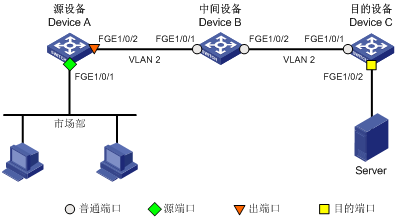
3. 配置步骤
(1) 配置Device C
# 配置端口FortyGigE1/0/1为Trunk口,并允许VLAN 2的报文通过。
<DeviceC> system-view
[DeviceC] interface fortygige 1/0/1
[DeviceC-FortyGigE1/0/1] port link-type trunk
[DeviceC-FortyGigE1/0/1] port trunk permit vlan 2
[DeviceC-FortyGigE1/0/1] quit
# 创建远程目的镜像组2。
[DeviceC] mirroring-group 2 remote-destination
# 创建VLAN 2作为远程镜像VLAN。
[DeviceC] vlan 2
[DeviceC-vlan2] quit
# 配置远程目的镜像组2的远程镜像VLAN为VLAN 2,目的端口为FortyGigE1/0/2,在该端口上关闭生成树协议并将其加入VLAN 2。
[DeviceC] mirroring-group 2 remote-probe vlan 2
[DeviceC] interface fortygige 1/0/2
[DeviceC-FortyGigE1/0/2] mirroring-group 2 monitor-port
[DeviceC-FortyGigE1/0/2] undo stp enable
[DeviceC-FortyGigE1/0/2] port access vlan 2
[DeviceC-FortyGigE1/0/2] quit
(2) 配置Device B
# 创建VLAN 2作为远程镜像VLAN。
<DeviceB> system-view
[DeviceB] vlan 2
[DeviceB-vlan2] quit
# 配置端口FortyGigE1/0/1为Trunk口,并允许VLAN 2的报文通过。
[DeviceB] interface fortygige 1/0/1
[DeviceB-FortyGigE1/0/1] port link-type trunk
[DeviceB-FortyGigE1/0/1] port trunk permit vlan 2
[DeviceB-FortyGigE1/0/1] quit
# 配置端口FortyGigE1/0/2为Trunk口,并允许VLAN 2的报文通过。
[DeviceB] interface fortygige 1/0/2
[DeviceB-FortyGigE1/0/2] port link-type trunk
[DeviceB-FortyGigE1/0/2] port trunk permit vlan 2
[DeviceB-FortyGigE1/0/2] quit
(3) 配置Device A
# 创建远程源镜像组1。
<DeviceA> system-view
[DeviceA] mirroring-group 1 remote-source
# 创建VLAN 2作为远程镜像VLAN。
[DeviceA] vlan 2
[DeviceA-vlan2] quit
# 配置远程源镜像组1的远程镜像VLAN为VLAN 2,源端口为FortyGigE1/0/1,出端口为FortyGigE1/0/2。
[DeviceA] mirroring-group 1 remote-probe vlan 2
[DeviceA] mirroring-group 1 mirroring-port fortygige 1/0/1 outbound
[DeviceA] mirroring-group 1 monitor-egress fortygige 1/0/2
# 配置端口FortyGigE1/0/2为Trunk口,允许VLAN 2的报文通过,并在该端口上关闭生成树协议。
[DeviceA] interface fortygige 1/0/2
[DeviceA-FortyGigE1/0/2] port link-type trunk
[DeviceA-FortyGigE1/0/2] port trunk permit vlan 2
[DeviceA-FortyGigE1/0/2] undo stp enable
[DeviceA-FortyGigE1/0/2] quit
4. 验证配置
# 显示Device C上所有镜像组的配置信息。
[DeviceC] display mirroring-group all
Mirroring group 2:
Type: Remote destination
Status: Active
Monitor port: FortyGigE1/0/2
Remote probe VLAN: 2
# 显示Device A上所有镜像组的配置信息。
[DeviceA] display mirroring-group all
Mirroring group 1:
Type: Remote source
Status: Active
Mirroring port:
FortyGigE1/0/1 Outbound
Remote probe VLAN: 2
配置完成后,用户可以通过Server监控所有从市场部发出的报文。
- 2025-12-05回答
- 评论(0)
- 举报
-
(0)
编辑答案


亲~登录后才可以操作哦!
确定你的邮箱还未认证,请认证邮箱或绑定手机后进行当前操作
举报
×
侵犯我的权益
×
侵犯了我企业的权益
×
- 1. 您举报的内容是什么?(请在邮件中列出您举报的内容和链接地址)
- 2. 您是谁?(身份证明材料,可以是身份证或护照等证件)
- 3. 是哪家企业?(营业执照,单位登记证明等证件)
- 4. 您与该企业的关系是?(您是企业法人或被授权人,需提供企业委托授权书)
抄袭了我的内容
×
原文链接或出处
诽谤我
×
- 1. 您举报的内容以及侵犯了您什么权益?(请在邮件中列出您举报的内容、链接地址,并给出简短的说明)
- 2. 您是谁?(身份证明材料,可以是身份证或护照等证件)
对根叔社区有害的内容
×
不规范转载
×
举报说明
暂无评论