
问题描述:
两台过保的s10510组了VRRP+MSTP。没有acl,单纯的办公网络,200个点。最近左边核心出现了,4-6台电脑丢包的现象。大部分正常。甚至丢包的电脑,拿网线直连左核心,ping左核心网关都丢包。检查过cpu空闲83%,arp条目稳定没有漂移,没有环路。log上面也没有硬件什么的报错。部分没有做vrrp的网关已经迁移到右核心,没有出现丢包的现象,业务都正常,用电脑直连右核心,长ping大包也是正常的。
神奇的现象还有,丢包的电脑连接核心,核心能正常学习到arp信息。丢包的电脑和不丢包的电脑接在同一个接入交换机下,丢包的电脑还是会丢包,正常的电脑依然正常。丢包的电脑和正常的电脑轮流接同一个接口,丢包的依然丢包,不丢包的依然不丢包。
有没有大佬能提供下思路。已经不知道怎么排查了,难道要重启核心么。
组网及组网描述:
两台s10510做VRRP+MSTP。下接各个楼层的接入交换机,接入两根光纤一左一右分别接两台核心。
- 2026-01-04提问
- 举报
-
(0)
最佳答案

ping业务测试,不要ping网关
交换机机制导致ping网关可能会丢包的。
流量统计:
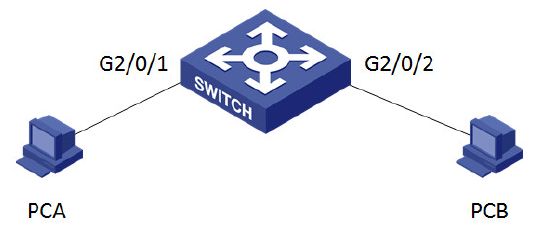
流量统计典型配置
流量统计就是通过与类关联,对符合匹配规则的流进行统计,统计报文数或字节数。是排查丢包和不
通类问题的手段。例如,可以统计从某个源IP地址发送的报文,然后管理员对统计信息进行分析,根
据分析情况采取相应的措施。
如图所示组网,PCA访问PCB web业务无法访问成功,怀疑网络中存在丢包,使用流量统计,确认丢
包位置。在大型网络中通过流量统计也可以缩小故障范围。PCA的IP为1.1.1.1,PCB的IP为2.2.2.2。
定义acl,匹配PCA访问PCB的流量计,在做流量统计时应尽量保证匹配的情况精确,避免抓取到其他
业务流量,使流量统计不准确。
[H3C]acl number 3333
[H3C-acl-adv-3333]description traffic accounting for host A to host B
[H3C-acl-adv-3333]rule 10 permit tcp source 1.1.1.1 0.0.0.0 destination 2.2.2.2 0.0.0.0 destin
ation-port eq 80
定义流分类,匹配acl定义的PCA访问PCB的web流量。
[H3C]traffic classifier traffic_accounting_from_A_to_B
[H3C-classifier-traffic_accounting_from_A_to_B]if-match acl 3333
定义流行为,统计报文个数
[H3C]traffic behavior traffic_accounting_from_A_to_B
[H3C-behavior-traffic_accounting_from_A_to_B]accounting packet
定义qos策略,关联流分类和流行为
[H3C]qos policy traffic_accounting_from_A_to_B
[H3C-qospolicy-traffic_accounting_from_A_to_B]classifier traffic_accounting_from_A_to_B be
havior traffic_accounting_from_A_to_B
在2/0/1的入方向和2/0/2的出访问下发qos策略,来统计报文是否到达设备和是否被设备转发给PCB
。
[H3C]interface GigabitEthernet2/0/1
[H3C-GigabitEthernet2/0/1]qos apply policy traffic_accounting_from_A_to_B inbound
[H3C]interface GigabitEthernet2/0/2
[H3C-GigabitEthernet2/0/2]qos apply policy traffic_accounting_from_A_to_B outbound
使PCA访问PCB,查看接口GigabitEthernet2/0/1流量统计结果
[H3C]display qos policy interface GigabitEthernet 2/0/1
Interface: GigabitEthernet2/0/1
Direction: Inbound
Policy: traffic_accounting_from_A_to_B
Classifier: traffic_accounting_from_A_to_B
Operator: AND
Rule(s) : If-match acl 3333
Behavior: traffic_accounting_from_A_to_B
Accounting Enable:
5 (Packets)
根据结果看出有5个报文进行交换机。查看接口GigabitEthernet2/0/2流量统计结果
[H3C]display qos policy interface GigabitEthernet 2/0/2
Interface: GigabitEthernet2/0/2
Direction: Outbound
Policy: traffic_accounting_from_A_to_B
Classifier: traffic_accounting_from_A_to_B
Operator: AND
Rule(s) : If-match acl 3333
Behavior: traffic_accounting_from_A_to_B
Accounting Enable:
5 (Packets)
有5个报文从交换机发出,说明从A到B转发正常。
使用相同方式对反方向做流量统计,同时查看结果。
[H3C]acl number 3334
[H3C-acl-adv-3334]description traffic accounting for host B to host A
[H3C-acl-adv-3334]rule 10 permit tcp source 2.2.2.2 0.0.0.0 source-port eq 80 destination 1.
1.1.1 0.0.0.0
定义流分类,匹配acl定义的PCA访问PCB的web流量。
[H3C]traffic classifier traffic_accounting_from_B_to_A
[H3C-classifier-traffic_accounting_from_B_to_A]if-match acl 3334
定义流行为,统计报文个数
[H3C]traffic behavior traffic_accounting_from_B_to_A
[H3C-behavior-traffic_accounting_from_B_to_A]accounting packet
定义qos策略,关联流分类和流行为
[H3C]qos policy traffic_accounting_from_B_to_A
[H3C-qospolicy-traffic_accounting_from_B_to_A]classifier traffic_accounting_from_B_to_A be
havior traffic_accounting_from_B_to_A
在2/0/2的入方向和2/0/1的出访问下发qos策略,来统计报文是否到达设备和是否被设备转发给PCB
。
[H3C]interface GigabitEthernet2/0/1
[H3C-GigabitEthernet2/0/1]qos apply policy traffic_accounting_from_B_to_A outbound
[H3C]interface GigabitEthernet2/0/2
[H3C-GigabitEthernet2/0/2]qos apply policy traffic_accounting_from_B_to_A inbound
使用display qos policy interface查看流量统计结果
[H3C]display qos policy interface GigabitEthernet 2/0/1
Interface: GigabitEthernet2/0/1
Direction: Outbound
Policy: traffic_accounting_from_B_to_A
Classifier: traffic_accounting_from_B_to_A
Operator: AND
Rule(s) : If-match acl 3334
Behavior: traffic_accounting_from_B_to_A
Accounting Enable:
5 (Packets)
[H3C]display qos policy interface GigabitEthernet 2/0/2
Interface: GigabitEthernet2/0/2
Direction: Inbound
Policy: traffic_accounting_from_B_to_A
Classifier: traffic_accounting_from_B_to_A
Operator: AND
Rule(s) : If-match acl 3334
Behavior: traffic_accounting_from_B_to_A
Accounting Enable:
5 (Packets)
通过以上结果可以看出交换机反向转发正常,在交换机上没有丢包。
关键配置如下
acl number 3333
description traffic accounting for host A to host B
rule 10 permit tcp source 1.1.1.1 0 destination 2.2.2.2 0 destination-port eq www
acl number 3334
description traffic accounting for host B to host A
rule 10 permit tcp source 2.2.2.2 0 source-port eq www destination 1.1.1.1 0
#
traffic classifier traffic_accounting_from_A_to_B operator and
if-match acl 3333
traffic classifier traffic_accounting_from_B_to_A operator and
if-match acl 3334
#
traffic behavior traffic_accounting_from_A_to_B
accounting packet
traffic behavior traffic_accounting_from_B_to_A
accounting packet
#
qos policy traffic_accounting_from_A_to_B
classifier traffic_accounting_from_A_to_B behavior traffic_accounting_from_A_to_B
qos policy traffic_accounting_from_B_to_A
classifier traffic_accounting_from_B_to_A behavior traffic_accounting_from_B_to_A
#
interface GigabitEthernet2/0/1
qos apply policy traffic_accounting_from_A_to_B inbound
qos apply policy traffic_accounting_from_B_to_A outbound
#
interface GigabitEthernet2/0/2
qos apply policy traffic_accounting_from_B_to_A inbound
qos apply policy traffic_accounting_from_A_to_B outbound
注意事项
1、对匹配的流量计一定要尽量精确,避免其他流量影响统计结果。
2、注意流量双向性和qos策略下发的方向要正确下发。
- 2026-01-04回答
- 评论(5)
- 举报
-
(0)

有可能是这个问题:
ASIC / 转发表(L2/L3 TCAM)部分异常(最高概率)
重启下试试看看,不行只能换新设备
- 2026-01-04回答
- 评论(2)
- 举报
-
(0)
把核心重启了。然后就好了。目前为止没有异常,想请教下,这个现象会复现吗?还是偶发的。有点担心这个

您好,排查优先级排序
- 替换正常终端测试 → 排除终端自身问题
- 检查左核心端口错误统计 + 硬件 ARP 表 → 定位转发硬件故障
- 重置左核心端口 / 单板 → 无损修复表项同步问题
- 业务低谷期重启左核心 → 解决隐性系统 / 硬件故障
- 2026-01-04回答
- 评论(0)
- 举报
-
(0)

不要ping设备,交换机有ping保护机制,icmp包会存在丢弃情况,ping经过交换机的设备如果怀疑是丢包在交换机上,那么就通过流量统计来排查定位问题,确认好故障设备之后再具体查看
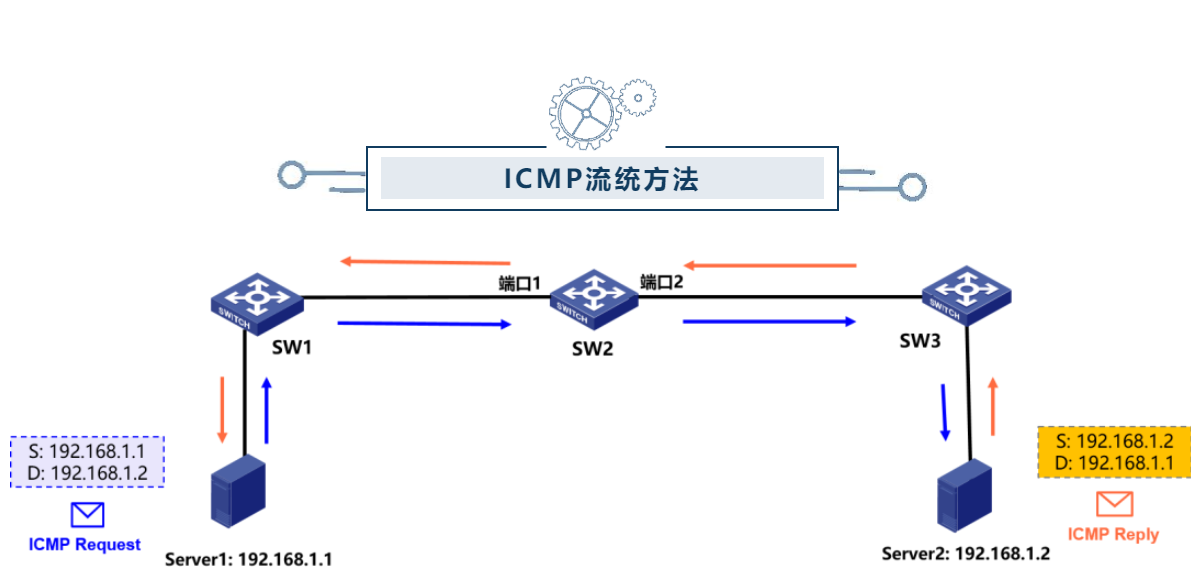
假如Server 1 (IP=192.168.1.1) 主动Ping往Server 2 (IP=192.168.1.2),那么ICMP Request报文从SW 2的端口1进入、端口2发出。反之同理。这里我们以ICMP Request报文流量走向举例,确认是否存在丢包:
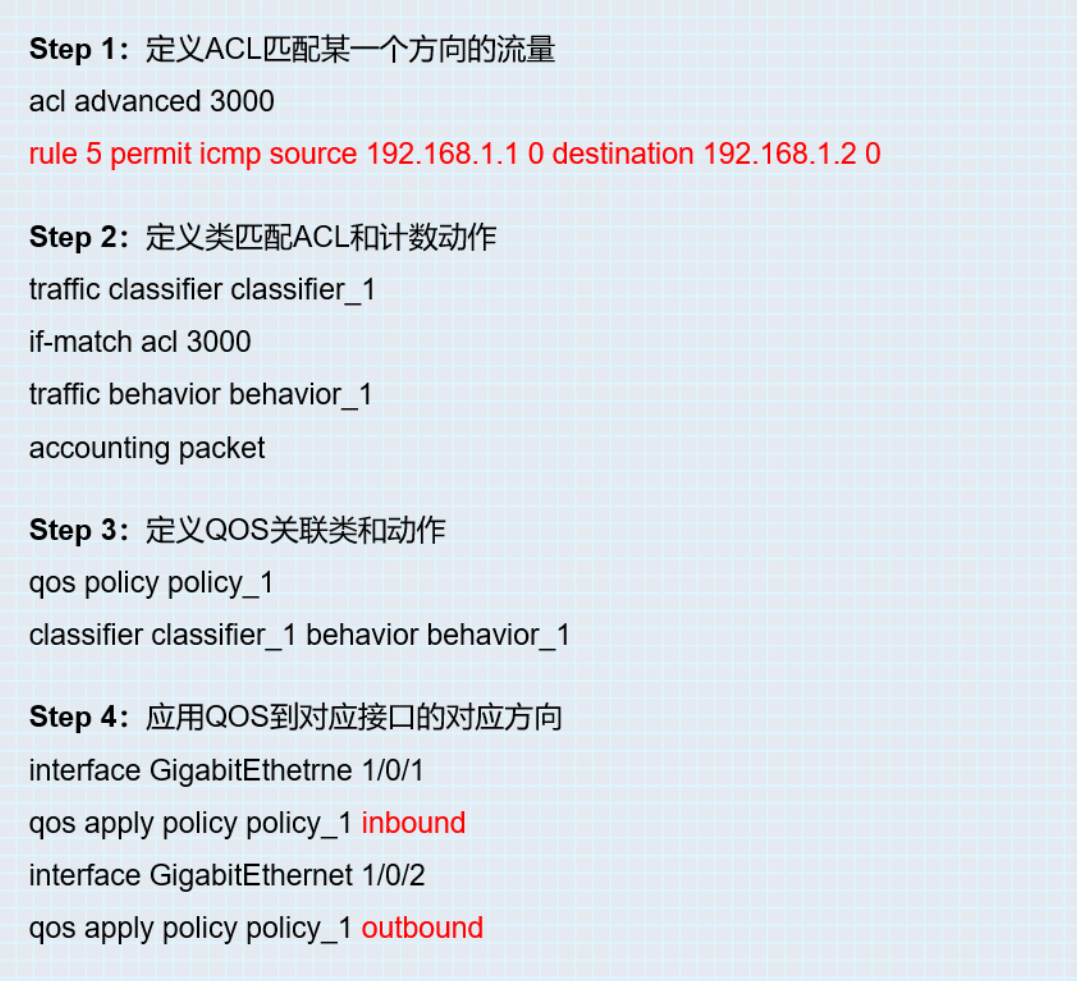
第一步:定义ACL匹配源IP为192.168.1.1、目的IP为192.168.1.2的ICMP Request报文。
第二步:创建名为classifier_1的流分类,匹配数据包的规则ACL 3000。再创建名为behavior_1的流行为,定义流统计动作accounting packet。
第三步:创建一个名为policy_1的策略,将流分类和流行为关联。
第四步:将QOS策略应用到端口1的入方向和端口2的出方向。
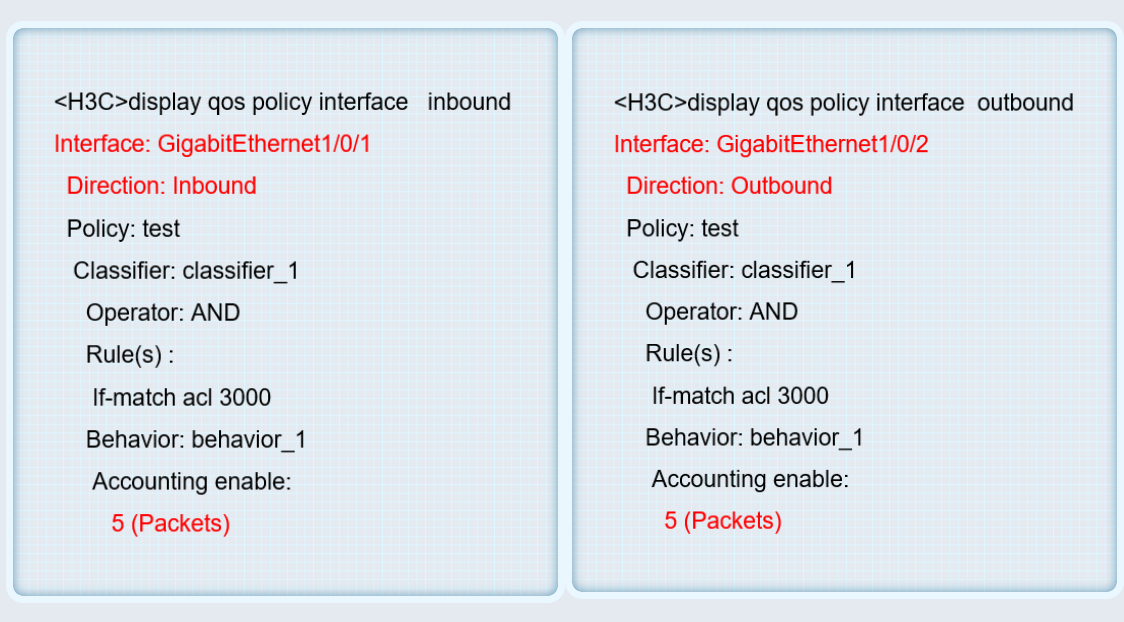
第五步:通过display qos policy interface inbound/outbound命令查看流统结果,图中端口1的inbound方向收到了5个ICMP Request报文,端口2的outbound方向发出了5个ICMP Request报文,由此说明SW 2并没有丢弃ICMP Request报文哦!
此外,可以通过reset counters interface命令来清除接口计数,清除后可以再次进行Ping测试和流统哦!
- 2026-01-04回答
- 评论(4)
- 举报
-
(0)
如果你是ping经过交换机后的设备不丢包,ping交换机丢包那么可能是ping保护机制,你流统也是测试过交换机的吧,流统不能用来看本机包,看本机是抓包
做过流通,大概结果是电脑发10个包,核心10个包都收不全
如果接口入方向就已经收不到那可以看下接口是否被阻塞了,dis stp brief,dis inter GXXX看看接口是否打满等等,之后就是看这一条路的设备一个个判定
如果你是ping经过交换机后的设备不丢包,ping交换机丢包那么可能是ping保护机制,你流统也是测试过交换机的吧,流统不能用来看本机包,看本机是抓包


会不会是终端问题呢 你把丢包的电脑IP 配置到不丢包的电脑上看看
- 2026-01-04回答
- 评论(1)
- 举报
-
(0)
做过测试,ip换了后,还是会丢包,不丢包的电脑还是正常的
做过测试,ip换了后,还是会丢包,不丢包的电脑还是正常的


编辑答案


亲~登录后才可以操作哦!
确定你的邮箱还未认证,请认证邮箱或绑定手机后进行当前操作
举报
×
侵犯我的权益
×
侵犯了我企业的权益
×
- 1. 您举报的内容是什么?(请在邮件中列出您举报的内容和链接地址)
- 2. 您是谁?(身份证明材料,可以是身份证或护照等证件)
- 3. 是哪家企业?(营业执照,单位登记证明等证件)
- 4. 您与该企业的关系是?(您是企业法人或被授权人,需提供企业委托授权书)
抄袭了我的内容
×
原文链接或出处
诽谤我
×
- 1. 您举报的内容以及侵犯了您什么权益?(请在邮件中列出您举报的内容、链接地址,并给出简短的说明)
- 2. 您是谁?(身份证明材料,可以是身份证或护照等证件)
对根叔社区有害的内容
×
不规范转载
×
举报说明
这个怎么看丢在哪,因为电脑直连的左核心,电脑网卡和网线排查过是正常的,但是核心收到的包确实就少很多