问
MSR830如何通过互联网远程管理
2026-01-23提问
- 0关注
- 0收藏,1607浏览

最佳答案


有公网IP就可以。
一、准备工作(必须完成)
1. 确认当前网络结构
互联网 ←→ 光猫 ←→ MSR830 ←→ 内部网络- MSR830如果是直接拨号,通常有公网IP
- MSR830如果接在光猫后面,可能是私网IP,需要端口映射
2. 获取MSR830的WAN口IP地址
# 在路由器上执行
display ip interface brief
查看连接到互联网的接口(通常是G0/0或WAN口)的IP地址。
二、方法一:通过Web界面远程管理(推荐)
步骤1:启用HTTP/HTTPS服务
# 进入系统视图
system-view

# 启用HTTP服务(默认端口80)
ip http enable

# 启用HTTPS服务(推荐,默认端口443,更安全)
ip https enable

# 创建SSL策略(如需)
ssl server-policy default_policy
rsa local-key-pair create

# 为HTTPS创建本地证书
pki domain default
public-key rsa general name default_key
quit
步骤2:配置远程登录权限
# 创建本地用户
local-user admin
password simple 你的密码
service-type http https ssh terminal
authorization-attribute user-role network-admin
quit

# 设置Web服务参数
ip http acl 2000  # 可选,用于限制访问源
步骤3:配置安全策略
# 创建ACL允许远程访问
acl number 3000
rule 5 permit tcp destination-port eq www
rule 10 permit tcp destination-port eq 443
rule 15 permit tcp destination-port eq 22
quit

# 在接口上应用(假设WAN口是GigabitEthernet0/0)
interface GigabitEthernet0/0
firewall packet-filter 3000 inbound
quit
三、方法二:通过SSH远程管理(最安全)
步骤1:配置SSH服务
# 生成RSA密钥对
rsa local-key-pair create

# 启用SSH服务
stelnet server enable
ssh server enable

# 设置SSH用户认证
user-interface vty 0 4
authentication-mode scheme
protocol inbound ssh
user-role network-admin
quit

# 设置SSH版本(推荐使用SSH2)
ssh server compatible-ssh1x disable
ssh server authentication-retries 3
ssh server timeout 60
步骤2:修改SSH端口(可选,增强安全性)
# 将SSH端口改为非默认的2222
ssh server port 2222
四、方法三:通过VPN远程管理(最安全,推荐)
配置L2TP over IPSec VPN
# 1. 配置IPSec提议
ipsec proposal 1
esp encryption-algorithm aes-cbc-256
esp authentication-algorithm sha1
quit

# 2. 配置IKE对等体
ike peer peer1
pre-shared-key simple 你的预共享密钥
quit

# 3. 配置IPSec策略
ipsec policy policy1 1 isakmp
security acl 3001
ike-peer peer1
proposal 1
quit

# 4. 配置L2TP
l2tp enable
l2tp-group 1
allow l2tp virtual-template 1 remote 路由器名称
tunnel authentication
tunnel password simple 隧道密码
quit

# 5. 创建虚拟模板
interface virtual-template 1
ppp authentication-mode pap
ppp ipcp dns 8.8.8.8
ip address 192.168.100.1 255.255.255.0
remote address pool 1
quit

# 6. 创建地址池
ip pool 1
network 192.168.100.0 mask 255.255.255.0
gateway-list 192.168.100.1
quit
五、如果MSR830在NAT后(无公网IP)
配置端口映射(在光猫或上级设备上)
外部端口: 8443 → 内部IP: MSR830的LAN IP → 内部端口: 443
外部端口: 2222 → 内部IP: MSR830的LAN IP → 内部端口: 22
在MSR830上配置:
# 确保MSR830有固定LAN IP
interface GigabitEthernet0/1
ip address 192.168.1.1 255.255.255.0
nat server protocol tcp global 光猫公网IP 8443 inside 192.168.1.1 443
nat server protocol tcp global 光猫公网IP 2222 inside 192.168.1.1 22
quit
六、完整配置示例
基础远程管理配置脚本
system-view
sysname MSR830-Router

# 1. 基础网络配置
interface GigabitEthernet0/0
 description WAN-Interface
 ip address dhcp-alloc
 nat outbound
 quit

interface GigabitEthernet0/1
 description LAN-Interface
 ip address 192.168.1.1 255.255.255.0
 quit

# 2. 创建管理用户
local-user admin
 password irreversible-cipher 你的强密码
 service-type http https ssh terminal
 authorization-attribute user-role network-admin
 level 3
 quit

local-user viewonly
 password irreversible-cipher 只读密码
 service-type http https ssh terminal
 authorization-attribute user-role network-operator
 quit

# 3. 启用管理服务
ip http enable
ip https enable
stelnet server enable
ssh server enable
ssh server port 2222
telnet server enable  # 不推荐,仅备用

# 4. 配置ACL限制访问
acl advanced 3000
 rule 5 permit tcp destination-port eq 2222
 rule 10 permit tcp destination-port eq www
 rule 15 permit tcp destination-port eq 443
 rule 20 permit tcp destination-port eq telnet
 rule 100 deny ip
 quit

# 5. 应用ACL到WAN口
interface GigabitEthernet0/0
 firewall packet-filter 3000 inbound
 quit

# 6. 配置VTY线路
user-interface vty 0 4
 authentication-mode scheme
 protocol inbound all
 user-role network-admin
 idle-timeout 10
 quit

# 7. 保存配置
save force
七、远程连接方法
1. Web管理
地址:https://公网IP地址:443
或: https://公网IP地址:8443(如果修改了端口)
2. SSH连接
# Windows使用PuTTY,Mac/Linux使用终端
ssh admin@公网IP地址 -p 2222
3. VPN连接后管理
- 先建立VPN连接
- 然后在浏览器访问:https://192.168.100.1
八、安全建议
1. 必须做的安全措施
# 修改默认密码
local-user admin
 password irreversible-cipher 新强密码
 quit

# 禁用不必要服务
undo ip http enable  # 如果只用HTTPS
undo telnet server enable  # 禁用Telnet

# 限制访问源IP
acl number 2000
 rule 5 permit source 你的固定公网IP 0
 rule 10 deny
 quit
ip https acl 2000
ssh server acl 2000
2. 启用日志记录
info-center enable
info-center loghost 192.168.1.100
3. 定期检查
# 查看当前登录用户
display users

# 查看登录日志
display logbuffer

# 查看攻击防御
display firewall-statistics
九、故障排查
1. 无法连接检查清单
- ✅ 检查MSR830的WAN口是否获得公网IP
- ✅ 检查光猫/防火墙是否放行端口
- ✅ 检查MSR830的ACL是否允许访问
- ✅ 检查用户名密码是否正确
- ✅ 检查服务是否已启用(
display ip http/display ssh server status)
2. 常用诊断命令
# 检查接口状态
display interface brief

# 检查NAT会话
display nat session

# 测试连通性
ping 公网测试IP

# 查看当前配置
display current-configuration
十、重要提醒
- 安全第一:务必修改默认密码,使用强密码
- 最小化开放:只开放必要的端口和服务
- VPN优先:尽量通过VPN连接后再管理,最安全
- 备份配置:远程修改前先备份当前配置
- 测试验证:先在局域网内测试,再开放到公网
- 定期更新:关注华三官网,及时更新固件修复漏洞
如果遇到具体问题,可以提供以下信息以便进一步帮助:
- 当前网络拓扑
- MSR830的软件版本(
display version) - 具体的错误提示
- 你已经尝试过的步骤
- 2026-01-23回答
- 评论(0)
- 举报
-
(0)


什么都不会的网络工程师
七段
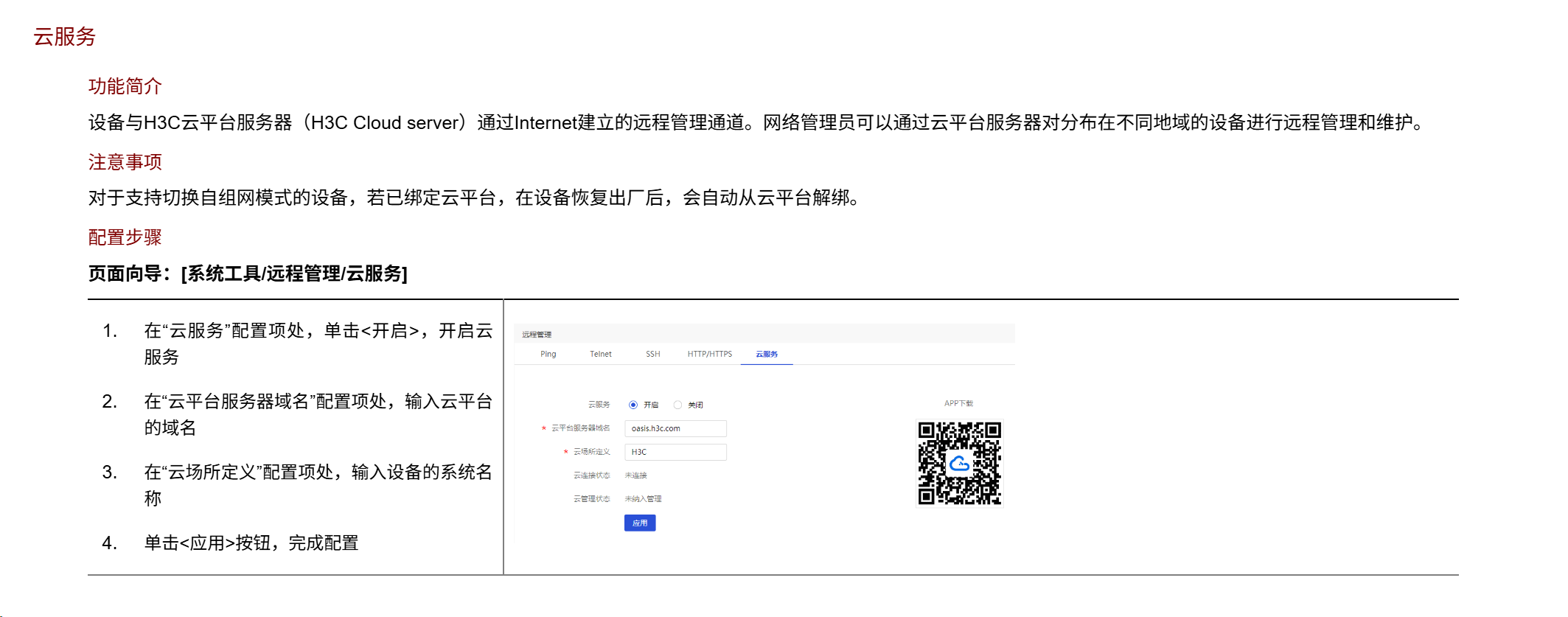
你可以看一下有没有云服务,有的话,就可以远程管理
如果没有的话你就只能使用公网地址远程访问(前提你有公网地址)
能使用公网地址远程访问还是不要用云服务,有的功能不全,
- 2026-01-23回答
- 评论(0)
- 举报
-
(0)
暂无评论

编辑答案
➤


✖
亲~登录后才可以操作哦!
确定
✖
✖
你的邮箱还未认证,请认证邮箱或绑定手机后进行当前操作
✖
举报
×
侵犯我的权益
>
对根叔社区有害的内容
>
辱骂、歧视、挑衅等(不友善)
侵犯我的权益
×
侵犯了我企业的权益
>
抄袭了我的内容
>
诽谤我
>
辱骂、歧视、挑衅等(不友善)
骚扰我
侵犯了我企业的权益
×
您好,当您发现根叔知了上有关于您企业的造谣与诽谤、商业侵权等内容时,您可以向根叔知了进行举报。 请您把以下内容通过邮件发送到 pub.zhiliao@h3c.com 邮箱,我们会在审核后尽快给您答复。
- 1. 您举报的内容是什么?(请在邮件中列出您举报的内容和链接地址)
- 2. 您是谁?(身份证明材料,可以是身份证或护照等证件)
- 3. 是哪家企业?(营业执照,单位登记证明等证件)
- 4. 您与该企业的关系是?(您是企业法人或被授权人,需提供企业委托授权书)
我们认为知名企业应该坦然接受公众讨论,对于答案中不准确的部分,我们欢迎您以正式或非正式身份在根叔知了上进行澄清。
抄袭了我的内容
×
原文链接或出处
诽谤我
×
您好,当您发现根叔知了上有诽谤您的内容时,您可以向根叔知了进行举报。 请您把以下内容通过邮件发送到pub.zhiliao@h3c.com 邮箱,我们会尽快处理。
- 1. 您举报的内容以及侵犯了您什么权益?(请在邮件中列出您举报的内容、链接地址,并给出简短的说明)
- 2. 您是谁?(身份证明材料,可以是身份证或护照等证件)
我们认为知名企业应该坦然接受公众讨论,对于答案中不准确的部分,我们欢迎您以正式或非正式身份在根叔知了上进行澄清。
对根叔社区有害的内容
×
垃圾广告信息
色情、暴力、血腥等违反法律法规的内容
政治敏感
不规范转载
>
辱骂、歧视、挑衅等(不友善)
骚扰我
诱导投票
不规范转载
×
举报说明
暂无评论