P3500 vlan 下发
- 0关注
- 0收藏,937浏览

问题描述:
已知ONU的SN码,需要给部分ONU下发vlan60 需要在OLT上创建vlan60 放通所有接口,怎么配置?
组网及组网描述:
核心---OLT---分光器----ONU
- 2026-04-06提问
- 举报
-
(0)
最佳答案


创建vlan,并且将trunk/xge口加入VLAN
# 创建vlan31、32、33、34、44:
P3600# configure l2 vlan vid 31 name 31
P3600# configure l2 vlan vid 32 name 32
P3600# configure l2 vlan vid 33 name 33
P3600# configure l2 vlan vid 34 name 34
P3600# configure l2 vlan vid 44 name 44
如果不配置聚合口的话,只需要配置xge口通过vlan,也就是配交换机的trunk vlan permit vlan 31 32 33 34 44,将报文带tag下放到olt上,同时核心也要配trunk permit vlan 31 32 33 34 44。相当于放通vlan31-34
P3600# configure l2 vlan interface xge 1 vid 31 tag
P3600# configure l2 vlan interface xge 1 vid 32 tag
P3600# configure l2 vlan interface xge 1 vid 33 tag
P3600# configure l2 vlan interface xge 1 vid 34 tag
P3600# configure l2 vlan interface xge 1 vid 44 tag
ONU类型 | UNI端口 | 业务 | VLAN | Vport端口映射 |
ET908-H-PQ | uni1~uni5 | 多媒体设备PC | 31 | vport 1 |
uni6 | 广播 | 32 | vport 2 | |
uni7 | 监控 | 33 | vport 3 | |
uni8 | 无线网络AP | 业务vlan34 | vport 4 | |
管理vlan44 | vport 5 |
# 创建5条flow模板映射vlan和vport端口:
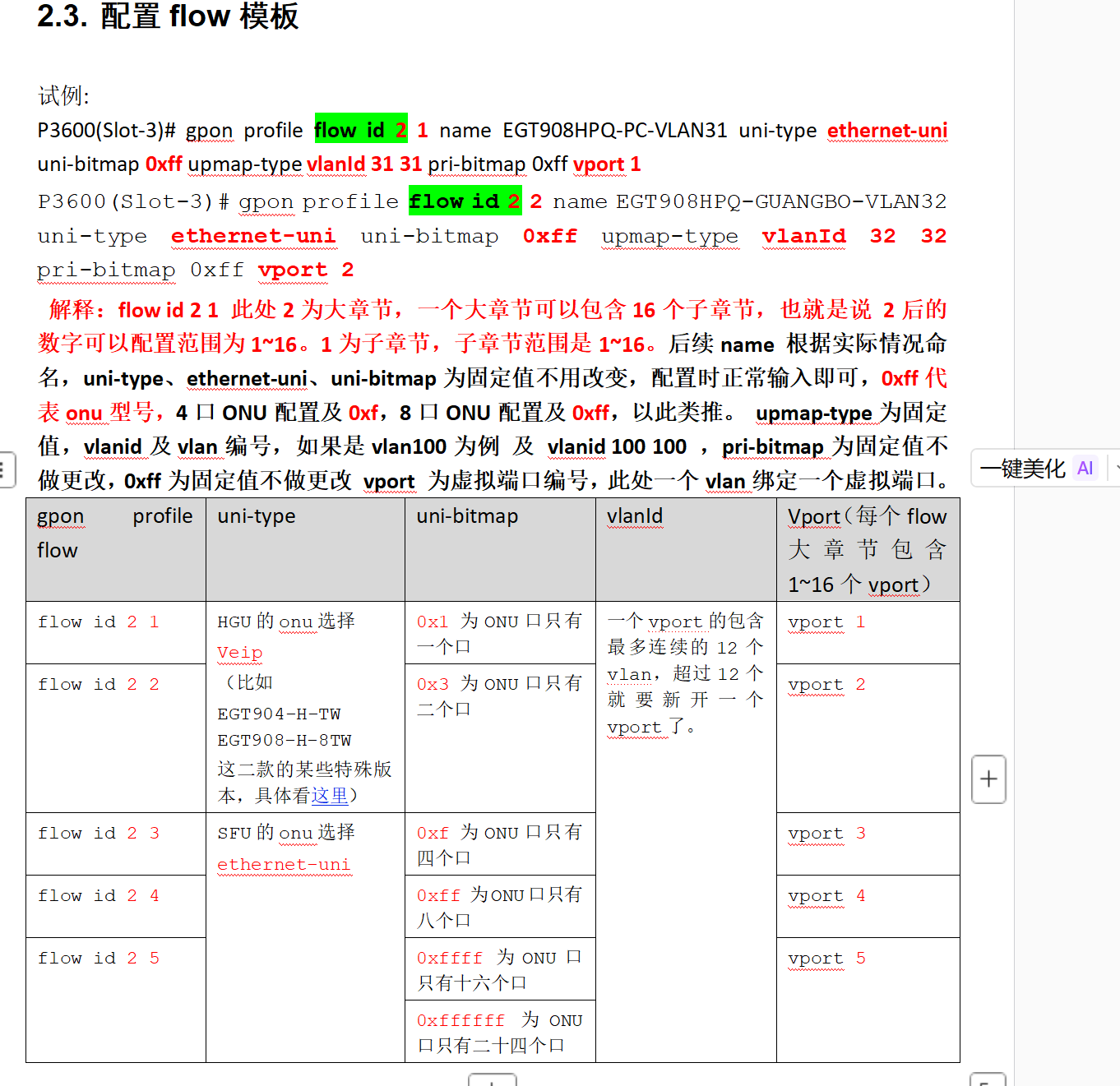
P3600(Slot-3)# gpon profile flow id 2 1 name EGT908HPQ-PC-VLAN31 uni-type ethernet-uni uni-bitmap 0xff upmap-type vlanId 31 31 pri-bitmap 0xff vport 1
P3600(Slot-3)# gpon profile flow id 2 2 name EGT908HPQ-GUANGBO-VLAN32 uni-type ethernet-uni uni-bitmap 0xff upmap-type vlanId 32 32 pri-bitmap 0xff vport 2
P3600(Slot-3)# gpon profile flow id 2 3 name EGT908HPQ-JIANKONG-VLAN33 uni-type ethernet-uni uni-bitmap 0xff upmap-type vlanId 33 33 pri-bitmap 0xff vport 3
P3600(Slot-3)# gpon profile flow id 2 4 name EGT908HPQ-AP-YEWU-VLAN34 uni-type ethernet-uni uni-bitmap 0xff upmap-type vlanId 34 34 pri-bitmap 0xff vport 4
P3600(Slot-3)# gpon profile flow id 2 5 name EGT908HPQ-AP-GUANLI-VLAN44 uni-type ethernet-uni uni-bitmap 0xff upmap-type vlanId 44 44 pri-bitmap 0xff vport 5
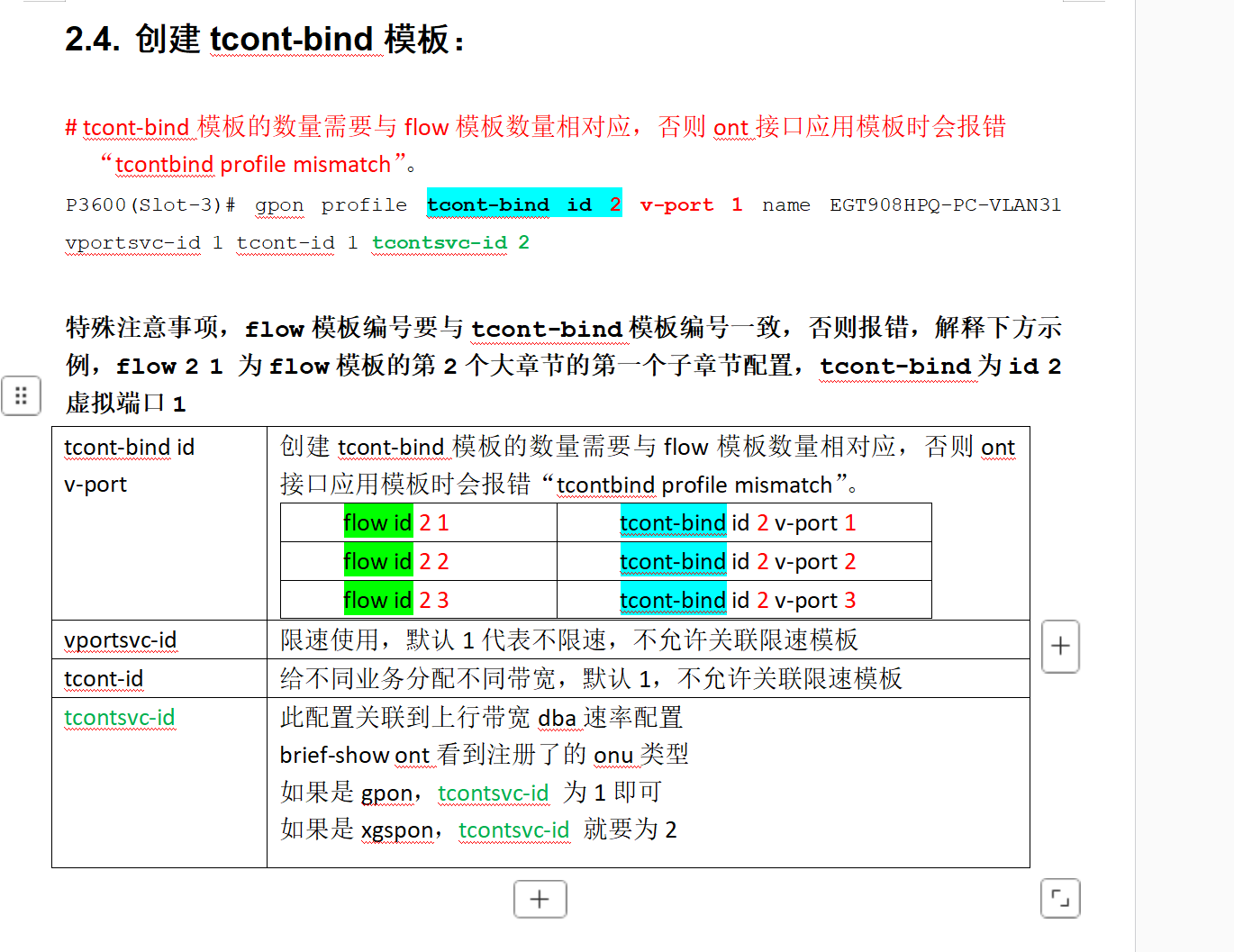
创建tcony-bind模板
P3600(Slot-3)# gpon profile tcont-bind id 2 v-port 1 name EGT908HPQ-PC-VLAN31 vportsvc-id 1 tcont-id 1 tcontsvc-id 2
P3600(Slot-3)# gpon profile tcont-bind id 2 v-port 2 name EGT908HPQ-GUANGBO-VLAN32 vportsvc-id 1 tcont-id 1 tcontsvc-id 2
P3600(Slot-3)# gpon profile tcont-bind id 2 v-port 3 name EGT908HPQ-JIANKONG-VLAN33 vportsvc-id 1 tcont-id 1 tcontsvc-id 2
P3600(Slot-3)# gpon profile tcont-bind id 2 v-port 4 name EGT908HPQ-AP-YEWU-VLAN34 vportsvc-id 1 tcont-id 1 tcontsvc-id 2
P3600(Slot-3)# gpon profile tcont-bind id 2 v-port 5 name EGT908HPQ-AP-GUANLI-VLAN44 vportsvc-id 1 tcont-id 1 tcontsvc-id 2
配置ONT口
ont接口下创建virtual-port端口
# 进入ont接口视图
P3600(Slot-3)# interface gpon-olt 1/4
P3600(Slot-3/if-gpon-olt-1/4)# ont 1
P3600(Slot-3/if-gpon-olt-1/4/1)#
# ET908-H-PQ注册在slot 3的pon 4口的ont 1接口,创建5个vport口
P3600(Slot-3/if-gpon-olt-1/4/1)# virtual-port 1 encrypt disable
P3600(Slot-3/if-gpon-olt-1/4/1)# virtual-port 2 encrypt disable
P3600(Slot-3/if-gpon-olt-1/4/1)# virtual-port 3 encrypt disable
P3600(Slot-3/if-gpon-olt-1/4/1)# virtual-port 4 encrypt disable
P3600(Slot-3/if-gpon-olt-1/4/1)# virtual-port 5 encrypt disable
应用业务模板
P3600(Slot-3/if-gpon-olt-1/4/1)# service flow-profile 2 tcont-bind-profile 2 svc_type n_p
配置uni口的pvid vlan(配置下行口电口的pvid逻辑)
# port-vlan和ont-vlan不可混用,配置VLAN模式只推荐使用port-vlan,其他方法一律不推荐。
P3600(Slot-3/if-gpon-olt-1/4/1)# port-vlan 1 downstream inverse-upstream intpid 0x8100 outtpid 0x8100
P3600(Slot-3/if-gpon-olt-1/4/1)# port-vlan 1 rule 1 untag add-vid inner-pri 0 inner-vid 31
P3600(Slot-3/if-gpon-olt-1/4/1)# port-vlan 2 downstream inverse-upstream intpid 0x8100 outtpid 0x8100
P3600(Slot-3/if-gpon-olt-1/4/1)# port-vlan 2 rule 1 untag add-vid inner-pri 0 inner-vid 31
P3600(Slot-3/if-gpon-olt-1/4/1)# port-vlan 3 downstream inverse-upstream intpid 0x8100 outtpid 0x8100
P3600(Slot-3/if-gpon-olt-1/4/1)# port-vlan 3 rule 1 untag add-vid inner-pri 0 inner-vid 31
P3600(Slot-3/if-gpon-olt-1/4/1)# port-vlan 4 downstream inverse-upstream intpid 0x8100 outtpid 0x8100
P3600(Slot-3/if-gpon-olt-1/4/1)# port-vlan 4 rule 1 untag add-vid inner-pri 0 inner-vid 31
P3600(Slot-3/if-gpon-olt-1/4/1)# port-vlan 5 downstream inverse-upstream intpid 0x8100 outtpid 0x8100
P3600(Slot-3/if-gpon-olt-1/4/1)# port-vlan 5 rule 1 untag add-vid inner-pri 0 inner-vid 31
P3600(Slot-3/if-gpon-olt-1/4/1)# port-vlan 6 downstream inverse-upstream intpid 0x8100 outtpid 0x8100
P3600(Slot-3/if-gpon-olt-1/4/1)# port-vlan 6 rule 1 untag add-vid inner-pri 0 inner-vid 32
P3600(Slot-3/if-gpon-olt-1/4/1)# port-vlan 7 downstream inverse-upstream intpid 0x8100 outtpid 0x8100
P3600(Slot-3/if-gpon-olt-1/4/1)# port-vlan 7 rule 1 untag add-vid inner-pri 0 inner-vid 33
# 下面的uni 8 口为接ap口的配置
P3600(Slot-3/if-gpon-olt-1/4/1)# port-vlan 8 downstream inverse-upstream intpid 0x8100 outtpid 0x8100
P3600(Slot-3/if-gpon-olt-1/4/1)# port-vlan 8 rule 1 untag add-vid inner-pri 0 inner-vid 44
P3600(Slot-3/if-gpon-olt-1/4/1)# port-vlan 8 rule 2 single-tag transparent
P3600# configure l2 vlan translate slot 3 port 4 ont 1 virtual-port 1 svid 31 new-svid 31
P3600# configure l2 vlan translate slot 3 port 4 ont 1 virtual-port 2 svid 32 new-svid 32
P3600# configure l2 vlan translate slot 3 port 4 ont 1 virtual-port 3 svid 33 new-svid 33
P3600# configure l2 vlan translate slot 3 port 4 ont 1 virtual-port 4 svid 34 new-svid 34
P3600# configure l2 vlan translate slot 3 port 4 ont 1 virtual-port 5 svid 44 new-svid 44
你参考下这个
补充下flow模板和t-cont模板的一些详解:
- 2026-04-07回答
- 评论(0)
- 举报
-
(0)


在H3C OLT上配置VLAN 60并放通所有接口,需结合ONU绑定与端口配置操作,具体步骤如下:
创建VLAN 60
在OLT全局视图下创建业务VLAN:system-view
[OLT] vlan 60
[OLT-vlan60] quit放通VLAN 60到所有OLT接口
在OLT的上联口(连接汇聚/核心交换机)和所有PON口(如Olt1/0/4)放通该VLAN:[OLT] interface Olt 1/0/4
[OLT-Olt1/0/4] port link-type hybrid
[OLT-Olt1/0/4] port hybrid vlan 60 tagged // 允许VLAN 60带标签通过
[OLT-Olt1/0/4] quit为指定ONU下发VLAN 60
基于ONU的SN码绑定并配置VLAN 60到其UNI口:[OLT] interface Onu 1/0/4:1
[OLT-Onu1/0/4:1] bind onu-id xxxx-xxxx-xxxx // 替换为ONU实际SN
[OLT-Onu1/0/4:1] uni 1 vlan-mode tag pvid 60 // 指定UNI口PVID为60
[OLT-Onu1/0/4:1] port link-type trunk
[OLT-Onu1/0/4:1] port trunk permit vlan 60 // 放通VLAN 60
[OLT-Onu1/0/4:1] quit验证配置
关键点说明
- 2026-04-06回答
- 评论(1)
- 举报
-
(0)
你发的这些这个olt 完全不支持,这个版本命令是 show brief-show
你发的这些这个olt 完全不支持,这个版本命令是 show brief-show


首先,通过Console口或SSH登录到OLT的命令行界面,然后按以下步骤操作:
1. 创建VLAN 60
2. 放通所有接口
配置上联口(连接核心交换机):假设上联口为
gigabitethernet 1/0/1。port link-type trunkinterface gigabitethernet 1/0/1- port trunk permit vlan all
- quit
- 配置PON口(连接分光器):PON口的配置理念类似,但命令格式可能不同。一个关键点在于,业务VLAN(60)需要在上联口和PON口都放通,才能在网络中传输。将PON口设置为透传VLAN的Hybrid模式,并将VLAN 60加入放通列表。
- port link-type hybridinterface gpon-olt 1/1/1
- port hybrid vlan 60 tagged
- quit
- 配置管理口:若需通过管理口(如MGMT口)管理,同样放通VLAN 60。
- port link-type trunkinterface mge 0/0/0
- port trunk permit vlan all
- quit
- 3. 为指定ONU下发VLAN 60
进入PON口并绑定ONU:假设ONU的SN为
1234567890。onu 1 sn 1234567890interface gpon-olt 1/1/1- quit
- 进入ONU端口并配置VLAN:进入ONU的UNI端口(假设为
uni 1)。 - uni 1 vlan pvid 60 vlan mode tag-allinterface onu 1/1/1:1
- quit
4. 保存配置
配置完成后,可以通过以下命令检查:
display vlan 60:查看VLAN 60是否创建,以及哪些端口已放通。display onu info interface gpon-olt 1/1/1:检查ONU的注册状态。display onu vlan interface gpon-olt 1/1/1:查看ONU下UNI端口的VLAN配置。
- 2026-04-06回答
- 评论(0)
- 举报
-
(0)

参考下手册:
https://www.h3c.com/cn/Service/Document_Software/Document_Center/EPON/OLT/GPON_OLT/H3C_P3500/?category=621471
- 2026-04-06回答
- 评论(0)
- 举报
-
(0)

P系列的模板和75X系列的模板命令不一致
可以按原来己应用的模板复制一份出来加个VLAN60
然后ONU上重新下发新的模板即可
然后OLT和核心之间互联口放通VLAN60
映射也放通VLAN60即可
- 2026-04-06回答
- 评论(0)
- 举报
-
(0)

H3C P3500 OLT 配置:基于 SN 给指定 ONU 下发 VLAN 60(完整可复制)
一、先说明配置逻辑
- OLT 全局创建 VLAN 60
- 上联口、PON 口放通 VLAN 60
- 通过SN 精准绑定,只让这台 ONU 用 VLAN 60
- 采用tag 透传 /untag 下行(最常用的宽带 / 教学 / 投屏场景)
二、完整配置命令(直接复制)
1. 进入系统视图 + 创建 VLAN 60
system-view
vlan 60
quit
2. 放通上联口(必须做,否则 VLAN60 上不去核心)
interface GigaPon 0/1
 port link-type trunk
 port trunk permit vlan 60
 quit
3. 放通 PON 口(你接分光器的口,如 0/1:1)
interface Pon 0/1:1
 port link-type trunk
 port trunk permit vlan 60
 quit
4. 关键:通过 SN 给指定 ONU 下发 VLAN 60
SN码 替换成你真实的 ONU 序列号即可。interface Pon 0/1:1 # 进入ONU所在PON口
ont add 1 1 sn-auth 你的ONU-SN码 omci ont-lineprofile-id 1 ont-srvprofile-id 1
ont port native-vlan 1 1 eth 1 vlan 60 # 端口1下发VLAN60
ont port native-vlan 1 1 eth 2 vlan 60 # 端口2也下发(可选)
commit
5. 如果是批量多台 ONU(同样方法)
ont add 1 2 sn-auth ONU-SN-2 omci ont-lineprofile-id 1 ont-srvprofile-id 1
ont port native-vlan 1 2 eth 1 vlan 60
commit
三、最常用的 3 条验证命令(必用)
display vlan 60          # 查看VLAN60是否放通接口
display ont info 0/1:1 all  # 查看ONU是否在线
display ont port native-vlan 0/1:1 1  # 查看VLAN60是否下发成功
- 2026-04-07回答
- 评论(0)
- 举报
-
(0)
编辑答案


亲~登录后才可以操作哦!
确定你的邮箱还未认证,请认证邮箱或绑定手机后进行当前操作
举报
×
侵犯我的权益
×
侵犯了我企业的权益
×
- 1. 您举报的内容是什么?(请在邮件中列出您举报的内容和链接地址)
- 2. 您是谁?(身份证明材料,可以是身份证或护照等证件)
- 3. 是哪家企业?(营业执照,单位登记证明等证件)
- 4. 您与该企业的关系是?(您是企业法人或被授权人,需提供企业委托授权书)
抄袭了我的内容
×
原文链接或出处
诽谤我
×
- 1. 您举报的内容以及侵犯了您什么权益?(请在邮件中列出您举报的内容、链接地址,并给出简短的说明)
- 2. 您是谁?(身份证明材料,可以是身份证或护照等证件)
对根叔社区有害的内容
×
不规范转载
×
举报说明