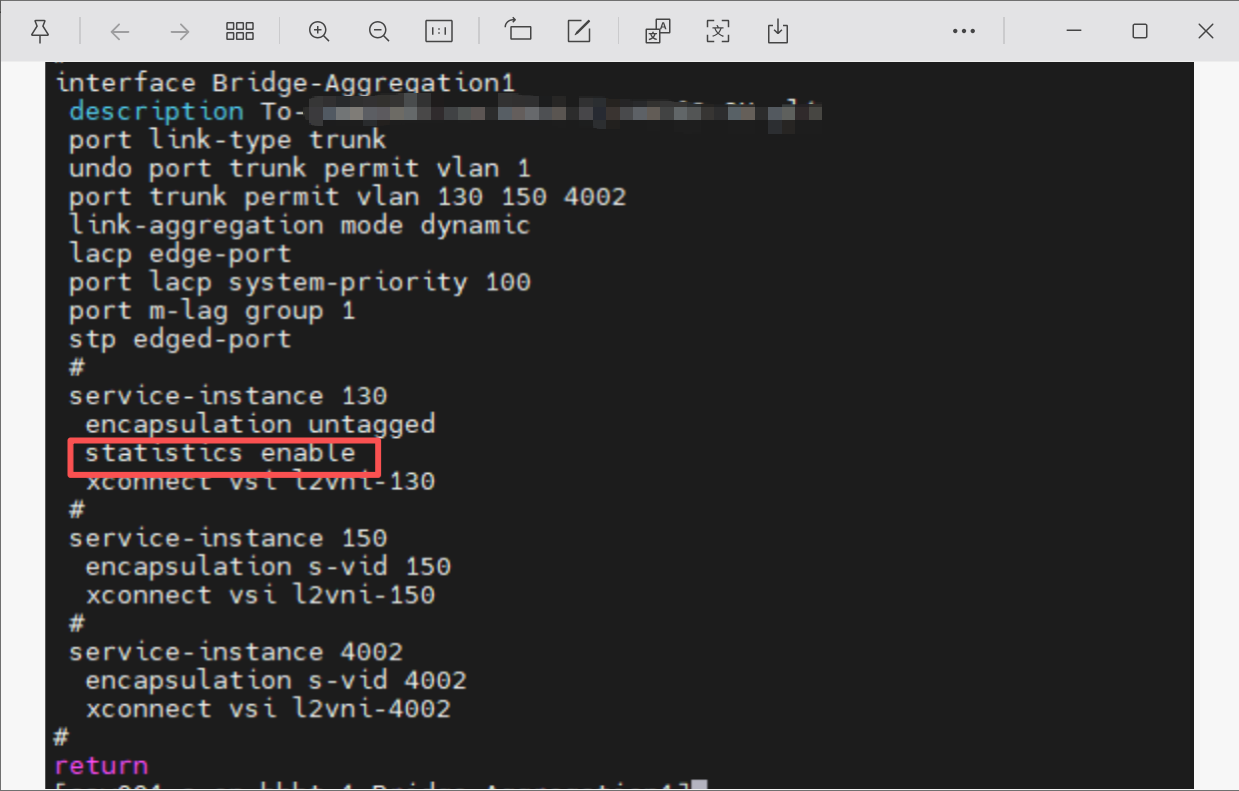
请教一个问题,service-instance 下的staticstics 开启后,怎么看统计数据
- 0关注
- 0收藏,670浏览
问题描述:
请教一个问题,service-instance 下的staticstics 开启后(stattsttcs enable),怎么看统计数据
- 2026-05-07提问
- 举报
-
(0)
最佳答案


要查看开启了流量统计的 service-instance 的统计数据,最直接的方法是使用 display service-instance interface 命令。
查看 Service-instance 统计信息
在任意视图下执行 display service-instance interface 命令,并配合接口类型和编号,即可看到该接口上所有或指定 service-instance 的详细信息,其中就包括流量统计。
该命令的格式为:display service-instance interface interface-type interface-number [ service-instance instance-id ]
interface-type interface-number:指定接口类型和编号。service-instance instance-id:可选项,指定要查看的 service-instance 的编号。如果不指定,则会显示该接口上配置的所有 service-instance 的信息。
使用示例:
假设我们想查看接口 GigabitEthernet 1/0/1 上 ID 为 5 的 service-instance 的统计信息,可以输入如下命令:
命令的输出结果中,包含了我们关心的双向流量统计信息:
Statistics on the PW in the inbound direction:接口入方向(接收)的统计,包括处理的字节数 (Bytes) 和包数 (Packets)。
Statistics on the PW in the outbound direction:接口出方向(发送)的统计,包括处理的字节数 (Bytes) 和包数 (Packets)。
如果想查看接口 GigabitEthernet 1/0/1 上所有 service-instance 的信息,可以省略 service-instance 参数:
- 2026-05-07回答
- 评论(1)
- 举报
-
(0)
这些数据可以通过snmp采集吗

命令:display current-configuration interface <接口类型 接口编号>
检查对应service-instance配置段是否包含statistics enable,确认统计功能已开启。
步骤2:查看接口下所有service-instance统计
命令:display service-instance statistics interface <接口类型 接口编号>
可查看该接口下所有已配置service-instance的收发报文数、字节数、错误报文数等统计数据。
步骤3:查看指定service-instance统计
命令:display service-instance statistics interface <接口类型 接口编号> instance-id <实例ID>
精准查看某一特定service-instance的统计信息,过滤无关实例数据。
步骤4:PW场景补充查看(PE设备)
若service-instance绑定了PW,可补充查看PW层面统计:
命令:display l2vpn pw statistics [pw-id
获取PW承载该实例业务的转发统计数据。
可选重置统计:reset service-instance statistics interface <接口类型 接口编号> [instance-id <实例ID>],操作前确认无需保留历史数据,重要变更建议备份配置。
- 2026-05-07回答
- 评论(1)
- 举报
-
(0)
这些数据可以通过snmp采集吗
这些数据可以通过snmp采集吗

1. 查看统计(核心命令)
display l2vpn service-instance verbose
- 会列出所有 AC(service‑instance)的:
- 入 / 出方向 包数、字节数
- 绑定的 VSI、交叉连接状态等
2. 只看某个接口 + 实例
display l2vpn service-instance verbose interface GigabitEthernet 1/0/1 service-instance 100
3. 清除统计(复位计数器)
reset l2vpn statistics ac
# 或指定接口+实例
reset l2vpn statistics ac interface GigabitEthernet 1/0/1 service-instance 100
4. 常见 “看不到统计” 的原因
- 没绑定 VS I / 交叉连接:enable 了但没真正绑定到 L2VPN,计数不涨
- 方向反了:看一下是在 inbound 还是 outbound 有流量
- 版本限制:仅 R3608 及以上版本支持该统计
- 2026-05-08回答
- 评论(0)
- 举报
-
(0)
编辑答案


亲~登录后才可以操作哦!
确定你的邮箱还未认证,请认证邮箱或绑定手机后进行当前操作
举报
×
侵犯我的权益
×
侵犯了我企业的权益
×
- 1. 您举报的内容是什么?(请在邮件中列出您举报的内容和链接地址)
- 2. 您是谁?(身份证明材料,可以是身份证或护照等证件)
- 3. 是哪家企业?(营业执照,单位登记证明等证件)
- 4. 您与该企业的关系是?(您是企业法人或被授权人,需提供企业委托授权书)
抄袭了我的内容
×
原文链接或出处
诽谤我
×
- 1. 您举报的内容以及侵犯了您什么权益?(请在邮件中列出您举报的内容、链接地址,并给出简短的说明)
- 2. 您是谁?(身份证明材料,可以是身份证或护照等证件)
对根叔社区有害的内容
×
不规范转载
×
举报说明
这些数据可以通过snmp采集吗