问
UIS前端卸载DSHA失败
2026-06-17提问
- 0关注
- 0收藏,963浏览
问题描述:
在前端平台上卸载亚信DSHA,提示失败。想着回到虚拟机关闭防病毒功能。发现防病毒功能都是灰色的。有什么方法能在后台删除。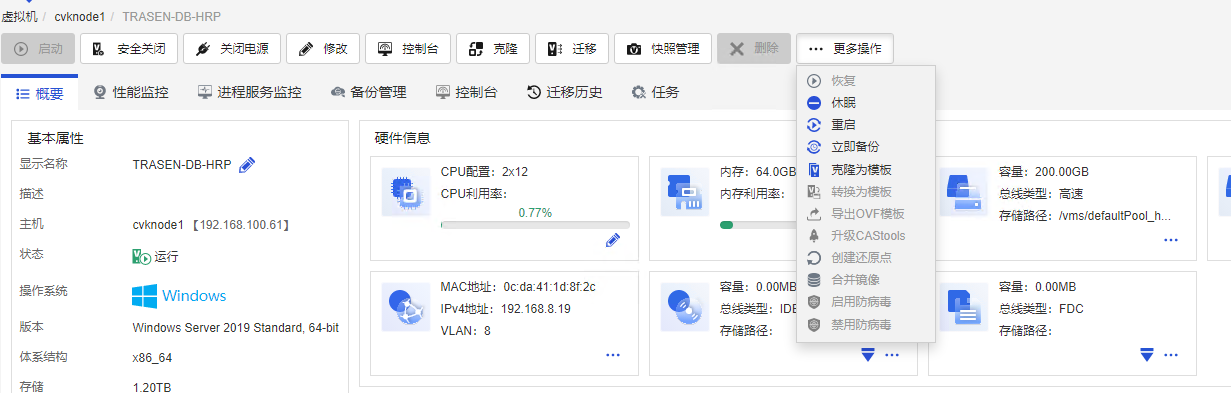
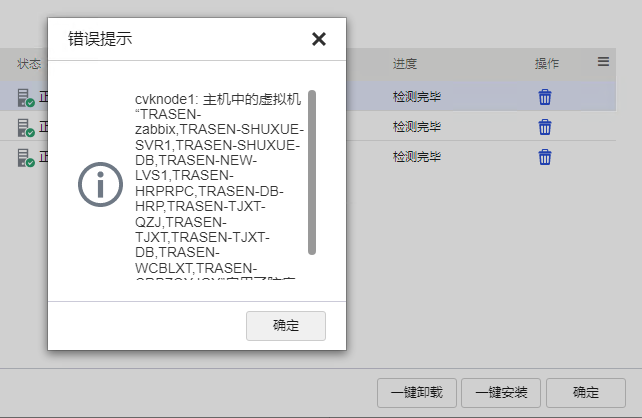
平台版本V8.0 (R0886P06)
- 2026-06-17提问
- 举报
-
(0)
已采纳


在 UIS 前端平台卸载亚信 DSHA 失败且防病毒选项变灰,通常是因为底层组件状态异常或前端与底层通信脱节导致的。针对您“在后台删除”的需求,建议按照以下步骤进行排查和处理:
1. 尝试通过底层 CVK 节点命令行强制卸载
既然前端界面已经无法操作,最直接的方法是通过底层命令行进行干预:
- 登录到该虚拟机所在的底层 CVK 节点(CVK Host)。
- 亚信 DSHA 通常以无代理(Agentless)形式部署在 CVK 节点上。您可以检查并执行亚信提供的卸载脚本。例如,如果之前是通过
util_asiainfo_antivirus_manage_xxx.sh脚本安装的,可以尝试执行对应的卸载参数(如./util_asiainfo_antivirus_manage_xxx.sh uninstall)。 - 检查底层是否有残留的
ds_agentless进程,如有,可通过kill命令强制结束,并清理/opt/ds_agentless/等相关目录。
2. 重启 UIS 前端服务或 CVK 节点
前端防病毒选项变灰,大概率是前端服务未能正确获取底层状态。
- 尝试重启 UIS 前端的管理服务,使其重新刷新底层资源状态。
- 如果条件允许,重启该虚拟机所在的 CVK 节点,让底层重新初始化防病毒模块的状态。
3. 重新安装以修复卸载逻辑(特殊手段)
在某些极端情况下(如升级 UIS 前未卸载旧版 DSHA 导致状态错乱),底层组件可能处于“半死不活”的僵死状态。此时,可以尝试将对应版本的亚信 DSHA 安装包重新安装一遍。这有助于修复底层损坏的卸载逻辑或注册表状态,安装成功后,再尝试通过前端或底层命令行进行正常卸载。
- 2026-06-18回答
- 评论(0)
- 举报
-
(0)

zhiliao_Gixe
九段
1. 确认防病毒功能状态:
执行 display security-profile 查看是否有病毒防护相关配置
检查 display sysinfo 确认防病毒进程是否运行(如 avp 或 virus 相关进程)
2. 后台强制卸载步骤:
进入系统维护模式:system-view → maintenance-mode
停止防病毒服务:service-stop virus
卸载DSHA组件:uninstall component dsha
恢复系统模式:reboot(重启后防病毒功能自动重置)
3. 补充操作:
若仍失败,检查安装日志:display logbuffer | include dsha
清理残留文件:rm -rf /opt/dsha/*(在维护模式下执行)
验证卸载结果:display component | include dsha
注:操作前建议备份关键配置,重启后需验证系统完整性。
执行 display security-profile 查看是否有病毒防护相关配置
检查 display sysinfo 确认防病毒进程是否运行(如 avp 或 virus 相关进程)
2. 后台强制卸载步骤:
进入系统维护模式:system-view → maintenance-mode
停止防病毒服务:service-stop virus
卸载DSHA组件:uninstall component dsha
恢复系统模式:reboot(重启后防病毒功能自动重置)
3. 补充操作:
若仍失败,检查安装日志:display logbuffer | include dsha
清理残留文件:rm -rf /opt/dsha/*(在维护模式下执行)
验证卸载结果:display component | include dsha
注:操作前建议备份关键配置,重启后需验证系统完整性。
- 2026-06-17回答
- 评论(1)
- 举报
-
(0)
你这命令我感觉不对呀
zhiliao_D4ChFc
发表时间:2026-06-17
更多>>
你这命令我感觉不对呀
zhiliao_D4ChFc
发表时间:2026-06-17

UIS/CAS 平台 DSHA 亚信防病毒卸载失败、虚拟机防病毒按钮灰色完整解决方案
一、故障根因说明
- 平台层面:主机
cvknode1上批量虚拟机已加载 DSHA 防病毒驱动 / 代理,平台后台标记防病毒组件已绑定虚拟机,所以单台虚拟机「启用 / 禁用防病毒」按钮置灰,无法前端单点关闭; - 卸载失败原因:
- DSHA 内核驱动、虚拟机内守护进程占用文件,一键卸载流程无法停止驱动;
- CAStools 异常、虚拟机内 DSHA 卸载组件损坏;
- 主机侧防病毒补丁包注册信息残留,批量卸载校验失败。
- 你截图里的报错:批量卸载检测列出 cvknode1 所有带 DSHA 的虚拟机,批量卸载流程无法逐个清理,需要分平台后台主机侧清理 + 虚拟机内系统强制卸载两套操作。
二、方案 1:先处理虚拟机内 Windows Server 2019(TRASEN-DB-HRP)本地强制卸载(单台虚拟机操作)
步骤 1:管理员权限终止亚信 DSHA 全部服务
- Win+R 输入
services.msc打开服务面板,停止并禁用以下所有亚信服务:plaintextDSHAService DSHADriverSrv TmComm TmFilter TmProxy - 管理员 CMD 强制删除服务:
cmd
sc delete DSHAService
sc delete DSHADriverSrv
sc delete TmComm
sc delete TmFilter
sc delete TmProxy
步骤 2:清理驱动与安装目录
- 删除安装目录(默认路径):
plaintext
C:\Program Files\AsiaInfo\DSHA C:\Program Files\H3C\CASTools\Antivirus - 删除系统驱动目录:
C:\Windows\System32\drivers\ds*.sys
步骤 3:清理注册表(管理员 CMD)
cmd
reg delete "HKLM\SOFTWARE\AsiaInfo\DSHA" /f
reg delete "HKLM\SYSTEM\CurrentControlSet\Services\DSHA*" /f
reg delete "HKLM\SOFTWARE\H3C\CASTools\Antivirus" /f
步骤 4:重启虚拟机
重启后平台页面刷新,查看「禁用防病毒」按钮是否恢复可点击。
三、方案 2:UIS 主机后台(cvknode1 节点 Linux 后台)强制解绑 DSHA(核心解决按钮灰色)
登录 cvknode1 主机 SSH(root 账号,192.168.100.61)
1. 查看当前主机已注册防病毒虚拟机列表
bash
运行
# 查看所有绑定DSHA的虚拟机ID
virsh list --all
# 查看防病毒绑定数据库
cat /var/lib/cas/antivirus/vm_bind.list
2. 单台虚拟机强制解绑防病毒标记(你的 TRASEN-DB-HRP)
bash
运行
# 替换虚拟机名称执行解绑
cas-antivirus-cli unbind --vm-name TRASEN-DB-HRP
# 刷新平台缓存
systemctl restart cas-web
systemctl restart cas-agent
执行完成后刷新前端页面,虚拟机「禁用防病毒」按钮解除灰色。
3. 批量清理主机所有虚拟机 DSHA 绑定(对应你弹窗里全部虚拟机)
bash
运行
# 批量解绑当前节点所有带DSHA的虚拟机
for vm in $(cat /var/lib/cas/antivirus/vm_bind.list | awk '{print $1}'); do cas-antivirus-cli unbind --vm-name $vm; done
# 清空绑定列表文件
> /var/lib/cas/antivirus/vm_bind.list
# 重启平台服务生效
systemctl restart cas-web cas-agent cas-task
4. 主机侧卸载 DSHA 底层补丁包(彻底清除批量卸载失败根源)
bash
运行
# 查看已安装防病毒补丁
cas-antivirus-cli list-patch
# 卸载亚信DSHA补丁包
cas-antivirus-cli remove-patch --vendor asinfo
# 删除主机缓存包文件
rm -rf /var/lib/cas/antivirus/patch/*
四、方案 3:BootROM 应急兜底(虚拟机无法进系统时)
虚拟机关机,控制台重启按
F12进入安全模式:- 安全模式无第三方驱动加载,直接执行上面 Windows 卸载命令;
- 安全模式卸载完成后正常启动,驱动不会自动加载。
五、操作顺序建议(最优流程,避免反复报错)
- 关机所有目标虚拟机(DSHA 内核驱动运行中无法解绑,必须关机);
- SSH 登录 cvknode1 主机后台执行批量解绑 + 卸载补丁;
- 单台开机进 Windows 管理员模式,清理亚信服务、驱动、注册表;
- 重启虚拟机,前端刷新页面,验证「禁用防病毒」按钮可点击;
- 平台防病毒配置页面执行「一键卸载」校验,不再弹出报错列表。
六、关键注意事项
- 不先关机虚拟机直接后台解绑会残留驱动标记,前端按钮依旧灰色;
- 仅前端点一键卸载会失败,必须主机后台清理绑定列表;
- 卸载完成后如需重新开启防病毒,需重新上传 DSHA 补丁包、重新绑定虚拟机;
- 数据库虚拟机(TRASEN-DB-HRP)操作前建议打快照,避免注册表误删导致系统异常。
- 2026-06-18回答
- 评论(0)
- 举报
-
(0)
编辑答案
➤


✖
亲~登录后才可以操作哦!
确定
✖
✖
你的邮箱还未认证,请认证邮箱或绑定手机后进行当前操作
✖
举报
×
侵犯我的权益
>
对根叔社区有害的内容
>
辱骂、歧视、挑衅等(不友善)
侵犯我的权益
×
侵犯了我企业的权益
>
抄袭了我的内容
>
诽谤我
>
辱骂、歧视、挑衅等(不友善)
骚扰我
侵犯了我企业的权益
×
您好,当您发现根叔知了上有关于您企业的造谣与诽谤、商业侵权等内容时,您可以向根叔知了进行举报。 请您把以下内容通过邮件发送到 pub.zhiliao@h3c.com 邮箱,我们会在审核后尽快给您答复。
- 1. 您举报的内容是什么?(请在邮件中列出您举报的内容和链接地址)
- 2. 您是谁?(身份证明材料,可以是身份证或护照等证件)
- 3. 是哪家企业?(营业执照,单位登记证明等证件)
- 4. 您与该企业的关系是?(您是企业法人或被授权人,需提供企业委托授权书)
我们认为知名企业应该坦然接受公众讨论,对于答案中不准确的部分,我们欢迎您以正式或非正式身份在根叔知了上进行澄清。
抄袭了我的内容
×
原文链接或出处
诽谤我
×
您好,当您发现根叔知了上有诽谤您的内容时,您可以向根叔知了进行举报。 请您把以下内容通过邮件发送到pub.zhiliao@h3c.com 邮箱,我们会尽快处理。
- 1. 您举报的内容以及侵犯了您什么权益?(请在邮件中列出您举报的内容、链接地址,并给出简短的说明)
- 2. 您是谁?(身份证明材料,可以是身份证或护照等证件)
我们认为知名企业应该坦然接受公众讨论,对于答案中不准确的部分,我们欢迎您以正式或非正式身份在根叔知了上进行澄清。
对根叔社区有害的内容
×
垃圾广告信息
色情、暴力、血腥等违反法律法规的内容
政治敏感
不规范转载
>
辱骂、歧视、挑衅等(不友善)
骚扰我
诱导投票
不规范转载
×
举报说明