请问我有一台H3C MSR 36-60路由器system.bin 文件不小心覆盖了
- 0关注
- 0收藏,1050浏览
问题描述:
msr36-cmw710-system-r0304p15.bin请问官网还有个文件吗?
- 2026-07-21提问
- 举报
-
(0)
最佳答案


MSR36-CMW710-SYSTEM-R0304P15.bin 资源说明 + 系统恢复完整方案
一、关于该单独 system.bin 官网是否还有
官网不单独提供 system.bin、boot.bin 拆分文件下载
新华三官网仅发布整合 IPE 全包(MSR36-CMW710-R0304P15.ipe),IPE 内部解压后才包含 boot、system、补丁等拆分镜像;不会单独上架 system.bin 分包,直接搜这个 bin 文件名找不到资源。
R0304P15 属于超老旧退役基线
CMW710-R0304P15 发布年代很早,官网公开软件下载页已下线该历史版本,普通注册账号自助检索无法获取,只能通过三种渠道拿到对应 IPE 包:
拨打 400-810-0504,提供设备型号 MSR36-60、设备 SN,客服匹配服务合约下发历史版本 IPE;
联系当初采购设备的代理商 / 办事处,渠道后台可调取归档老版本;
知了社区发帖求助同型号存量用户分享该 IPE 完整包。
替代方案:可下载同系列稳定新版 R6749Pxx,Bootware 兼容,直接修复系统,业务特性完全覆盖老 R0304P15,不用死守旧版本。
二、关键提醒:你不能只单独上传 system.bin 修复
MSR V7 路由器 Bootware、system 镜像版本必须严格配套,只替换 system.bin 会启动校验失败、设备无法进系统,正确修复必须使用完整 IPE 包,在 Bootware 下解压加载整套镜像。
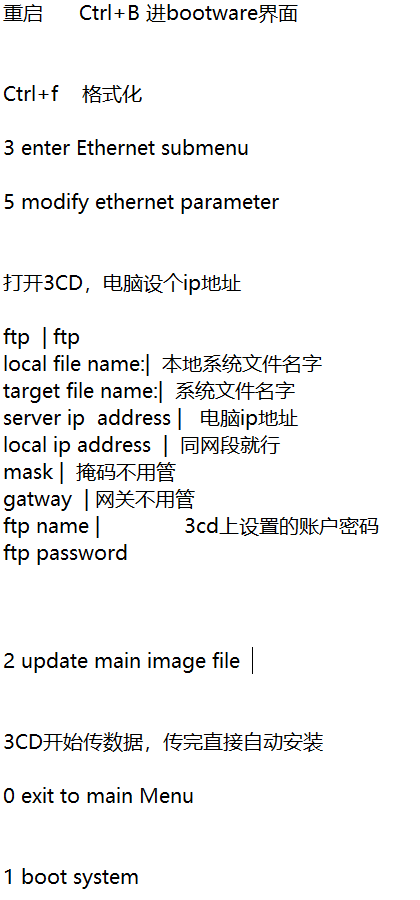
三、system.bin 被覆盖后的紧急恢复步骤(Console+Ctrl+B)
设备断电重启,开机立刻按 Ctrl+B 进入 Bootware 菜单;
选择以太网配置,设置本机 PC 与路由器管理口同网段,开启 TFTP 服务器;
TFTP 下载完整 MSR36-CMW710-R0304P15.ipe 全包到 CFA0/Flash;
Bootware 菜单执行 IPE 解压,自动分离 boot.bin、system.bin 并写入存储;
设置该套镜像为主启动文件,重启设备正常进入系统。
四、极简总结
官网无单独MSR36-CMW710-SYSTEM-R0304P15.bin下载入口,仅提供整合 IPE 包;
R0304P15 老版本官网公开渠道已下架,需 400 / 代理商调取归档资源;
禁止仅单独上传 system.bin 修复,必须使用完整 IPE 包在 Bootware 下整机恢复;
应急方案:直接升级同系列新版 CMW710 R6749 稳定版,兼容 MSR36-60 硬件,修复更快。
- 2026-07-21回答
- 评论(0)
- 举报
-
(0)


 1
1
- 2026-07-21回答
- 评论(4)
- 举报
-
(0)
谢谢大家,包下错了导致重罐系统不成功,重新找了个包就可以了。
==========================<EXTENDED-BOOTWARE MENU>========================== |<1> Boot System | |<2> Enter Serial SubMenu | |<3> Enter Ethernet SubMenu | |<4> File Control | |<5> Restore to Factory Default Configuration | |<6> Skip Current System Configuration | |<7> BootWare Operation Menu | |<8> Skip Authentication for Console Login | |<9> Storage Device Operation | |<0> Reboot | ============================================================================ Ctrl+Z: Access EXTENDED ASSISTANT MENU Ctrl+F: Format File System Ctrl+C: Display Copyright Enter your choice(0-9): 文件上传完后按了0,然后按了1,一直卡在这里
MSR36X1-CMW710-R6749P2102.ipe 我是用的这个包
Enter your choice(0-9): 1 Loading the main image files... The image does not exist! Loading the backup image files... The image does not exist! Loading images fails. Loading the main boot and system image files... The system image does not exist! Loading the backup boot and system image files... The image does not exist! Loading images fails. Loading the main boot image... Loading file cfa0:/msr36-cmw710-boot-r0304p15.bin... The image does not exist! Loading the backup boot image... The image does not exist! Loading boot image fails.
谢谢大家,包下错了导致重罐系统不成功,重新找了个包就可以了。



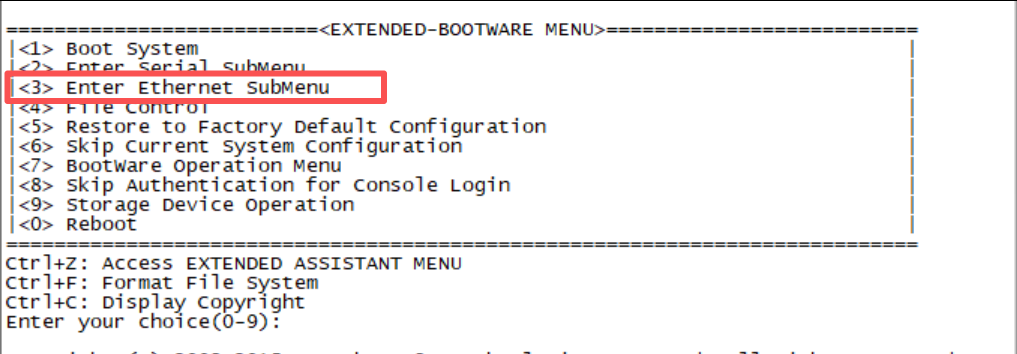
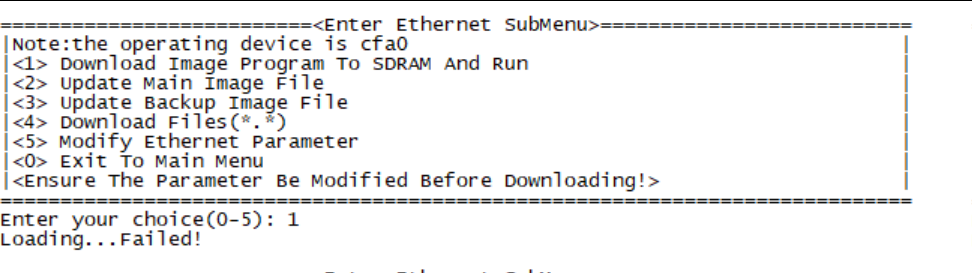 按了这个没有配IP,直接就跳到这里来了
- 2026-07-21回答
- 评论(7)
- 举报
-
(0)
我不用同样的版本也可以,只要版本能运行起来就行
现在是设备里没有系统了,是吗?
是的,系统起来
BootWare Validating... Press Ctrl+B to access EXTENDED-BOOTWARE MENU... Loading the main image files... Loading file cfa0:/msr36-cmw710-system-r0304p15.bin......................... .............Done. Image file cfa0:/msr36-cmw710-system-r0304p15.bin is invalid! Loading the backup image files... The image does not exist! Loading images fails. Loading the main boot and system image files... Loading file cfa0:/msr36-cmw710-system-r0304p15.bin......................... .............Done. Image file cfa0:/msr36-cmw710-system-r0304p15.bin is invalid! Loading the backup boot and system image files... The image does not exist! Loading images fails. Loading the main boot image... Loading file cfa0:/msr36-cmw710-boot-r0304p15.bin............Done. Image file cfa0:/msr36-cmw710-boot-r0304p15.bin is self-decompressing....... ....Done. System image is starting... <boot>dir Directory of cfa0: 0 drw- - Apr 14 2016 15:32:06 diagfile 1 -rw- 567 Mar 15 2019 09:53:40 dsakey 2 -rw- 735 Mar 19 2021 06:12:04 hostkey 3 -rw- 1180 Jul 07 2021 03:42:30 ifindex.dat 4 drw- - Apr 14 2016 15:32:06 license 5 drw- - Apr 24 2018 12:44:56 logfile 6 -rw- 8473600 Apr 14 2016 15:29:32 msr36-cmw710-boot-r0304p15.bin 7 -rw- 2721792 Apr 14 2016 15:31:26 msr36-cmw710-data-r0304p15.bin 8 -rw- 367616 Apr 14 2016 15:31:20 msr36-cmw710-security-r0304p15.bin 9 -rw- 33553920 Jul 21 2026 06:00:52 msr36-cmw710-system-r0304p15.bin 10 -rw- 2052096 Apr 14 2016 15:31:22 msr36-cmw710-voice-r0304p15.bin 11 drw- - Apr 14 2016 15:32:06 seclog 12 -rw- 591 Mar 19 2021 06:12:04 serverkey 13 -rw- 27451 Jul 07 2021 03:42:30 startup.cfg 14 -rw- 133685 Jul 07 2021 03:42:30 startup.mdb 252164 KB total (205302 KB free) <boot>help ^ % Unrecognized command found at '^' position. <boot>
编辑答案


亲~登录后才可以操作哦!
确定你的邮箱还未认证,请认证邮箱或绑定手机后进行当前操作
举报
×
侵犯我的权益
×
侵犯了我企业的权益
×
- 1. 您举报的内容是什么?(请在邮件中列出您举报的内容和链接地址)
- 2. 您是谁?(身份证明材料,可以是身份证或护照等证件)
- 3. 是哪家企业?(营业执照,单位登记证明等证件)
- 4. 您与该企业的关系是?(您是企业法人或被授权人,需提供企业委托授权书)
抄袭了我的内容
×
原文链接或出处
诽谤我
×
- 1. 您举报的内容以及侵犯了您什么权益?(请在邮件中列出您举报的内容、链接地址,并给出简短的说明)
- 2. 您是谁?(身份证明材料,可以是身份证或护照等证件)
对根叔社区有害的内容
×
不规范转载
×
举报说明