h3c s5110交换机配置hybird
- 0关注
- 0收藏,350浏览
最佳答案

.3.1 组网需求
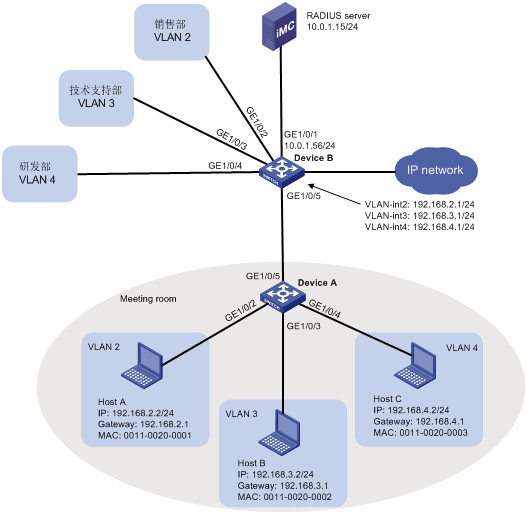
如图2所示,某公司为了隔离广播报文以及实现通信安全,给不同的部门指定了不同的VLAN,销售部属于VLAN 2;技术支持部属于VLAN 3;研发部属于VLAN 4。
现要求通过配置动态MAC VLAN实现以下应用需求:
· 终端通过802.1X认证后接入网络;
· Meeting room为员工提供了临时办公场所,终端可以通过Device A的任意端口接入公司网络,但接入后只能划分到自己部门所在的VLAN。如图2所示,Host A、Host B、Host C分别归属于VLAN 2、VLAN 3、VLAN 4。
1.3.2 配置注意事项
· 基于MAC的VLAN功能只能在Hybrid端口配置。
· 基于MAC的VLAN功能主要用于在用户的接入设备的下行端口上进行配置,因此不能和聚合功能同时使用。
1.3.3 配置步骤
1. 配置Device A
# 创建RADIUS认证方案macvlan,指定认证和计费服务器的IP地址均为10.0.1.15,密钥均为expert(该参数需要和iMC服务器上的配置保持一致),认证时不需要携带域名。
<DeviceA> system-view
[DeviceA] radius scheme macvlan
New Radius scheme
[DeviceA-radius-macvlan] server-type extended
[DeviceA-radius-macvlan] primary authentication 10.0.1.15
[DeviceA-radius-macvlan] primary accounting 10.0.1.15
[DeviceA-radius-macvlan] key authentication expert
[DeviceA-radius-macvlan] key accounting expert
[DeviceA-radius-macvlan] user-name-format without-domain
[DeviceA-radius-macvlan] quit
# 配置域参数。因为所有用户上线都需要进行认证,所以直接使用缺省域system,在system下进行配置。
[DeviceA] domain system
[DeviceA-isp-system] authentication lan-access radius-scheme macvlan
[DeviceA-isp-system] authorization lan-access radius-scheme macvlan
[DeviceA-isp-system] accounting lan-access radius-scheme macvlan
[DeviceA-isp-system] quit
# 全局使能802.1X功能。
[DeviceA] undo port-security enable
[DeviceA] dot1x
802.1X is enabled globally.
# 使能接口GigabitEthernet1/0/2、GigabitEthernet1/0/3和GigabitEthernet1/0/4的802.1X功能。
[DeviceA] dot1x interface gigabitethernet 1/0/2 to gigabitethernet 1/0/4
802.1x is enabled on port GigabitEthernet1/0/2.
802.1x is enabled on port GigabitEthernet1/0/3.
802.1x is enabled on port GigabitEthernet1/0/4.
# 配置端口GigabitEthernet1/0/2、GigabitEthernet1/0/3和GigabitEthernet1/0/4的链路类型为Hybrid,并使能端口的MAC VLAN功能。
[DeviceA] interface gigabitethernet 1/0/2
[DeviceA-GigabitEthernet1/0/2] port link-type hybrid
[DeviceA-GigabitEthernet1/0/2] mac-vlan enable
[DeviceA-GigabitEthernet1/0/2] quit
[DeviceA] interface gigabitethernet 1/0/3
[DeviceA-GigabitEthernet1/0/3] port link-type hybrid
[DeviceA-GigabitEthernet1/0/3] mac-vlan enable
[DeviceA-GigabitEthernet1/0/3] quit
[DeviceA] interface gigabitethernet 1/0/4
[DeviceA-GigabitEthernet1/0/4] port link-type hybrid
[DeviceA-GigabitEthernet1/0/4] mac-vlan enable
[DeviceA-GigabitEthernet1/0/4] quit
# 将端口GigabitEthernet1/0/5的链路类型配置为Trunk,并允许VLAN 2、VLAN 3和VLAN 4通过。
[DeviceA] interface gigabitethernet 1/0/5
[DeviceA-GigabitEthernet1/0/5] port link-type trunk
[DeviceA-GigabitEthernet1/0/5] port trunk permit vlan 2 to 4
[DeviceA-GigabitEthernet1/0/5] quit
2. 配置Device B
# GigabitEthernet1/0/1是一个三层接口用于认证服务器的接入,IP地址为10.0.1.56。
<DeviceB> system-view
[DeviceB] interface gigabitethernet 1/0/1
[DeviceB] port link-mode route
[DeviceB-GigabitEthernet1/0/1] ip address 10.0.1.56 24
[DeviceB-GigabitEthernet1/0/1] quit
# GigabitEthernet1/0/2用于销售部的接入,属于VLAN 2;GigabitEthernet1/0/3用于技术支持部的接入,属于VLAN 3;GigabitEthernet1/0/4用于研发部的接入,属于VLAN 4。
[DeviceB] vlan 2
[DeviceB-vlan2] port gigabitethernet 1/0/2
[DeviceB-vlan2] vlan 3
[DeviceB-vlan3] port gigabitethernet 1/0/3
[DeviceB-vlan3] vlan 4
[DeviceB-vlan4] port gigabitethernet 1/0/4
[DeviceB-vlan4] quit
# 创建VLAN 2接口、VLAN 3接口和VLAN 4接口,并分别配置IP地址(如图2所示),用于实现不同VLAN之间报文的三层互通。
[DeviceB] interface vlan-interface 2
[DeviceB-Vlan-interface2] ip address 192.168.2.1 24
[DeviceB-Vlan-interface2] interface vlan-interface 3
[DeviceB-Vlan-interface3] ip address 192.168.3.1 24
[DeviceB-Vlan-interface3] interface vlan-interface 4
[DeviceB-Vlan-interface4] ip address 192.168.4.1 24
[DeviceB-Vlan-interface4] quit
# 将端口GigabitEthernet1/0/5的端口类型配置为Trunk,允许VLAN 2、VLAN 3和VLAN 4通过。
[DeviceA] interface gigabitethernet 1/0/5
[DeviceA-GigabitEthernet1/0/5] port link-type trunk
[DeviceA-GigabitEthernet1/0/5] port trunk permit vlan 2 to 4
[DeviceA-GigabitEthernet1/0/5] quit
- 2026-09-29回答
- 评论(0)
- 举报
-
(0)

1. 进入系统视图:
system-view
2. 创建VLAN(如果需要):
vlan 10
quit
3. 进入接口视图:
interface GigabitEthernet 1/0/1
4. 配置链路类型为Hybrid:
port link-type hybrid
5. 配置允许通过的VLAN(PVID默认是VLAN1,必须显式允许):
port hybrid vlan 1 10 untagged
6. 配置接口PVID:
port hybrid pvid vlan 10
7. 退出并保存:
quit
save force
- 2026-09-29回答
- 评论(0)
- 举报
-
(0)
暂无评论


- S5110 V7 Hybrid 口:可自定义多个 VLAN带标签 / 剥标签,Trunk 只能 PVID 剥标签。
- 配置要点:先创建 VLAN;端口设 hybrid;
untagged给终端(去标签),tagged给交换机(保留标签);配置 PVID。 - 切换坑:Trunk 不能直接改成 Hybrid,必须先改成 Access 中转。
- 查看命令:
display port hybrid brief。
- 2026-09-29回答
- 评论(0)
- 举报
-
(0)
暂无评论

根据提供的资料,H3C S5110系列交换机支持Hybrid端口配置。Hybrid端口是H3C交换机中一种常用的二层端口类型,它既可以连接普通用户主机,也可以连接交换机,能够灵活地实现VLAN之间的隔离和互通。
以下基于S5110系列交换机(属于S5000PV2/S5120同系列技术平台)的Hybrid端口典型配置方法:
配置步骤:
进入系统视图和接口视图
system-view
[H3C] interface GigabitEthernet 1/0/1
配置端口为Hybrid类型
[H3C-GigabitEthernet1/0/1] port link-type hybrid配置Hybrid端口允许通过的VLAN(并设置是否带标签)
- 允许VLAN 10和20通过,其中VLAN 10的报文不带标签(untagged),VLAN 20的报文带标签(tagged):
[H3C-GigabitEthernet1/0/1] port hybrid vlan 10 untagged
[H3C-GigabitEthernet1/0/1] port hybrid vlan 20 tagged
(可选)配置Hybrid端口的PVID(默认VLAN)
- 当收到的报文不带VLAN标签时,将打上PVID的标签:
[H3C-GigabitEthernet1/0/1] port hybrid pvid vlan 10
说明:
- 2026-09-29回答
- 评论(0)
- 举报
-
(0)
暂无评论
编辑答案


亲~登录后才可以操作哦!
确定你的邮箱还未认证,请认证邮箱或绑定手机后进行当前操作
举报
×
侵犯我的权益
×
侵犯了我企业的权益
×
- 1. 您举报的内容是什么?(请在邮件中列出您举报的内容和链接地址)
- 2. 您是谁?(身份证明材料,可以是身份证或护照等证件)
- 3. 是哪家企业?(营业执照,单位登记证明等证件)
- 4. 您与该企业的关系是?(您是企业法人或被授权人,需提供企业委托授权书)
抄袭了我的内容
×
原文链接或出处
诽谤我
×
- 1. 您举报的内容以及侵犯了您什么权益?(请在邮件中列出您举报的内容、链接地址,并给出简短的说明)
- 2. 您是谁?(身份证明材料,可以是身份证或护照等证件)
对根叔社区有害的内容
×
不规范转载
×
举报说明
暂无评论