问
6608路由器console密码重置
1小时前提问
- 0关注
- 0收藏,27浏览


zhiliao_Gixe
九段
H3C 6608路由器Console密码重置,需通过重启进入BootWare菜单操作。
步骤:
1. 用Console线连接设备,重启路由器。
2. 启动时按 Ctrl+B 进入BootWare菜单(默认密码可能为空或 h3c,具体看版本)。
3. 选择 “Skip Current System Configuration”(跳过当前配置启动),通常为选项 3 或类似描述。
4. 设备以空配置启动后,进入系统视图:
system-view
5. 修改Console密码:
[H3C] user-interface console 0
[H3C-ui-console0] authentication-mode password
[H3C-ui-console0] set authentication password simple 新密码
或改用AAA认证:
[H3C] local-user admin class manage
[H3C-luser-manage-admin] password simple 新密码
[H3C-luser-manage-admin] service-type terminal
[H3C-luser-manage-admin] quit
[H3C] user-interface console 0
[H3C-ui-console0] authentication-mode scheme
6. 保存配置:
[H3C] save force
7. 重启设备,正常加载配置,用新密码登录。
注意: 跳过配置启动不会丢失原配置,只是临时不加载;修改密码后保存即可覆盖原密码。若BootWare有密码且未知,需联系H3C技术支持走RMA或提供设备序列号申请解锁。
步骤:
1. 用Console线连接设备,重启路由器。
2. 启动时按 Ctrl+B 进入BootWare菜单(默认密码可能为空或 h3c,具体看版本)。
3. 选择 “Skip Current System Configuration”(跳过当前配置启动),通常为选项 3 或类似描述。
4. 设备以空配置启动后,进入系统视图:
5. 修改Console密码:
[H3C] user-interface console 0
[H3C-ui-console0] authentication-mode password
[H3C-ui-console0] set authentication password simple 新密码
或改用AAA认证:
[H3C] local-user admin class manage
[H3C-luser-manage-admin] password simple 新密码
[H3C-luser-manage-admin] service-type terminal
[H3C-luser-manage-admin] quit
[H3C] user-interface console 0
[H3C-ui-console0] authentication-mode scheme
6. 保存配置:
[H3C] save force
7. 重启设备,正常加载配置,用新密码登录。
注意: 跳过配置启动不会丢失原配置,只是临时不加载;修改密码后保存即可覆盖原密码。若BootWare有密码且未知,需联系H3C技术支持走RMA或提供设备序列号申请解锁。

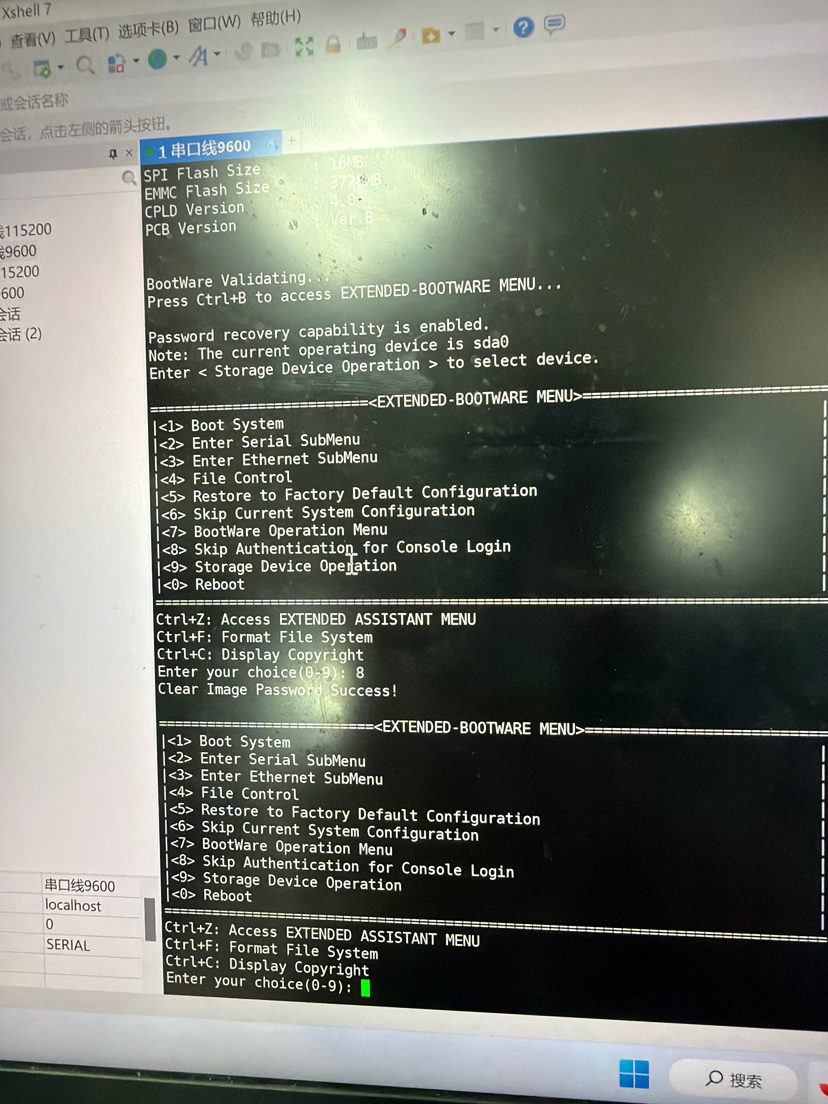
含义:本次标记下次启动临时跳过 Console 密码校验;只生效这一次开机,原有业务配置全部保留,不会清空配置H3C
后续操作
- 在 BootWare 菜单输入
0Reboot,重启路由器
Enter your choice(0-9):0
- 设备正常启动,Console 登录不再要求密码,直接进入系统
⚠️重点:这个跳过认证仅本次启动有效,如果不修改密码并保存,下一次正常重启,原来的 Console 密码会再次生效!
- 登录进系统后,立刻修改 Console 密码并保存配置(V7 平台 SR6608)
system-view
# 修改console线路密码
line console 0
 authentication-mode password
 set authentication password simple NewPass@123
quit
# 或者如果是账号+密码登录模式(local-user)
local-user admin
 password simple NewPass@123
quit
save
保存配置之后,新密码永久写入,后续重启都使用新密码。
两种方案对比(BootWare 菜单)
- 选项 8 Skip Authentication for Console Login(你当前操作):保留全部配置,仅本次开机免密登录,推荐;前提是
Password recovery capability is enabled(截图里已经开启)H3C - 选项 5 Restore to Factory Default Configuration:恢复出厂,所有业务配置全部删除,业务中断,尽量不要选。
重要注意事项
- 密码恢复功能如果被关闭,选项 8 会不可用,只能恢复出厂。你的设备
Password recovery capability is enabled,可以正常使用该功能。 - 双主控场景:该操作只对当前主控生效,备板需要单独操作 BootWare。
- 串口参数:9600,8N1,就是你当前 Xshell 的串口设置。
排错小提示
- 重启后仍然要密码:大概率是没有执行选项 8 成功,或者 BootWare 的密码恢复功能关闭;
- 登录进去忘记
save保存:下次重启,旧密码又回来,再次无法登录。
完整流程复盘
- 串口连接,断电上电,出现
Press Ctrl+B to access EXTENDED-BOOTWARE MENU快速按 Ctrl+B - 菜单输入
8→ 提示 Clear Image Password Success - 输入
0重启设备 - 启动后 Console 免密登录,修改 console 密码 + save 保存配置
暂无评论

方式一:密码恢复功能已使能(跳过当前系统配置)
此方式不会删除原有配置文件,重启后可通过配置回滚恢复原配置。
- 重启设备,在启动过程中根据提示按
Ctrl+B进入BootWare主菜单。 - 在BootWare主菜单中选择
<6>(Skip Current System Configuration),即忽略系统配置启动。 - 系统提示
Flag Set Success.后,再次进入BootWare主菜单,选择<0>(Reboot)重启设备。 - 设备重启后,配置为空。在系统视图下执行配置回滚,恢复原有配置(若不需恢复可跳过此步):
system-view [sysname] configuration replace file startup.cfg - Current configuration will be lost, save current configuration? [Y/N]:n
Info: Now replacing the current configuration. Please wait... Info: Succeeded in replacing current configuration with the file startup.cfg. - 设置新的Console口密码并保存配置:
[sysname] user-interface console 0 [sysname-ui-console0] authentication-mode password[sysname-ui-console0] set authentication password cipher 123456[sysname-ui-console0]save
暂无评论

编辑答案
➤


✖
亲~登录后才可以操作哦!
确定
✖
✖
你的邮箱还未认证,请认证邮箱或绑定手机后进行当前操作
✖
举报
×
侵犯我的权益
>
对根叔社区有害的内容
>
辱骂、歧视、挑衅等(不友善)
侵犯我的权益
×
侵犯了我企业的权益
>
抄袭了我的内容
>
诽谤我
>
辱骂、歧视、挑衅等(不友善)
骚扰我
侵犯了我企业的权益
×
您好,当您发现根叔知了上有关于您企业的造谣与诽谤、商业侵权等内容时,您可以向根叔知了进行举报。 请您把以下内容通过邮件发送到 pub.zhiliao@h3c.com 邮箱,我们会在审核后尽快给您答复。
- 1. 您举报的内容是什么?(请在邮件中列出您举报的内容和链接地址)
- 2. 您是谁?(身份证明材料,可以是身份证或护照等证件)
- 3. 是哪家企业?(营业执照,单位登记证明等证件)
- 4. 您与该企业的关系是?(您是企业法人或被授权人,需提供企业委托授权书)
我们认为知名企业应该坦然接受公众讨论,对于答案中不准确的部分,我们欢迎您以正式或非正式身份在根叔知了上进行澄清。
抄袭了我的内容
×
原文链接或出处
诽谤我
×
您好,当您发现根叔知了上有诽谤您的内容时,您可以向根叔知了进行举报。 请您把以下内容通过邮件发送到pub.zhiliao@h3c.com 邮箱,我们会尽快处理。
- 1. 您举报的内容以及侵犯了您什么权益?(请在邮件中列出您举报的内容、链接地址,并给出简短的说明)
- 2. 您是谁?(身份证明材料,可以是身份证或护照等证件)
我们认为知名企业应该坦然接受公众讨论,对于答案中不准确的部分,我们欢迎您以正式或非正式身份在根叔知了上进行澄清。
对根叔社区有害的内容
×
垃圾广告信息
色情、暴力、血腥等违反法律法规的内容
政治敏感
不规范转载
>
辱骂、歧视、挑衅等(不友善)
骚扰我
诱导投票
不规范转载
×
举报说明
暂无评论