S7506X-G+LSCM3PG24TSSD0-G3组建光网络问题
- 0关注
- 0收藏,348浏览
问题描述:
S7506X-G+LSCM3PG24TSSD0-G3组建光网络问题:请教原因和解决方法。
在部署过程中,发现有以下几种故障现象;
1、16口和24口onu设备注册到olt,olt上显示onu为上线状态;但onu配置下发失败,onu下连终端业务部正常;
2、曾经已正常注册和下发配置的16口和24口onu,可能在重启设备后,出现“1”描述现象;
3、同olt接口或不同olt接口下的8口onu未出现上述故障现象;
4、曾关闭所有olt口,单独启用测试olt口,直连分光器+16口+24口onu测试,注册下发配置正常。当启用其他olt口后,随着onu上线数越来越多,其中16口和24口异常的情况越明显。
主机软件版本7772P03,GPON板卡软件版本7772P03
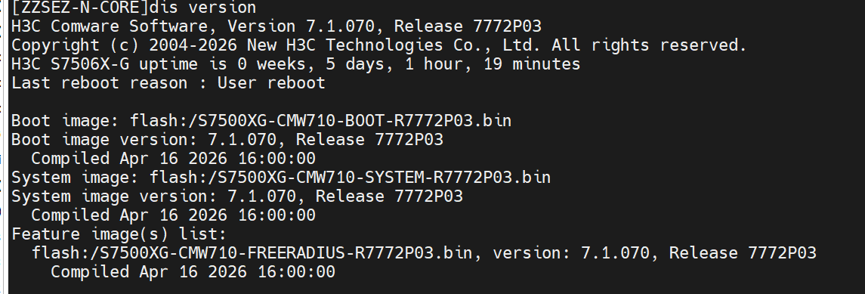
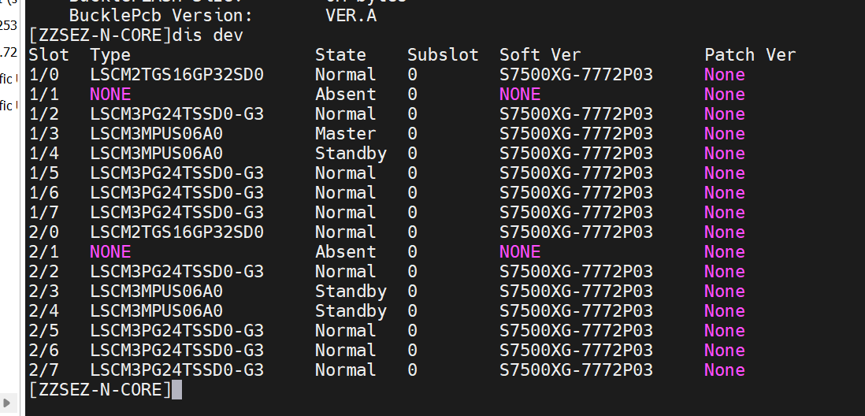
onu型号包括EGT358、EGT458-P、EGT316、EGT316-P、EGT324、EGT423-P;
测试ONU型号版本信息:
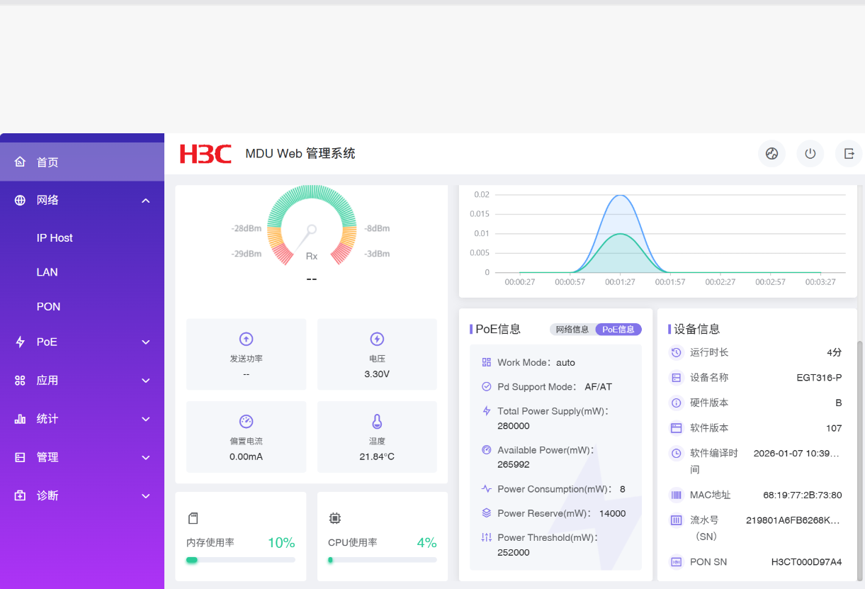
5、测试配置:
#
interface Olt2/2/0/15
using onu 1 to 15
port link-type hybrid
undo port hybrid vlan 1
port hybrid vlan 55 to 57 109 to 112 1006 1700 tagged
#
onu config-profile test_onu
uni 1 vlan-mode tag pvid 111
uni 1 multicast vlan 111
uni 1 multicast-strip-tag enable
uni 2 vlan-mode tag pvid 112
uni 3 vlan-mode trunk pvid 1106 57 to 57 1700 to 1700
uni 4 vlan-mode trunk pvid 1106 57 to 57 1700 to 1700
uni 5 vlan-mode tag pvid 112
uni 6 vlan-mode tag pvid 112
uni 7 vlan-mode tag pvid 112
uni 8 vlan-mode tag pvid 112
uni 9 vlan-mode tag pvid 112
uni 10 vlan-mode tag pvid 112
uni 11 vlan-mode tag pvid 112
uni 12 vlan-mode tag pvid 112
uni 13 vlan-mode trunk pvid 1106 57 to 57 1700 to 1700
uni 14 vlan-mode trunk pvid 1106 57 to 57 1700 to 1700
uni 15 vlan-mode trunk pvid 1106 57 to 57 1700 to 1700
uni 16 vlan-mode trunk pvid 1106 57 to 57 1700 to 1700
#
onu service-profile GPON
port link-type hybrid
undo port hybrid vlan 1
port hybrid vlan 55 to 60 109 to 112 1006 1096 1700 tagged
port hybrid pvid vlan 111
#
onu line-profile ShiWai_16_TiaoShi
apply onu-config-profile test_onu
tcont tcont_default onu-dba-profile dba_profile_default
subinterface 1
apply tcont tcont_default
onu-mapping uni all
apply onu-service-profile GPON
#
interface Onu2/2/0/15:1
bind onu-id sn H3CT000D97A4
bind onu-line-profile ShiWai_16_TiaoShi
#
6、测试结果:olt侧
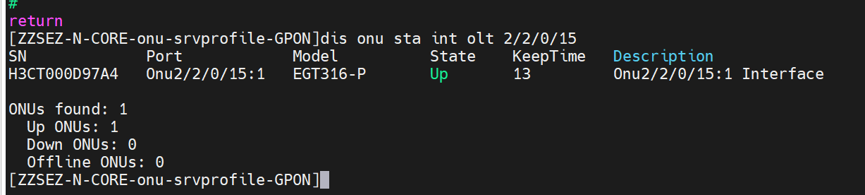
[ZZSEZ-N-CORE-onu-srvprofile-GPON]dis pon diagnostic config-error int onu 2/2/0/
15:1
Onu2/2/0/15:1
Line Profile Name: ShiWai_16_TiaoShi Cfg Profile Name: test_onu
Error-Config 1: Type = UNI_PORT_ISOL CfgIndex = 1 Status = TimeOut UTC time :2026-08-29 17:24:29
Error-Config 2: Type = UNI_VLAN CfgIndex = 1 Status = TimeOut UTC time :2026-08-29 17:27:11
Error-Config 3: Type = UNI_VLAN CfgIndex = 2 Status = TimeOut UTC time :2026-08-29 17:28:26
Error-Config 4: Type = UNI_VLAN CfgIndex = 3 Status = TimeOut UTC time :2026-08-29 17:29:41
Error-Config 5: Type = UNI_VLAN CfgIndex = 4 Status = TimeOut UTC time :2026-08-29 17:30:56
Error-Config 6: Type = UNI_VLAN CfgIndex = 5 Status = TimeOut UTC time :2026-08-29 17:32:11
Error-Config 7: Type = UNI_VLAN CfgIndex = 6 Status = TimeOut UTC time :2026-08-29 17:33:26
Error-Config 8: Type = UNI_VLAN CfgIndex = 7 Status = TimeOut UTC time :2026-08-29 17:34:41
Error-Config 9: Type = UNI_VLAN CfgIndex = 8 Status = TimeOut UTC time :2026-08-29 17:35:56
Error-Config 10: Type = UNI_VLAN CfgIndex = 9 Status = TimeOut UTC time :2026-08-29 17:37:11
Error-Config 11: Type = UNI_VLAN CfgIndex = 10 Status = TimeOut UTC time :2026-08-29 17:38:26
Error-Config 12: Type = UNI_VLAN CfgIndex = 11 Status = Configing UTC time :2026-08-29 17:38:30
Error-Config 13: Type = UNI_VLAN CfgIndex = 12 Status = Unsent UTC time :2026-08-29 17:24:08
Error-Config 14: Type = UNI_VLAN CfgIndex = 13 Status = Unsent UTC time :2026-08-29 17:24:08
Error-Config 15: Type = UNI_VLAN CfgIndex = 14 Status = Unsent UTC time :2026-08-29 17:24:08
Error-Config 16: Type = UNI_VLAN CfgIndex = 15 Status = Unsent UTC time :2026-08-29 17:24:08
Error-Config 17: Type = UNI_VLAN CfgIndex = 16 Status = Unsent UTC time :2026-08-29 17:24:08
Error-Config 18: Type = UNI_MCAST CfgIndex = 1 Status = Unsent UTC time :2026-08-29 17:24:08
Error-Config 19: Type = UNI_MCAST CfgIndex = 2 Status = Unsent UTC time :2026-08-29 17:24:08
Error-Config 20: Type = UNI_MCAST CfgIndex = 3 Status = Unsent UTC time :2026-08-29 17:24:08
Error-Config 21: Type = UNI_MCAST CfgIndex = 4 Status = Unsent UTC time :2026-08-29 17:24:08
Error-Config 22: Type = UNI_MCAST CfgIndex = 5 Status = Unsent UTC time :2026-08-29 17:24:08
Error-Config 23: Type = UNI_MCAST CfgIndex = 6 Status = Unsent UTC time :2026-08-29 17:24:08
Error-Config 24: Type = UNI_MCAST CfgIndex = 7 Status = Unsent UTC time :2026-08-29 17:24:08
Error-Config 25: Type = UNI_MCAST CfgIndex = 8 Status = Unsent UTC time :2026-08-29 17:24:08
Error-Config 26: Type = UNI_MCAST CfgIndex = 9 Status = Unsent UTC time :2026-08-29 17:24:08
Error-Config 27: Type = UNI_MCAST CfgIndex = 10 Status = Unsent UTC time :2026-08-29 17:24:08
Error-Config 28: Type = UNI_MCAST CfgIndex = 11 Status = Unsent UTC time :2026-08-29 17:24:08
Error-Config 29: Type = UNI_MCAST CfgIndex = 12 Status = Unsent UTC time :2026-08-29 17:24:08
Error-Config 30: Type = UNI_MCAST CfgIndex = 13 Status = Unsent UTC time :2026-08-29 17:24:08
Error-Config 31: Type = UNI_MCAST CfgIndex = 14 Status = Unsent UTC time :2026-08-29 17:24:08
Error-Config 32: Type = UNI_MCAST CfgIndex = 15 Status = Unsent UTC time :2026-08-29 17:24:08
Error-Config 33: Type = UNI_MCAST CfgIndex = 16 Status = Unsent UTC time :2026-08-29 17:24:08
Error-Config 34: Type = ONU_ENCRYPT CfgIndex = 255 Status = Unsent UTC time :2026-08-29 17:24:08
Error-Config 35: Type = ONU_FEC CfgIndex = 255 Status = Unsent UTC time :2026-08-29 17:24:08
Error-Config 36: Type = NULL CfgIndex = 255 Status = Unsent UTC time :2026-08-29 17:24:08
[ZZSEZ-N-CORE-onu-srvprofile-GPON]
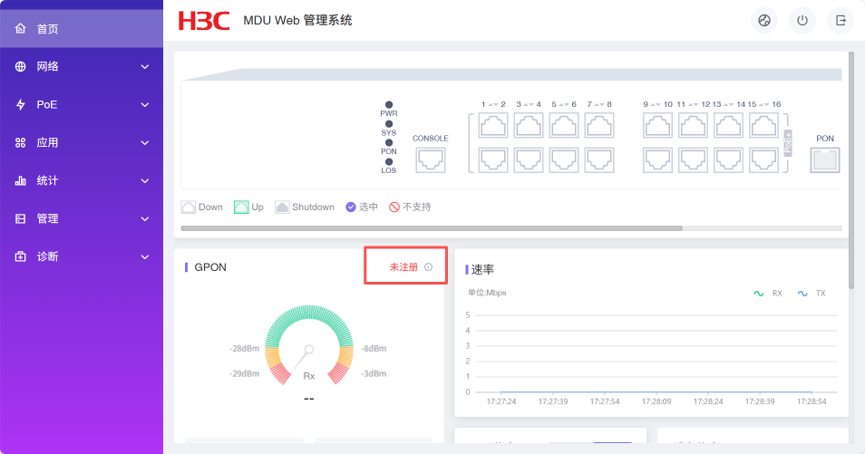
7、测试结果:onu侧
- 2026-08-30提问
- 举报
-
(0)
最佳答案

# S7506X‑G LSCM3PG24TSSD0‑G3 GPON 故障分析
>
> 现象:
>
>
> 1. ONU(EGT316‑P/EGT324 等 16/24 口)**注册 Up,OMCI 配置下发 Timeout**,UNI_VLAN / UNI_PORT_ISOL 配置超时;8 口 ONU 正常;
> 2. 单 PON 口隔离测试:16/24 口 ONU 可以正常下发配置;**多 PON 口启用、ONU 数量增多后故障复现**;
> 3. 重启 ONU 后故障重现;
> 4. `display pon diagnostic config‑error`输出大量`Status=TimeOut`,部分`Unsent`,OMCI 报文下发超时、ONU 应答未收到。
> 版本:S7506X‑G 7772P03,GPON 板卡 7772P03。
## 核心根因
**OMCI 消息队列资源竞争:16/24 口多 UNI 的 ONU,需要下发大量 UNI 端口配置(VLAN、隔离、组播);当整机 ONU 数量上涨,GPON 板卡 OMCI 消息调度资源不足,大 UNI 数量 ONU 的 OMCI 报文得不到及时应答,出现 TimeOut;8 口 ONUUNI 少,配置量小不受影响**。
>
> 特征:单 PON 口少量 ONU 正常;整机 ONU 变多,16/24 口 ONU 开始出现 OMCI 下发超时。
>
> 报错含义:
>
>
> - `UNI_PORT_ISOL TimeOut`:UNI 端口隔离配置 OMCI 下发,ONU 未应答,超时;
> - `UNI_VLAN TimeOut`:UNI VLAN 模式配置 OMCI 下发超时;
> - `Unsent`:OMCI 消息排队,没有机会发送出去。
## 排查 & 整改步骤(按优先级)
### 1、调整 OMCI 超时参数(优先尝试)
进入 ftth 视图,修改**扩展 OAM (OMCI) 发现超时时间**,加大超时,缓解多 ONU 并发下发压力。
```
system-view
ftth
oam-discovery-timeout 80 slot 2 // 单位:100ms,80=8秒;默认30(3s),范围30‑2550;slot为GPON板卡槽位
```
>
> 注意:不要设置过大,会拉长 ONU 上线配置耗时。修改后,把故障 ONU**删除重新绑定**,观察`display pon diagnostic config‑error`是否不再报 Timeout。
### 2、优化 ONU 配置模板,减少 OMCI 下发报文数量(关键)
你的`onu‑config‑profile test_onu`,**16 个 UNI 全部单独配置 trunk/tag,每个 UNI 都要走 OMCI 报文,报文量巨大**。
>
> 问题:`uni 3 vlan‑mode trunk pvid 1106 57 to 57 1700 to 1700`,每个 UNI 都单独下发 OMCI;16 口 ONU 就会产生大量 OMCI 消息。
#### 优化方案 A:使用**uni all**批量配置,减少逐条 UNI 下发
```
onu config-profile test_onu
# 把所有需要相同配置的UNI合并,用uni all,避免16条重复命令
uni all vlan-mode trunk pvid 1106 57 1700
uni 1 vlan-mode tag pvid 111
uni 1 multicast vlan 111
uni 1 multicast-strip-tag enable
uni 2 vlan-mode tag pvid 112
# 其余uni3‑16统一用uni all,不再逐条写uni 3/4/5...16
```
>
> 减少 OMCI 报文数量,降低单板 OMCI 队列压力。
#### 优化方案 B:**尽量不要在 ONU 配置模板里写大量 UNI 组播配置**
你配置了大量`uni x multicast vlan xxx`,每一条都要 OMCI 下发。如果业务不需要 UNI 组播,删除`multicast vlan`、`multicast‑strip‑tag`,减少报文。
### 3、检查 DBA Profile,确认带宽分配是否合理
```
display onu‑dba‑profile dba_profile_default
```
确认默认 DBA 模板没有限制带宽过小;OMCI 是控制报文,需要 PON 通道带宽;DBA 如果限制过紧,会造成 OMCI 应答报文无法及时返回。
>
> 不要修改 DBA 为过大,只确认默认模板没有异常限制。
### 4、版本问题确认
>
> 7772P03 存在**GPON 多 UNI ONU 并发 OMCI 下发的已知问题**。
> 1)优先使用上面参数 + 配置模板优化;
> 2)如果优化后仍然复现,需要升级到**7772P04 及以上版本**,该版本修复了 GPON 板卡 OMCI 消息队列调度缺陷。
> 注意:升级时需要同时升级**主控和 GPON 板卡镜像**,必须保持版本一致。
### 5、故障 ONU 恢复操作
每次修改配置模板 / 超时参数后,故障 ONU 必须**删除重新绑定**,才能重新下发完整 OMCI 配置:
```
undo interface Onu2/2/0/15:1
interface Onu2/2/0/15:1
bind onu-id sn H3CT000D97A4
bind onu-line-profile ShiWai_16_TiaoShi
```
>
> 不要仅仅 save 配置,旧的 OMCI 配置缓存不会自动刷新。
## 验证命令(改完之后)
1. `display onu status int olt 2/2/0/15` 看 ONU 状态 Up;
2. `display pon diagnostic config‑error int onu 2/2/0/15:1`,**不再出现 TimeOut 报错**;
3. 登录 EGT316‑P 的 web 页面,查看 UNI 端口 VLAN 配置是否和 OLT 下发一致;
4. 模拟多 PON 口 ONU 批量上线,观察是否复现 Timeout。
## 补充:现象匹配点
1. 8 口 ONU 正常:UNI 端口少,OMCI 报文数量少,不会出现队列拥堵;
2. 16/24 口 ONU 故障:每个 UNI 都要下发 VLAN、隔离、组播 OMCI 消息;整机 ONU 数量上升,GPON 板 OMCI 队列被占满,报文排队超时;
3. 单 PON 口隔离测试正常:此时整机 OMCI 消息少,队列资源充足;
4. 重启 ONU 复现:ONU 重启后,OLT 重新下发全套 OMCI 配置,再次触发大量报文。
## 临时应急方案
- 临时:减少整机同时上线的 ONU 数量,分批注册;
- 长期:**优化 onu‑config‑profile 减少 UNI 逐条配置 + 调整 oam‑discovery‑timeout,必要升级版本**。
- 2026-08-31回答
- 评论(0)
- 举报
-
(0)

方向 1:板卡 OMCI 报文处理压力,16/24 口 MDU 配置量大触发(最高概率)
- 8 口 ONU:onu‑config-profile 配置条目少,OMCI 交互报文数量少,压力小,不会超时。
- 16/24 口 MDU:
test_onu配置 16 个 UNI,每个 UNI 包含 vlan‑mode/pvid/trunk、组播配置;一条 ONU 需要下发几十条 OMCI ME 报文。 - 现象和你的测试完全吻合:
- 单 OLT 口、少量 ONU:板卡 CPU 负载低,OMCI 收发处理来得及,配置全部下发成功。
- 整机多 OLT 口,大量 ONU 同时上线,尤其是多台 16/24 口 MDU 同时注册,GPON 板卡本地 OMCI 任务队列拥塞,部分 ME 下发收不到 ONU 应答,标记
TimeOut、后续部分配置直接Unsent。
S7506X‑G 的 LSCM3PG24TSSD0‑G3,7772P03 版本存在已知场景:大量多 UNI MDU 并发上线,OMCI 调度超时。
方向 2:ONU‑config-profile 配置冗余 / 语法,放大 OMCI 交互量
你的onu config‑profile test_onu:
uni 1 vlan-mode tag pvid 111
uni 1 multicast vlan 111
uni 1 multicast-strip-tag enable
……一直到uni16
- 16 个 UNI 逐条配置组播
multicast vlan、multicast‑strip‑tag enable,每个 uni 都会产生多条 OMCI 组播 ME; - 部分 MDU 型号,trunk 模式下 pvid 参数写法,如果 MDU 固件对 OMCI 的应答处理慢,进一步加剧超时。
方向 3:GPON 的 OMCI 保护 / 速率参数默认值,大配置 MDU 不匹配
默认 OMCI 重传次数、超时时间针对小型 4/8 口 ONU;16‑24 口 MDU 业务配置量大,ONU 侧处理所有 OMCI 需要更长时间,默认超时时间不够,OLT 直接判定超时。
排查验证步骤
1. 查看 GPON 板卡 CPU
display cpu slot X
display cpu slot X subslot Y
故障复现时,看 GPON 子卡 CPU 是否冲高;大量 ONU 上线瞬间,CPU 尖峰。
2. 查看 OMCI 统计,确认丢包
display pon statistics omci int olt 2/2/0/15
重点看:OLT 发送 OMCI 报文、收到应答报文,重传计数。
- Send >> Receive Ack,重传计数器持续上涨 → 确认 OMCI 通道交互异常。
3. 缩小 profile 做对照实验(必做)
新建极简 config‑profile,只配置 2‑3 个 UNI,去掉全部 multicast 相关配置,绑定给故障的 EGT316‑P。
- 删除原 onu,重新 bind 上线;
- 如果极简 profile 下OMCI 不再超时,业务正常,证明是 profile 配置规模大触发。
4. 对比现象:8 口设备 EGT358,用同样复杂 profile,是否超时。
解决方案(按优先级)
方案 A:升级版本【优先推荐】
7772P03 这个版本,LSCM3PG24TSSD0‑G3 在大量多 UNI MDU 并发注册场景有 OMCI 调度缺陷。 升级到R7772P06 及以后稳定版本,该版本优化 GPON 板卡 OMCI 报文队列调度、并发 ONU 注册的任务处理。
注意:主机版本、GPON 板卡版本必须配套。
方案 B:临时规避(版本不能立刻升级时)
B‑1 调大 OMCI 超时、重传参数(OLT 全局下)
pon
 omci timeout 8000        # 默认4000ms,改成8000,给MDU更多应答时间
 omci retry 4             # 默认3次,增加重传次数
该命令是 GPON 视图,S7506X‑G 平台支持。配置后重新注册 ONU 测试。
B‑2 优化 onu‑config‑profile,减少 OMCI 下发条目
- 相同配置的 UNI,尽可能用范围配置
uni 9 to 16,不要逐条 uni 9、uni10…uni16 写,减少 ME 条目; - 把重复的
multicast vlan、multicast‑strip‑tag enable,优先放到onu‑service‑profile,不在 config‑profile 每个 uni 重复下发; - trunk 模式下注意语法:
# 原写法
uni 3 vlan-mode trunk pvid 1106 57 to 57 1700 to 1700
# 拆分写法,减少单条OMCI负载
uni 3 vlan‑mode trunk
uni 3 trunk pvid 1106
uni 3 trunk permit vlan 57 1700
部分 MDU 固件,单条 OMCI 携带大量 vlan 范围会处理缓慢。
B‑3 控制 ONU 并发上线,降低板卡瞬时压力
机房批量上电时,不要一次性把全部分光器 OLT 口全部 enable;分批启用 OLT 接口,错开 MDU 注册时间,避免几十台 16/24 口 MDU 同时发起 OMCI 配置。
方案 C:MDU 侧固件同步升级
EGT316‑P / EGT324 系列 MDU 固件旧版本 OMCI 消息处理效率低。 在 OMCI 可以短暂通的时候,升级 MDU 固件;注意:OMCI 已经超时的时候无法远程升级 MDU。
补充说明你的现象解释
- OLT 显示 ONU UP,Web 显示未注册:MPCP 物理注册成功,OMCI 业务通道超时失败,MDU 没有完成 OMCI 状态机,MDU Web 判定 GPON 未注册。
- 单口测试正常,多口压力大故障:属于并发压力触发,不是光功率问题(光功率 Rx 在 web 截图中无读数,就是 OMCI 不通无法读取光模块参数)。
- 重启 ONU 概率复现:重启后 MDU 重新全量同步全部 OMCI 业务 ME;整机在线 ONU 多时,板卡处理不过来,随机部分 ME 超时。
- 2026-08-30回答
- 评论(0)
- 举报
-
(0)
暂无评论

该故障为GPON端口下ONU数量增多后,OMCI通道拥塞/配置报文丢失导致,核心诱因:
1. 16/24口ONU(EGT316/324系列)的OMCI配置条目远多于8口ONU(EGT358系列),单PON口下高密ONU上线时,OMCI报文并发量超OLT处理阈值,导致配置下发超时失败;
2. 7772P03版本对GPON板卡OMCI调度优化不足,多PON口同时上线时板卡CPU/通道资源抢占,大配置量ONU优先失败;
3. 重启后ONU需重新全量同步配置,并发压力更大,因此复现概率更高。
排查&解决步骤
1. 确认资源瓶颈
查看GPON板卡CPU、OMCI通道利用率:
display device slot <板卡槽位号>
display pon-port statistics omci interface gpon
若板卡CPU持续超70%、OMCI丢包计数增长,即可确认拥塞。
2. 优化ONU上线机制
全局配置ONU分批上线,降低并发压力:
gpon
onu auto-activate batch enable //开启批量激活
onu auto-activate interval 5 //每批间隔5秒(可调整)
onu auto-activate batch-num 8 //每批激活8台(根据PON口带宽调整)
3. 优化OMCI报文优先级
提升OMCI报文调度优先级,避免被数据流量挤占:
interface gpon
pon omci priority 7
4. 版本升级
建议升级至S7500X-G系列最新稳定版(如R7772P06及以上),该版本针对GPON高密ONU场景的OMCI调度、板卡资源分配有专项优化。
5. 组网优化
若单PON口下ONU数量超32台,建议拆分PON口、降低分光比,或扩容GPON板卡分散ONU接入。
- 2026-08-30回答
- 评论(0)
- 举报
-
(0)
暂无评论

感谢帮忙分析和提供解决方法。目前该问题已由400指导解决。
(注1:目前未出S7506X-G软件版本7772P06,以官网7772P03为最新版本)
(注2:上述查询、调试命令,在当前S7506X-G配置命令中均没有)
解决方法:在S7506X-G(OLT)上开启olt端口隔离和uni端口隔离,使业务流量不冲击OMCI控制通道,保障配置下发。
具体配置:
1、全局配置port-isolate group 1,将所有olt接口加入port-isolate group 1,实现olt端口隔离;
2、在所有onu config-profile 中配置onu port-isolate enable,重新下发onu 的line-profile(或者重启onu,实现line-profile生效),实现onu的uni口端口隔离;
或者在onu config-profile 中对uni x(uni接口编号)单独配置uni x port-isolate enable。
上述配置完成后,重启onu,onu注册、配置下发、onu下连终端业务均正常。
- 2026-08-30回答
- 评论(0)
- 举报
-
(0)
暂无评论

根据你提供的配置和故障现象,这个问题很可能是由系统软件版本缺陷、ONU类型不匹配或配置模板问题引起的。
以下是详细的分析和解决方案。
🔍 问题定位:配置超时与未下发
从你提供的 display pon diagnostic config-error 信息来看,核心问题在于ONU无法正确接收并应用OLT下发的配置。
Status = TimeOut:表示OLT向ONU下发配置的请求超时,ONU未能在规定时间内回应。Status = Unsent:表示配置命令尚未发送给ONU。这通常是因为OLT检测到之前的配置流程未完成,因此停止了后续命令的发送。
错误主要集中在 UNI_VLAN (UNI端口VLAN配置) 和 UNI_MCAST (组播配置) 上,这说明VLAN相关的配置指令是问题的焦点。
- 2026-08-31回答
- 评论(0)
- 举报
-
(0)
暂无评论
编辑答案


亲~登录后才可以操作哦!
确定你的邮箱还未认证,请认证邮箱或绑定手机后进行当前操作
举报
×
侵犯我的权益
×
侵犯了我企业的权益
×
- 1. 您举报的内容是什么?(请在邮件中列出您举报的内容和链接地址)
- 2. 您是谁?(身份证明材料,可以是身份证或护照等证件)
- 3. 是哪家企业?(营业执照,单位登记证明等证件)
- 4. 您与该企业的关系是?(您是企业法人或被授权人,需提供企业委托授权书)
抄袭了我的内容
×
原文链接或出处
诽谤我
×
- 1. 您举报的内容以及侵犯了您什么权益?(请在邮件中列出您举报的内容、链接地址,并给出简短的说明)
- 2. 您是谁?(身份证明材料,可以是身份证或护照等证件)
对根叔社区有害的内容
×
不规范转载
×
举报说明
暂无评论