问题描述:
打印机用mac地址接入802.1x认证的无线,WX2510H上怎么设置,我只有打印机的mac地址
- 2026-08-17提问
- 举报
-
(0)


WX2510H‑F,802.1X SSID 接入无线打印机(打印机无 802.1X 客户端,只用 MAC 地址)
场景:SSID 已经开启 802.1X(PEAP/MSCHAPv2,员工电脑用账号密码);WiFi 打印机没有 802.1X 客户端,需要 MAC 旁路认证(dot1 mac‑bypass),打印机只提供 MAC 地址,不需要改打印机任何设置。
Comware7 无线 AC,无线叫 dot1x mac‑bypass(MAC 旁路):终端不回复 802.1X 报文,AC 自动切换成 MAC 地址认证;电脑正常走 802.1X,物联网 / 打印机走 MAC 认证。
两种方案
1)本地认证(AC 本地存打印机 MAC 账号,无 IMC/Radius 服务器也可以,优先测试)
2)Radius 服务器(IMC/UAM 服务器上添加打印机 MAC 账号,企业已有 IMC 选这个)
⚠️MAC 账号格式:用户名 = 密码 = MAC 地址,全部小写,去掉横杠 / 短横,例如001122aabbcc,不要带‑符号,否则认证失败。
方案一:本地 MAC 旁路认证(WX2510H 本地账号,推荐)
1、全局基础
plaintext
system‑view
dot1x
dot1x authentication‑method eap
# 开启全局MAC地址认证
mac‑authentication
2、创建 ISP 域,用于本地认证
plaintext
domain printer‑local
authentication local
authorization local
accounting optional
quit
# 指定MAC地址认证使用这个域
mac‑authentication domain printer‑local
3、创建打印机本地账号(关键!用户名密码都是无分隔小写 MAC)
示例打印机 MAC:00‑11‑22‑aa‑bb‑cc → 账号密码:001122aabbcc
plaintext
local‑user 001122aabbcc
password simple 001122aabbcc
service‑type mac‑authentication
authorization‑attribute vlan‑id 100 # 打印机放的业务VLAN
quit
4、无线服务模板配置(你的 802.1X SSID 模板)
plaintext
wlan service-template office‑dot1x
ssid Office‑WiFi‑8021X
security‑ie rsn
akm mode dot1x‑wpa2 # 原有的802.1X WPA2
cipher‑suite ccmp
dot1x enable
dot1x authentication‑method eap
dot1x mac‑bypass enable # ✅开启无线MAC旁路!打印机不响应802.1X,自动切MAC认证
mac‑authentication enable
mac‑authentication domain printer‑local
service‑template enable
quit
重点命令:dot1x mac‑bypass enable,这就是 802.1X 环境下给无客户端设备(打印机、摄像头)用的功能,打印机端完全不用配置任何东西,只需要连这个 SSID。
方案二:有 IMC/UAM Radius 服务器场景
IMC UAM 接入用户,新建账号,用户名 / 密码 = 小写无分隔 MAC;服务类型选 MAC 地址认证。
AC 配置 radius‑scheme,domain 调用 radius 模板。
service‑template 同样开启dot1x mac‑bypass enable,mac‑authentication domain 调用 radius 域。
排错查看命令
bash
# 查看无线在线用户
display wlan client
# 查看dot1x/mac认证会话
display dot1x sessions
display mac‑authentication sessions
# 调试(故障时)
debugging wlan all
debugging dot1x all
terminal debugging
高频踩坑
❌MAC 账号带横杠‑,认证直接失败;用户名密码必须全部小写,不带分隔符。
❌忘记敲dot1x mac‑bypass enable:打印机只会关联 SSID,不会触发 MAC 认证,拿不到 IP。
❌service‑template 下没有开启mac‑authentication enable,旁路功能不生效。
部分 WiFi 打印机:2.4G 优先,5G 连不上,射频尽量 2.4G 开启,不要只开 5G 射频。
不要和 mac‑filter(MAC 白名单)混淆,mac‑filter 是链路层过滤,不是认证。
业务逻辑解释
Windows 电脑:发送 802.1X 请求,正常走 PEAP 账号密码认证上线。
WiFi 打印机:关联 SSID 之后,完全不回应 802.1X EAP 报文,AC 等待超时,触发 mac‑bypass 旁路,提取打印机 MAC 地址,做 MAC 地址认证;账号匹配成功直接放行网络,打印机拿到 IP,打印机侧零配置。
如果 Web 界面配置:无线服务模板‑安全认证,802.1X 页面,勾选【MAC 旁路认证】,再配置 MAC 认证域,添加本地用户。
- 2026-08-17回答
- 评论(0)
- 举报
-
(1)

打印机下的端口采用MAC,其他的采用802.1x.接口下可以同时配置这两种,
2.48 802.1X典型配置举例
2.48.1 802.1X认证配置举例
1. 组网需求
用户通过Device的端口Twenty-FiveGigE1/0/1接入网络,设备对该端口接入的用户进行802.1X认证以控制其访问Internet,具体要求如下:
· 由两台RADIUS服务器组成的服务器组与Device相连,其IP地址分别为10.1.1.1/24和10.1.1.2/24,使用前者作为主认证/计费服务器,使用后者作为备份认证/计费服务器。
· 端口Twenty-FiveGigE1/0/1下的所有接入用户均需要单独认证,当某个用户下线时,也只有该用户无法使用网络。
· 认证时,首先进行RADIUS认证,如果RADIUS服务器没有响应则进行本地认证。
· 所有接入用户都属于同一个ISP域bbb。
· Device与RADIUS认证服务器交互报文时的共享密钥为name、与RADIUS计费服务器交互报文时的共享密钥为money。
2. 组网图
图2-1 802.1X认证组网图

3. 配置步骤

下述配置步骤中包含了若干AAA/RADIUS协议的配置命令,关于这些命令的详细介绍请参考“安全命令参考”中的“AAA”。
(1) 配置RADIUS服务器,添加用户账户,保证用户的认证/授权/计费功能正常运行(略)
(2) 配置各接口的IP地址(略)
(3) 配置本地用户
# 添加网络接入类本地用户,用户名为localuser,密码为明文输入的123456TESTplat&!。(此处添加的本地用户的用户名和密码需要与服务器端配置的用户名和密码保持一致,本例中的localuser仅为示例,请根据实际情况配置)
<Device> system-view
[Device] local-user localuser class network
[Device-luser-network-localuser] password simple 123456TESTplat&!
# 配置本地用户的服务类型为lan-access。
[Device-luser-network-localuser] service-type lan-access
[Device-luser-network-localuser] quit
(4) 配置RADIUS方案
# 创建RADIUS方案radius1并进入其视图。
[Device] radius scheme radius1
# 配置主认证/计费RADIUS服务器的IP地址。
[Device-radius-radius1] primary authentication 10.1.1.1
[Device-radius-radius1] primary accounting 10.1.1.1
# 配置备份认证/计费RADIUS服务器的IP地址。
[Device-radius-radius1] secondary authentication 10.1.1.2
[Device-radius-radius1] secondary accounting 10.1.1.2
# 配置Device与认证/计费RADIUS服务器交互报文时的共享密钥。
[Device-radius-radius1] key authentication simple name
[Device-radius-radius1] key accounting simple money
# 配置发送给RADIUS服务器的用户名不携带域名。
[Device-radius-radius1] user-name-format without-domain
[Device-radius-radius1] quit

发送给服务器的用户名是否携带域名与服务器端是否接受携带域名的用户名以及服务器端的配置有关:
· 若服务器端不接受携带域名的用户名,或者服务器上配置的用户认证所使用的服务不携带域名后缀,则Device上指定不携带用户名(without-domain);
· 若服务器端可接受携带域名的用户名,且服务器上配置的用户认证所使用的服务携带域名后缀,则Device上指定携带用户名(with-domain)。
(5) 配置ISP域
# 创建域bbb并进入其视图。
[Device] domain bbb
# 配置802.1X用户使用RADIUS方案radius1进行认证、授权、计费,并采用local作为备选方法。
[Device-isp-bbb] authentication lan-access radius-scheme radius1 local
[Device-isp-bbb] authorization lan-access radius-scheme radius1 local
[Device-isp-bbb] accounting lan-access radius-scheme radius1 local
[Device-isp-bbb] quit
# 开启端口Twenty-FiveGigE1/0/1的802.1X。
[Device] interface twenty-fivegige 1/0/1
[Device-Twenty-FiveGigE1/0/1] dot1x
# 配置端口的802.1X接入控制方式为MAC-based(该配置可选,因为端口的接入控制在缺省情况下就是基于MAC地址的)。
[Device-Twenty-FiveGigE1/0/1] dot1x port-method macbased
# 指定端口上接入的802.1X用户使用强制认证域bbb。
[Device-Twenty-FiveGigE1/0/1] dot1x mandatory-domain bbb
[Device-Twenty-FiveGigE1/0/1] quit
# 开启全局802.1X。
[Device] dot1x
(7) 配置802.1X客户端(略)
若使用iNode 802.1X客户端,为保证备选的本地认证可成功进行,请确认802.1X连接属性中的“上传客户端版本号”选项未被选中。
4. 验证配置
使用命令display dot1x interface可以查看端口Twenty-FiveGigE1/0/1上的802.1X的配置情况。当802.1X用户输入正确的用户名和密码成功上线后,可使用命令display dot1x connection查看到上线用户的连接情况。
1.32.2 使用RADIUS服务器进行MAC地址认证配置举例
1. 组网需求
如图1-6所示,用户主机Host通过端口Twenty-FiveGigE1/0/1连接到设备上,设备通过RADIUS服务器对用户进行认证、授权和计费。
· 设备的管理者希望在端口Twenty-FiveGigE1/0/1上对用户接入进行MAC地址认证,以控制其对Internet的访问。
· RADIUS服务器和设备上均采用CHAP认证方法。
· 要求设备每隔180秒就对用户是否下线进行检测;并且当用户认证失败时,需等待180秒后才能对用户再次发起认证。
· 所有用户都属于域2000,认证时采用固定用户名账号,用户名为aaa,密码为123456。
2. 组网图
图1-6 启动MAC地址认证对接入用户进行RADIUS认证

3. 配置步骤
(1) 配置RADIUS服务器,添加接入用户账户:用户名为aaa,密码为123456,并保证用户的认证/授权/计费功能正常运行(略)
(2) 配置使用RADIUS服务器进行MAC地址认证
# 配置RADIUS方案。
<Device> system-view
[Device] radius scheme 2000
[Device-radius-2000] primary authentication 10.1.1.1 1812
[Device-radius-2000] primary accounting 10.1.1.2 1813
[Device-radius-2000] key authentication simple abc
[Device-radius-2000] key accounting simple abc
[Device-radius-2000] user-name-format without-domain
[Device-radius-2000] quit
# 配置MAC地址认证的认证方法为CHAP。
[Device] mac-authentication authentication-method chap
# 配置ISP域的AAA方法。
[Device] domain bbb
[Device-isp-bbb] authentication default radius-scheme 2000
[Device-isp-bbb] authorization default radius-scheme 2000
[Device-isp-bbb] accounting default radius-scheme 2000
[Device-isp-bbb] quit
# 开启端口Twenty-FiveGigE1/0/1的MAC地址认证。
[Device] interface twenty-fivegige 1/0/1
[Device-Twenty-FiveGigE1/0/1] mac-authentication
[Device-Twenty-FiveGigE1/0/1] quit
# 配置MAC地址认证用户所使用的ISP域。
[Device] mac-authentication domain bbb
# 配置MAC地址认证的定时器。
[Device] mac-authentication timer offline-detect 180
[Device] mac-authentication timer quiet 180
# 配置MAC地址认证使用固定用户名账号:用户名为aaa,密码为明文123456。
[Device] mac-authentication user-name-format fixed account aaa password simple 123456
# 开启全局MAC地址认证。
[Device] mac-authentication
- 2026-08-17回答
- 评论(3)
- 举报
-
(0)
呢就在服务模板里加
打印机是无线接入
没有有线的网络
呢就在服务模板里加



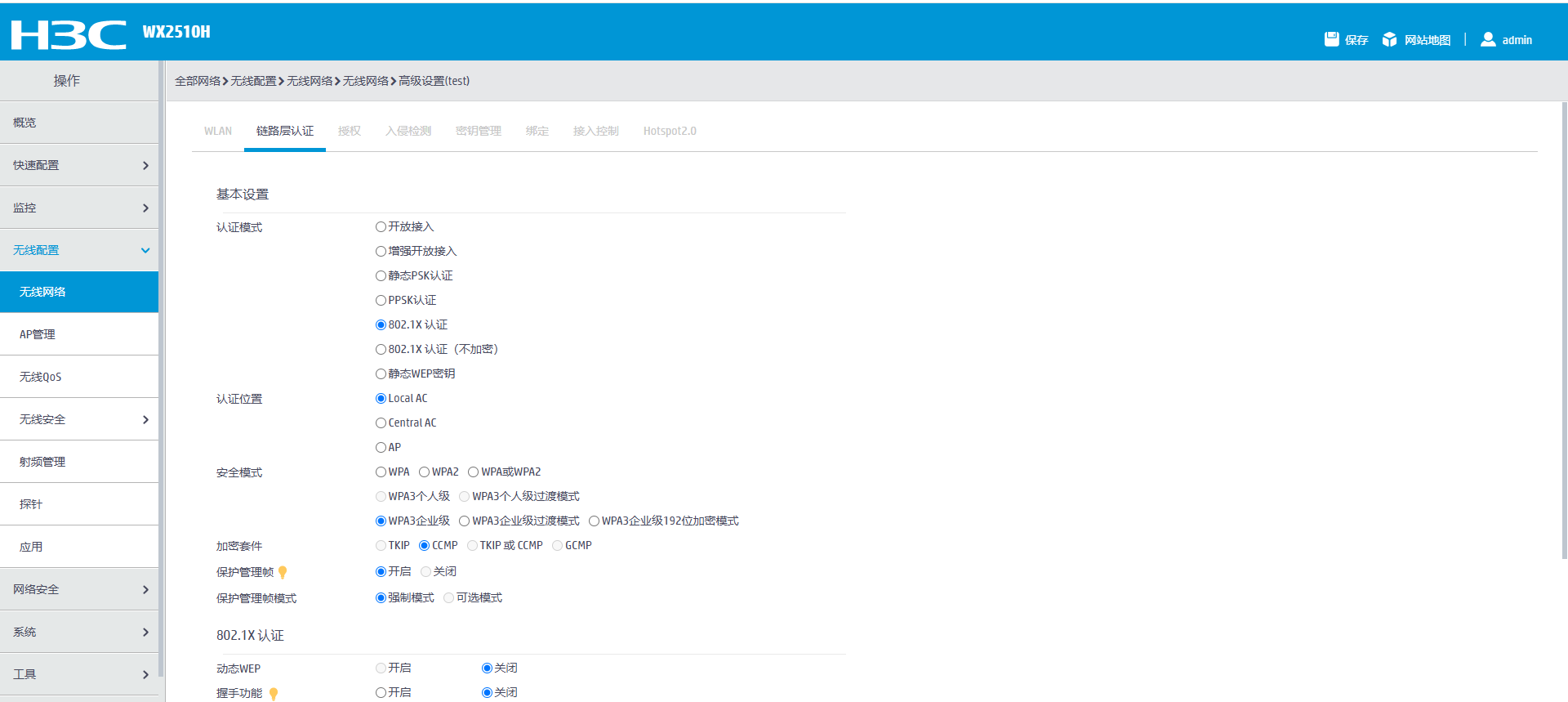
请问在web界面里哪里有设置呢?
- 2026-08-17回答
- 评论(1)
- 举报
-
(0)
radius服务器中我已经加了mac地址,无线ac上还不知道哪里加
radius服务器中我已经加了mac地址,无线ac上还不知道哪里加
编辑答案


亲~登录后才可以操作哦!
确定你的邮箱还未认证,请认证邮箱或绑定手机后进行当前操作
举报
×
侵犯我的权益
×
侵犯了我企业的权益
×
- 1. 您举报的内容是什么?(请在邮件中列出您举报的内容和链接地址)
- 2. 您是谁?(身份证明材料,可以是身份证或护照等证件)
- 3. 是哪家企业?(营业执照,单位登记证明等证件)
- 4. 您与该企业的关系是?(您是企业法人或被授权人,需提供企业委托授权书)
抄袭了我的内容
×
原文链接或出处
诽谤我
×
- 1. 您举报的内容以及侵犯了您什么权益?(请在邮件中列出您举报的内容、链接地址,并给出简短的说明)
- 2. 您是谁?(身份证明材料,可以是身份证或护照等证件)
对根叔社区有害的内容
×
不规范转载
×
举报说明