S12500-2xl 子接口不支持vlan终结吗?如下三个命令都提示异常
- 0关注
- 0收藏,405浏览

问题描述:
S12500-2xl 子接口不支持vlan终结吗?如下三个命令都提示异常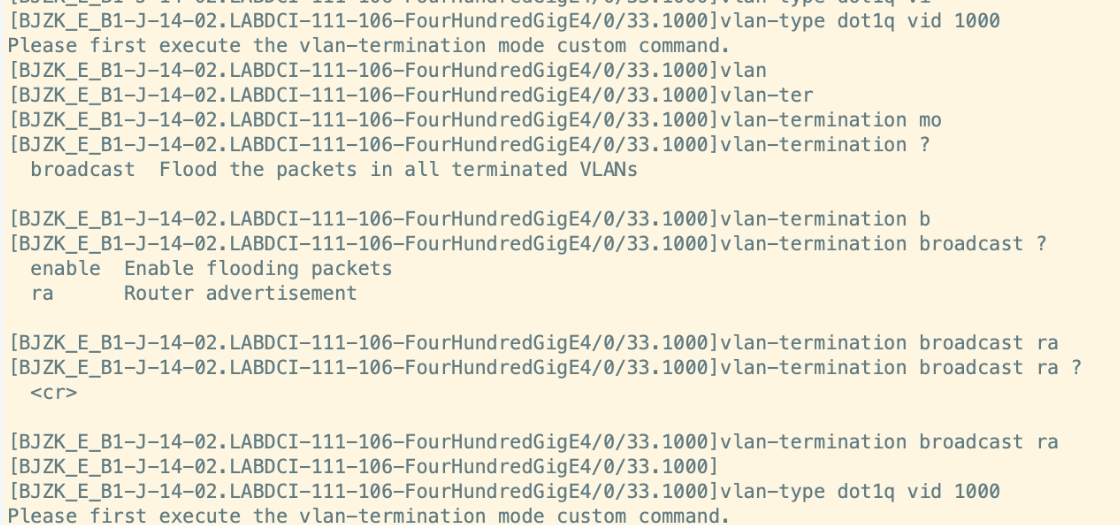
- 2026-08-31提问
- 举报
-
(0)
最佳答案


# S12500‑2XL 子接口 VLAN 终结报错解析
>
> 报错:`Please first execute the vlan‑termination mode custom command.`H3C
> **S12500‑2XL(S12500‑2X)子接口 VLAN 终结有两种工作模式:auto(默认)、custom(自定义)**H3C。
>
>
> 1. **auto 模式(出厂默认)**:子接口编号 = 终结 VLAN ID,**不允许执行`vlan‑type dot1q vid`**,自动终结和子接口号一致的 VLAN;不能自定义终结其他 VLAN。
> 2. **custom 自定义模式**:**必须在系统视图先执行`vlan‑termination mode custom`**,子接口视图才允许使用`vlan‑type dot1q vid`指定任意 VLAN 终结。
>
> 你现在的问题:**没有在系统视图切换为 custom 模式,直接在子接口敲`vlan‑type dot1q vid 1000`,直接报提示,不是硬件不支持子接口终结**。
## 正确完整配置步骤
### 步骤 1:系统视图修改 VLAN 终结模式为 custom(全局配置)
```
system-view
# 全局修改子接口终结模式为自定义,这是报错的根源!
vlan-termination mode custom
save
```
>
> ⚠️注意:该命令是**系统视图**,不是子接口视图!你截图是在子接口视图敲的,所以找不到这个命令。
### 步骤 2:进入子接口,配置 dot1q 终结
```
interface FourHundredGigE4/0/33.1000
# 终结vlan 1000
vlan-type dot1q vid 1000
#配置子接口IP
ip address 10.0.0.1 255.255.255.0
quit
```
## 两种模式对比
表格
| 模式 | 说明 | 是否支持 vlan‑type dot1q vid |
| --- | --- | --- |
| auto(默认) | 子接口号 = 终结 VLAN,例如`.1000`自动终结 vlan1000 | ❌不支持,无法指定别的 VLAN |
| custom(自定义) | 子接口可以终结任意 VLAN ID,子接口编号可以和 VLAN 不一致 | ✅支持`vlan‑type dot1q vid` |
>
> 举例子:
> auto 模式下:`FourHundredGigE4/0/33.1000`,**自动终结 VLAN1000,不需要 vlan‑type 命令;但不能终结 vlan2000**。
> custom 模式下:`FourHundredGigE4/0/33.1000`,可以配置终结 vlan 2000,子接口编号可以和终结 VLAN 无关。
## 重要坑点
1. `vlan‑termination mode custom` 是**系统视图命令**,不是子接口下;你截图是在子接口视图输入,所以找不到该命令。
2. 修改`vlan‑termination mode`后,**会清空所有已存在子接口的 VLAN 终结配置**,需要重新配置子接口终结;建议在业务窗口操作。
3. 支持的单板:S12500‑2XL 的 CSPEX‑1204/CEPC 系列单板,支持子接口 dot1q 终结;老部分老单板不支持子接口。
4. 如果你只是简单的:子接口编号等于要终结的 VLAN,**不需要切换 custom 模式,直接使用 auto 模式即可**,不用配置`vlan‑type dot1q vid`。
### 场景 A:简单场景(子接口编号 = VLAN),不建议改 custom
>
> 例如:`.1000`子接口终结 vlan1000,直接使用默认 auto 模式,不需要`vlan‑type dot1q vid`命令。
```
interface FourHundredGigE4/0/33.1000
ip address 10.0.0.1 255.255.255.0
quit
```
>
> 自动终结 vlan1000,不需要额外配置终结命令。
### 场景 B:需要子接口终结和子接口编号不一样的 VLAN(例如子接口`.1`终结 vlan1000)
>
> 必须执行全局 `vlan‑termination mode custom`,然后子接口下配置`vlan‑type dot1q vid 1000`。
## 验证命令
```
#查看全局VLAN终结模式
display vlan-termination mode
#查看子接口终结配置
display interface FourHundredGigE4/0/33.1000
```
## 补充说明
>
> 你截图里的`vlan‑termination broadcast`是子接口下广播报文处理,**和模式切换无关**,不要混淆。
- 2026-08-31回答
- 评论(0)
- 举报
-
(0)

1. 确认子接口类型:必须在三层主接口下创建子接口,不能在二层口/聚合二层口下配置。主接口先切三层:
interface GigabitEthernet x/x/x
port link-mode route
2. 创建子接口并配置终结:
interface GigabitEthernet x/x/x.1
vlan-type dot1q vid 10 // 单VLAN终结,对应Dot1q子接口
// 多VLAN终结用:vlan-termination multi-vlan 10 20 30
// QinQ终结用:vlan-termination svid 100 cvid 10
ip address 192.168.1.1 24
3. 常见报错原因:
主接口是二层模式,需先切port link-mode route
聚合子接口需先确保聚合口是三层:interface Bridge-Aggregation 1下配port link-mode route,再建子接口
命令拼写错误:注意是vlan-type dot1q vid(单VLAN)或vlan-termination(多VLAN/QinQ),不是vlan dot1q
版本过低:确认是Release 76xx及以上正式版本,老版本可能功能不全。
- 2026-08-31回答
- 评论(0)
- 举报
-
(0)
暂无评论

根据你的报错信息,S12500-2XL 是完全支持子接口 VLAN 终结的。报错的核心原因是配置流程不完整,设备提示需要先执行 vlan-termination mode custom 命令。
🔍 错误分析
你的报错 Please first execute the vlan-termination mode custom command 指明了问题所在。在 Comware V7 系统中,子接口上的 VLAN 终结功能并不是默认开启的。在配置具体的 VLAN 终结方式(如 vlan-type dot1q vid)之前,必须先在子接口视图下,通过 vlan-termination mode custom 命令将接口的终结模式修改为“自定义模式”。
⚙️ 正确的配置步骤
请严格按照以下顺序操作,即可解决报错:
确保主接口为三层模式
VLAN 终结只能在三层接口的子接口上配置。请先确认你的主接口FourHundredGigE4/0/33是三层模式,如果不是,需要切换:<H3C> system-view [H3C] interface FourHundredGigE 4/0/33 [H3C-FourHundredGigE4/0/33] port link-mode route [H3C-FourHundredGigE4/0/33] quittext创建子接口并设置终结模式(关键步骤)
这是解决你报错的核心步骤。[H3C] interface FourHundredGigE 4/0/33.1000 [H3C-FourHundredGigE4/0/33.1000] vlan-termination mode custom # <-- 必须先执行此命令text配置VLAN终结方式
现在,你就可以正常配置具体的终结方式了。单 VLAN 终结:
vlan-type dot1q vid 1000多 VLAN 终结:
vlan-termination multi-vlan 1000 2000 3000QinQ 终结:
vlan-termination svid 100 cvid 10
配置IP地址并启用接口
[H3C-FourHundredGigE4/0/33.1000] ip address 192.168.1.1 255.255.255.0 [H3C-FourHundredGigE4/0/33.1000] quit [H3C] interface FourHundredGigE 4/0/33 [H3C-FourHundredGigE4/0/33] undo shutdowntext
- 2026-08-31回答
- 评论(0)
- 举报
-
(0)
暂无评论
编辑答案


亲~登录后才可以操作哦!
确定你的邮箱还未认证,请认证邮箱或绑定手机后进行当前操作
举报
×
侵犯我的权益
×
侵犯了我企业的权益
×
- 1. 您举报的内容是什么?(请在邮件中列出您举报的内容和链接地址)
- 2. 您是谁?(身份证明材料,可以是身份证或护照等证件)
- 3. 是哪家企业?(营业执照,单位登记证明等证件)
- 4. 您与该企业的关系是?(您是企业法人或被授权人,需提供企业委托授权书)
抄袭了我的内容
×
原文链接或出处
诽谤我
×
- 1. 您举报的内容以及侵犯了您什么权益?(请在邮件中列出您举报的内容、链接地址,并给出简短的说明)
- 2. 您是谁?(身份证明材料,可以是身份证或护照等证件)
对根叔社区有害的内容
×
不规范转载
×
举报说明
暂无评论